8 Best Mesh WiFi System for Long Distances (November 2026)
The best mesh wifi systems for long distances include the TP-Link Deco S4 Mesh AC1900 WiFi System for most large homes, the TP-Link Deco X55 AX3000 WiFi 6 Mesh for the widest coverage, and the NETGEAR Orbi Whole Home Tri-Band WiFi 6 for busy tri-band traffic.
On this page (10 sections)
- The best mesh WiFi systems for long-distance coverage
- How these mesh WiFi systems compare
- How we compared these systems for long-distance coverage
- How much coverage does your long home need?
- Does a dedicated backhaul band help in a long home?
- Should you use Ethernet backhaul in a long house?
- Where should you place mesh units in a long home?
- Which system fits your internet plan and speed needs?
- Do mesh WiFi systems need a modem?
- Verdict: which mesh WiFi system is best for long distance?
The best mesh WiFi system for long distance is the TP-Link Deco S4, which covers up to 5,500 sq ft from three units on one network name. Pick the TP-Link Deco X55 for the widest coverage at 6,500 sq ft and faster WiFi 6 speeds.
Distance in a large home is rarely one straight line. Long ranches, split layouts and homes with thick walls need a system that hands devices between units cleanly and offers a way to wire a node where wireless struggles.
The picks below were chosen for reach, device limits and backhaul options rather than headline speed alone. A long home also stresses capacity more than a compact one, because the far rooms often hold the TVs, consoles and work laptops that all pull data at once.
Each system below was matched to a named need, from the widest footprint to the cheapest way to reach 6,500 sq ft.
Our picks at a glance
-
1

-
2
-
3
 Best for busy tri-band traffic
NETGEAR Orbi Whole Home Tri-Band WiFi 6
8.9/10 our score
See it on Amazon
- 4
 Best for very large multi-floor homesCheck it
- 5
 Best for easy app setupCheck it
- 6
 Best for budget coverageCheck it
- 7
 Check it
DBIT AX1800 WiFi 6 Mesh System
Best for gigabit ports on a budget - 8
 Check it
Linksys Multi-gig Micro Mesh WiFi 6 System
Best for future internet upgrades
The best mesh WiFi systems for long-distance coverage
The Deco S4 is the best pick overall for a large home, and each other system below is the best choice for a named need. Start with how far your home actually stretches, then choose the system that matches your layout and internet plan.
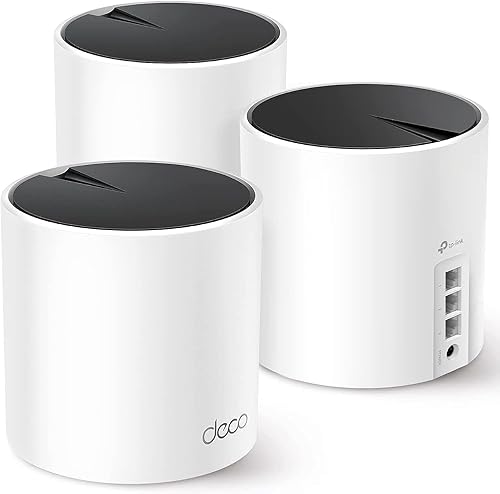
TP-Link Deco S4 Mesh AC1900 WiFi System: Best for most large homes
- Up to 5,500 sq ft coverage
- AC1900 dual-band speeds
- Connect up to 100 devices
- Wired Ethernet backhaul support
Three units form one network name across 5,500 sq ft. Gigabit ports on every unit let you wire a backhaul run for steadier long-distance coverage.
Pros
- Covers up to 5,500 sq ft
- Single network name across all units
- Ethernet backhaul on each unit
Cons
- WiFi 5 rather than WiFi 6
- No dedicated backhaul band
The Deco S4 suits most large homes because three units cover up to 5,500 sq ft as one mesh network. Its AC1900 dual-band speeds handle up to 100 devices, enough for a family streaming in several rooms at once.
For long distances, the key feature is that each unit has two Gigabit Ethernet ports and supports wired Ethernet backhaul. If a far bedroom gets a weak signal, run a cable to a node there and it feeds the room directly instead of repeating a weak wireless hop.
The single network name matters too. Your phone switches between units as you walk down a long hallway, without you changing networks by hand.
Setup runs through the Deco app, and the system works with all major internet providers, though you'll still need a modem. Each unit has a 3×3 stream design and LAN ports rated at 1000 Mbps, so a wired run to a far TV or console keeps its full speed.
Buy it if you want broad, reliable coverage without paying for the newest WiFi standard. It's the best value in this group for a big single-story home.
TP-Link Deco X55 AX3000 WiFi 6 Mesh: Best for the widest coverage
- Up to 6,500 sq ft coverage
- AX3000 WiFi 6 speeds
- Connect up to 150 devices
- 3 Gigabit ports per unit
Reaches 6,500 sq ft and supports up to 150 devices, which suits a large home with many connected gadgets. AI-driven mesh tunes the network to the layout.
Pros
- Covers up to 6,500 sq ft
- WiFi 6 with AX3000 speeds
- 3 Gigabit ports per unit
- HomeShield security features
Cons
- Dual-band only, no dedicated backhaul band
- Premium price tier
The Deco X55 reaches up to 6,500 sq ft and supports up to 150 devices, so it's the pick when your home is bigger than the S4 can handle or packed with smart gadgets. WiFi 6 AX3000 speeds give each device more bandwidth than the S4's AC1900.
The AI-driven mesh learns your network environment and adjusts to it, which helps in a long home where signals change from room to room. HomeShield adds network security and parental controls without a separate device.
The system's description says it's ideal for internet plans up to a Gigabit, so it pairs well with a modern cable or fiber line.
Each unit has three Gigabit Ethernet ports and supports wired backhaul, so the same cable trick works here to steady a far corner. The dual-band design means there's no dedicated band for the router-to-satellite link, so a wired run helps most in a very spread-out home.
The three ports per unit also give you more places to plug in a far-room console or desktop.
Buy it if coverage and device count matter more than the lowest price. For a very large footprint, the extra 1,000 sq ft over the S4 is the reason to choose it.
NETGEAR Orbi Whole Home Tri-Band WiFi 6: Best for busy tri-band traffic
- Up to 5,000 sq ft coverage
- AX6000 tri-band speeds
- Connect up to 100 devices
- Dedicated quad-stream backhaul
A dedicated backhaul band keeps router-to-satellite traffic off your device bands. That helps in a long home where the satellite link carries the load.
Pros
- Dedicated tri-band backhaul
- 4 Gigabit Ethernet ports on router and satellite
- Works with internet providers up to 2.5Gbps
Cons
- Covers less area than the top two picks
- Higher price tier
The NETGEAR Orbi RBK852 covers up to 5,000 sq ft from a router and one satellite, and its tri-band design puts a dedicated backhaul band between them. In a long home, that means the link carrying data from the far end doesn't compete with your phones and TVs.
AX6000 speeds reach up to 6 Gbps and support streaming and gaming, and the system works with internet providers up to 2.5Gbps. The router and satellite each have four Gigabit Ethernet ports, the most wired ports on any pick here, so a far room can host several wired devices without a switch.
The trade-off is reach: 5,000 sq ft is less than the Deco X55's 6,500 sq ft, so a very large home may need another satellite, sold separately, and each adds coverage. The dedicated backhaul earns its keep in a long, spread-out layout where wireless hops carry the load, and NETGEAR Armor adds a security suite with a trial period.
Buy it if your long home has heavy traffic at both ends, such as a home office in a far room and a media setup in another. The dedicated band keeps both running without a wire.
Netgear Orbi 770 (3-pack): Best for very large multi-floor homes
- Up to 8,000 sq ft coverage
- WiFi 7 speeds up to 11 Gbps
- Connect up to 100 devices
- 2.5 Gig port
The widest reach here at 8,000 sq ft from a router and two satellites. WiFi 7 and a 2.5 Gig port suit a big home with a fast internet plan.
Pros
- Covers up to 8,000 sq ft
- WiFi 7 speeds up to 11 Gbps
- 2.5 Gig port
- Expandable with extra satellites
Cons
- Premium price tier
- Made for US use only
The Orbi 770 is the widest system here, covering up to 8,000 sq ft from a router and two satellites. That makes it the pick for a very large multi-floor home where other systems leave dead spots.
Extra satellites add coverage later if your layout grows.
WiFi 7 speeds reach up to 11 Gbps, and a 2.5 Gig port is ready for a fast internet plan. The tri-band design with enhanced backhaul keeps the router-to-satellite link strong so speeds stay usable at the far end of the house, and the system still connects older WiFi 6 and WiFi 5 devices.
It's also the most expensive pick here and is made for US use only. If your home is 5,000 sq ft or less, the extra reach and WiFi 7 speed are more than you need.
But for a sprawling home with many devices, this is the system built for the job.
Buy it if your home is genuinely huge or you want WiFi 7 now. For most long homes under 6,500 sq ft, the Deco X55 covers the same ground for less.
eero 6+ (3-pack): Best for easy app setup
- Up to 4,500 sq ft coverage
- Supports internet plans up to a Gigabit
- Connect 75+ devices
- Built-in smart home hub
TrueMesh routing and a guided app make this the simplest setup in the group. The built-in hub replaces separate Thread and Zigbee bridges.
Pros
- TrueMesh traffic routing
- Built-in Thread and Zigbee hub
- Setup guided in the app
Cons
- Covers less area than the top picks
- Some security features need a separate subscription
The eero 6+ covers up to 4,500 sq ft from three units and supports internet plans up to a Gigabit. Its TrueMesh routing sends traffic along the best path, which helps reduce drop-offs in a long home with rooms that block signals.
Setup is the easiest here. The eero app walks you through each step, and the system runs automatic updates.
A built-in smart home hub for Thread and Zigbee devices replaces separate bridges, so smart locks and sensors connect directly and Alexa can control them.
Coverage is the smallest of the three-unit systems in this group, so a very large home may need a fourth unit. The 160 MHz channel support adds bandwidth for busy households, and the system stays backward-compatible with older eero units you may already own.
Some security and network management features need a separate subscription.
Buy it if you want the simplest setup and smart home devices all in one place. It's a strong pick for a long home where you'd rather not fiddle with settings.
Google WiFi: Best for budget coverage
- Up to 3,000 sq ft coverage from two points
- AC1200 dual-band speeds
- Gigabit Ethernet port
- Voice control support
A two-pack for smaller or open-plan spaces where 3,000 sq ft is enough. It costs less than the wide-coverage systems above.
Pros
- Simple two-point setup
- Gigabit Ethernet port
- Voice control support
- Budget price tier
Cons
- Smallest coverage in this group
- Older AC1200 speeds
Google WiFi covers up to 3,000 sq ft from a two-pack, so it suits a smaller or open-plan home rather than a sprawling one. It's the least expensive system here and keeps the setup simple.
The mesh points work together as one network, and the first point replaces your router when you plug it into your provider's modem. You can add more points later if you need more reach, and they also work alongside existing Nest Wifi gear, which makes it a reasonable starting system for a home that may grow.
The AC1200 dual-band speeds are older than the WiFi 6 systems here, and 3,000 sq ft won't reach the far end of a long ranch. Each point covers about 1,500 sq ft on its own, and a Gigabit Ethernet port plus voice control cover the basics.
If your home stretches past 3,000 sq ft, start with the Deco S4 instead.
Buy it if your home is modest and your budget is tight. It's the entry point to mesh coverage, not the long-distance workhorse.
DBIT AX1800 WiFi 6 Mesh System: Best for gigabit ports on a budget
- Up to 6,500 sq ft coverage
- AX1800 WiFi 6 speeds
- Connect up to 150 devices
- 6 Gigabit ports total
Matches the Deco X55 on coverage and device count for less money. Each unit has two Gigabit ports and supports Ethernet backhaul.
Pros
- Covers up to 6,500 sq ft
- 6 Gigabit ports total
- Supports Ethernet backhaul
- WPA3 encryption
Cons
- Lower AX1800 speeds than the X55
- No dedicated backhaul band
The DBIT AX1800 covers up to 6,500 sq ft and connects up to 150 devices, matching the Deco X55 on reach for less money. Three units with two Gigabit ports each give you six wired ports in total and support Ethernet backhaul.
WiFi 6 speeds split into 574 Mbps on 2.4 GHz and 1201 Mbps on 5 GHz, lower than the X55's AX3000, so it suits a household that needs coverage more than raw speed. OFDMA and MU-MIMO help share bandwidth when many devices are active at once.
WPA3 encryption and automatic firmware updates handle security, and the app manages parental controls and guest networks.
For a long home on a budget, the coverage figure is the draw, and any unit can also run as a standalone access point. The lower speed ceiling matters only if your internet plan is fast or you move large files regularly.
If speed is the priority, pay more for the Deco X55.
Buy it if coverage matters more than peak speed and price is tight. It's the practical long-distance choice when the Deco X55 stretches the budget.
Linksys Multi-gig Micro Mesh WiFi 6 System: Best for future internet upgrades
- Up to 5,000 sq ft coverage
- Speeds up to 3.0 Gbps
- Connect 100+ devices
- Multi-gig internet port
A multi-gig port and WiFi 6 speeds make this one ready for faster internet plans. The compact units are easy to place around a long home.
Pros
- Multi-gig internet port
- WiFi 6 speeds up to 3.0 Gbps
- Compact unit size
- No app required
Cons
- Covers less area than the top picks
- Dual-band only
The Linksys Micro 6 covers up to 5,000 sq ft and connects 100+ devices, with speeds up to 3.0 Gbps. Its multi-gig internet port is the feature that sets it apart, ready for internet plans faster than a gigabit.
The compact units are easier to tuck into a long home's rooms than larger nodes, measuring roughly 8 by 5 inches. Setup runs without an app, and the system works with standard mesh features and expandable nodes.
The dual-band design has no dedicated backhaul band.
Its coverage sits below the top picks, so a very large home may need extra nodes. The multi-gig port only pays off if your internet plan supports those speeds.
For most long homes, the Deco S4 or X55 covers more ground for less.
Buy it if you plan to upgrade to a multi-gig internet plan soon. Otherwise, the extra port is the main reason to choose it over the wider Deco systems.
How these mesh WiFi systems compare
Every system here runs one network name across multiple units. They split on coverage, band design and backhaul support.
Use the table to line up reach against your home's size before you read the buying sections below.
| Product | Best for | Coverage | Band class | Max devices | Our score |
|---|---|---|---|---|---|
| TP-Link Deco S4 Mesh AC1900 WiFi System | most large homes | 5,500 sq ft | Dual-Band | 100 | 9.7 |
| TP-Link Deco X55 AX3000 WiFi 6 Mesh | the widest coverage | 6,500 sq ft | Dual-Band | 150 | 9.6 |
| NETGEAR Orbi Whole Home Tri-Band WiFi 6 | busy tri-band traffic | 5,000 sq ft | Tri-Band | 100 | 8.9 |
| Netgear Orbi 770 (3-pack) | very large multi-floor homes | 8,000 sq ft | Tri-Band | 100 | 8.7 |
| eero 6+ (3-pack) | easy app setup | 4,500 sq ft | Dual-Band | 75+ | 8.6 |
| Google WiFi | budget coverage | 3,000 sq ft | Dual-Band | 8.4 | |
| DBIT AX1800 WiFi 6 Mesh System | gigabit ports on a budget | 6,500 sq ft | Dual-Band | 150 | 8.2 |
| Linksys Multi-gig Micro Mesh WiFi 6 System | future internet upgrades | 5,000 sq ft | Dual-Band | 100+ | 8.0 |
How we compared these systems for long-distance coverage
We compared these mesh systems on the specs that matter for a long home: stated coverage in square feet, device limits, band design and whether each unit supports Ethernet backhaul. A dedicated backhaul band or a wired option matters more than raw speed when signals have to travel far.
Port counts got weight too, since a long home often needs wired connections at both ends. The Orbi RBK852 leads on ports with four per unit, while the Deco S4 and DBIT AX1800 offer two per unit and the Deco X55 three.
Device limits ranged from the eero 6+'s 75+ to the 150 shown for the Deco X55 and DBIT.
Our score weighs specs, features and the stated coverage against what a long-distance buyer needs. The Deco S4 leads because it covers 5,500 sq ft with backhaul support at a lower price tier.
The Deco X55 adds more reach and WiFi 6 speed. Every other pick earns its place for a named need, from the widest footprint to the easiest setup.
How much coverage does your long home need?
Start with the square footage of your whole home, not just the rooms with weak signals. A system's stated coverage assumes open placement and typical walls.
In a long, narrow home with thick interior walls, plan on reaching less than the headline number.
If your home is up to 3,000 sq ft and fairly open, Google WiFi's two-pack is enough. From 4,500 to 5,500 sq ft, the eero 6+ or Deco S4 fits.
At 6,500 sq ft and up, look at the Deco X55, DBIT AX1800 or Orbi 770. For a long ranch with several separate wings, choose more coverage than the square footage suggests.
When should you step up to a larger system?
Step up when your home has more than one long wing or several rooms separated by thick walls. A system rated for 5,000 sq ft in an open plan may leave the far end of a 4,000 sq ft ranch weak.
The extra 1,000 to 1,500 sq ft in the Deco X55 or Orbi 770 gives the far rooms a closer node to connect to.
How do you count square footage for a mesh system?
Measure the floor you need to cover, then add a margin for walls. Count an attached garage or finished basement only if you want WiFi there.
A two-pack like Google WiFi covers about 1,500 sq ft per point, so a 2,500 sq ft home may need three points rather than two. Stated coverage is a guide, and a little headroom costs less than adding a unit later.
Does a dedicated backhaul band help in a long home?
Yes. A dedicated backhaul band carries the traffic between units on its own channel, so your devices don't share bandwidth with the router-to-satellite link.
In a long home where the far node repeats a signal across several rooms, that separation keeps speeds steadier.
The Orbi RBK852 and Orbi 770 both use a tri-band design with dedicated backhaul. The RBK852 runs a dedicated quad-stream link, while the 770 uses enhanced backhaul.
The dual-band Deco S4, Deco X55 and DBIT AX1800 instead offer Ethernet backhaul, which gives you the same benefit with a cable. If you can't run cable and your home is very long, a tri-band system earns its higher price.
Should you use Ethernet backhaul in a long house?
Use it when you can. Running a cable to each far node gives that node a direct link to the router, so it doesn't repeat a weak wireless signal.
That's the biggest single improvement for a long, spread-out home.
The Deco S4, Deco X55, Orbi RBK852, Orbi 770 and DBIT AX1800 all include Gigabit ports for wired backhaul. You don't need to wire every node.
Wiring just the farthest one or two often fixes the rooms that struggled most. For a two-story layout, see our guide to mesh WiFi for a 2 story house.
Where should you place mesh units in a long home?
Place units in a line toward the far end, about halfway between the modem and the weak rooms. A long ranch benefits from a straight spread rather than clustering all units near the modem.
Keep each node in the open and off the floor. Walls, cabinets and metal appliances cut the signal, so avoid tucking a node behind a TV or inside a closet.
The compact Linksys Micro 6 is the easiest to hide out of sight without blocking its signal. If your home has a detached garage or a far home office, that's where an extra node or a wired run pays off most.
Which system fits your internet plan and speed needs?
Match the system to your internet plan. A 200 Mbps cable plan runs fine on the AC1200 Google WiFi or the AC1900 Deco S4.
A gigabit plan benefits from WiFi 6 systems like the Deco X55 or eero 6+, and a multi-gig plan needs a port to match, such as the Linksys Micro 6 or Orbi 770.
If you're on fiber, our guide to the best mesh WiFi system for fiber covers systems built for those speeds. For a home with several cameras, see the best mesh WiFi systems for security cameras, since cameras add constant upload load to a long-distance network.
Do mesh WiFi systems need a modem?
Yes, in almost every case. A mesh router connects to your internet provider's modem, which is what brings the internet into the home.
If your provider gives you a gateway that handles both jobs, put it in bridge mode so the mesh system manages routing and WiFi.
Our guide on whether mesh WiFi systems need a modem explains the gateway setup in more detail. Plan for that connection before you buy, since no mesh system replaces the modem itself.
Verdict: which mesh WiFi system is best for long distance?
The best mesh WiFi system for long distance for most large homes is the TP-Link Deco S4, because it covers 5,500 sq ft with Ethernet backhaul on every unit at a lower price tier. Pick the TP-Link Deco X55 if your home is bigger or packed with devices.
For a very large multi-floor home, the Netgear Orbi 770 covers up to 8,000 sq ft with WiFi 7. If setup simplicity is your priority, the eero 6+ is the easiest to run.
Measure your home's real footprint first, then choose the system that reaches the farthest room without leaving a gap.
Our top 3 picks at a glance
-
1
-
2
-
3
Best for busy tri-band traffic
NETGEAR Orbi Whole Home Tri-Band WiFi 6
8.9/10 our score
See it on Amazon
Frequently asked questions
How far can a mesh WiFi system reach?
A three-unit mesh system typically covers 4,500 to 8,000 sq ft, depending on the model. The TP-Link Deco S4 covers up to 5,500 sq ft and the Netgear Orbi 770 covers up to 8,000 sq ft.
Real reach depends on walls, floors and where you place each unit.
Is a mesh system better than a range extender for a long distance?
Yes. A mesh system keeps one network name and hands your devices between units automatically.
Range extenders often need a second network name, so your phone stays on a weak signal instead of switching to the closer one.
Where should I place mesh WiFi nodes in a long home?
Put the first unit near your modem and the others about halfway between that spot and the far rooms. Keep each node out in the open and off the floor.
In a long ranch-style home, spread them in a line rather than clustering them together.
Does Ethernet backhaul help over long distances?
Yes. Wiring each satellite to the router with Ethernet cable gives it a steadier link than WiFi alone.
The Deco S4, Deco X55 and DBIT AX1800 all support wired Ethernet backhaul, which suits long homes where walls block wireless signals.
Will WiFi 7 help in a very large home?
It can, because WiFi 7 adds speed and capacity for many devices at once. The Netgear Orbi 770 covers up to 8,000 sq ft with WiFi 7.
You only benefit if your internet plan and devices are fast enough to use it.