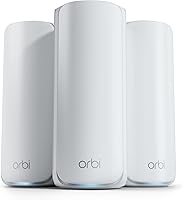
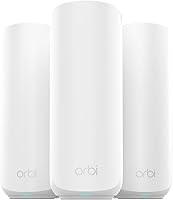
8 Best Mesh WiFi Systems for a 3,000 Sq Ft Home (October 2026)
The best mesh WiFi systems for a 3,000 sq ft house include the eero 7 (3-pack) for simple whole-home coverage, the Netgear Orbi 370 (3-pack) for WiFi 7 and three units, and the Netgear Orbi 770 (2-pack) for tri-band WiFi 7.
On this page (12 sections)
- How we chose mesh WiFi systems for a 3,000 sq ft house
- Compare the best mesh WiFi systems for 3,000 sq ft homes
- 1. eero 7 (3-pack): Best for simple whole-home coverage
- 2. Netgear Orbi 370 (3-pack): Best for WiFi 7 and three units
- 3. Netgear Orbi 770 (2-pack): Best for tri-band WiFi 7
- 4. ASUS ZenWiFi BT6 (3-pack): Best for larger coverage claims
- 5. eero Pro 6E (3-pack): Best for WiFi 6E devices
- 6. Netgear Orbi 360 (3-pack): Best for a three-unit WiFi 7 kit
- 7. ASUS ZenWiFi BD4 (3-pack): Best for wired backhaul options
- 8. ASUS ZenWiFi BD5 (3-pack): Best for dual-band WiFi 7 coverage
- What matters when choosing mesh WiFi for 3,000 sq ft
- Which mesh WiFi system should you pick for a 3,000 sq ft house?
The best mesh WiFi system for a 3,000 sq ft house is the eero 7 (3-pack) for most homes. It includes three units and has stated coverage up to 6,000 sq ft, giving you options for a main living area and rooms farther from the modem.
Choose the Netgear Orbi 770 (2-pack) if you want a tri-band system and your layout can be served from two good locations. The ASUS ZenWiFi BT6 (3-pack) is another three-unit WiFi 7 option, with stated coverage up to 7,600 sq ft.
Coverage figures are estimates, not promises for every floor plan. Wall material, floors, furniture and satellite placement all affect the signal, so start with the shape of your home as well as its square footage.
If you're still deciding how many units to use, see our guide to how many mesh nodes you need. For homes with more than one floor, compare the placement advice in our guide to mesh WiFi for a 2-story house.
Our picks at a glance
-
1

-
2

-
3

How we chose mesh WiFi systems for a 3,000 sq ft house
We compared the stated coverage, number of units, WiFi generation, bands and connection features for each system. We gave more weight to kits with enough coverage and placement flexibility for a 3,000 sq ft home, then considered whether a model offered a useful feature for a particular layout or device mix.
Our score weighs specs and features against what you're shopping for. The stated coverage numbers come from each brand, and your results can vary with construction and placement.
A kit with more units is not automatically the right choice. A central router and well-placed satellite can work in an open plan, while a long or divided layout may benefit from a third unit.
Compare the best mesh WiFi systems for 3,000 sq ft homes
The main differences are unit count, WiFi bands and stated coverage. Use this table to narrow the options, then check each system's strengths and limits below.
| Product | Best for | Coverage | WiFi | Pack | Our score |
|---|---|---|---|---|---|
| eero 7 (3-pack) | simple whole-home coverage | Up to 6,000 sq ft | WiFi 7, dual-band | 3 units | 9.0 |
| Netgear Orbi 370 (3-pack) | WiFi 7 and three units | Up to 6,000 sq ft | WiFi 7, dual-band | Router and 2 satellites | 8.6 |
| Netgear Orbi 770 (2-pack) | tri-band WiFi 7 | Up to 5,500 sq ft | WiFi 7, tri-band | Router and 1 satellite | 8.5 |
| ASUS ZenWiFi BT6 (3-pack) | larger coverage claims | Up to 7,600 sq ft | WiFi 7, tri-band | 3 units | 8.0 |
| eero Pro 6E (3-pack) | WiFi 6E devices | Up to 6,000 sq ft | WiFi 6E | 3 units | 7.9 |
| Netgear Orbi 360 (3-pack) | a three-unit WiFi 7 kit | Up to 6,000 sq ft | WiFi 7, dual-band | Router and 2 satellites | 7.7 |
| ASUS ZenWiFi BD4 (3-pack) | wired backhaul options | Up to 6,500 sq ft | WiFi 7, dual-band | 3 units | 7.5 |
| ASUS ZenWiFi BD5 (3-pack) | dual-band WiFi 7 coverage | Up to 6,800 sq ft | WiFi 7, dual-band | 3 units | 7.4 |
1. eero 7 (3-pack): Best for simple whole-home coverage
eero 7 (3-pack): Best for simple whole-home coverage
- Three units
- Coverage up to 6,000 sq ft
- WiFi 7
- Supports internet plans up to 2.5 Gbps
Three units and stated coverage up to 6,000 sq ft give this kit room to serve a 3,000 sq ft home with varied rooms. It supports plans up to 2.5 Gbps.
Pros
- Three-unit kit
- WiFi 7 with MLO
- Two auto-sensing 2.5 GbE ports
Cons
- Coverage depends on layout and placement
- Some security and management features require an optional subscription
The eero 7 (3-pack) is our top pick for a 3,000 sq ft home because it combines three units with stated coverage up to 6,000 sq ft. Extra coverage headroom can help when rooms sit at opposite ends of the house or the signal must pass through several spaces.
The system supports internet plans up to 2.5 Gbps and wireless speeds up to 1.8 Gbps. Each unit has two auto-sensing 2.5 GbE ports, and eero says three units support more than 120 devices.
WiFi 7 features include multi-link operation (MLO), and the system is backward compatible with earlier eero generations. If you already use select Amazon Echo devices, eero says they can work as eero Built-in devices.
This is a good fit if you want a current WiFi 7 system with three units and don't need a tri-band model. Some security and management features are part of the optional eero Plus subscription.
2. Netgear Orbi 370 (3-pack): Best for WiFi 7 and three units
Netgear Orbi 370 (3-pack): Best for WiFi 7 and three units
- Coverage up to 6,000 sq ft
- WiFi 7 up to 5 Gbps
- Dual-band with Enhanced Backhaul
- Supports up to 70 devices
This router-and-two-satellite kit has stated coverage up to 6,000 sq ft and Enhanced Backhaul. It suits a 3,000 sq ft home where three placement points are useful.
Pros
- Three-unit kit
- Supports up to 70 devices
- App-guided setup
Cons
- Actual coverage varies with layout and placement
- NETGEAR Armor requires a separate subscription after its trial
The Orbi 370 includes one router and two satellites, with stated coverage up to 6,000 sq ft. That gives a 3,000 sq ft home three units to place across separate rooms or floors.
It uses dual-band WiFi 7 with Enhanced Backhaul and supports up to 70 devices. NETGEAR states speeds up to 5 Gbps and compatibility with internet plans up to 2.5 Gbps.
The Orbi app provides guided setup and device management. NETGEAR says its security features include automatic firmware updates and Advanced Router Protection; a 30-day Armor trial is included, followed by a separate subscription requirement for Armor.
Choose it if three access points and WiFi 7 are priorities. The system is made for use in the US only, so check regional compatibility before you buy.
3. Netgear Orbi 770 (2-pack): Best for tri-band WiFi 7
Netgear Orbi 770 (2-pack): Best for tri-band WiFi 7
- Coverage up to 5,500 sq ft
- WiFi 7 up to 11 Gbps
- Tri-band with Enhanced Backhaul
- Supports up to 100 devices
The two-unit Orbi 770 uses tri-band WiFi 7 and has stated coverage up to 5,500 sq ft. It may suit an open layout served by two well-placed units.
Pros
- Tri-band WiFi 7
- Supports up to 100 devices
- 2.5 Gbps port
Cons
- Only two units in the pack
- Actual coverage varies with layout and placement
The Orbi 770 suits an open layout where two units can reach the areas you use. It has stated coverage up to 5,500 sq ft, with one router and one satellite in the pack.
Its tri-band WiFi 7 system has stated speeds up to 11 Gbps and Enhanced Backhaul. NETGEAR says it supports up to 100 devices, and its 2.5 Gbps port can work with plans up to 2.5 Gbps.
The Orbi app guides setup and lets you manage devices and guest WiFi. NETGEAR includes security features and a 30-day Armor trial; continuing Armor requires a separate subscription.
This is the strongest fit here if you prefer tri-band WiFi 7 and two units are enough for your layout. If your rooms are long, separated by thick walls or spread across several floors, compare it with a three-unit kit.
4. ASUS ZenWiFi BT6 (3-pack): Best for larger coverage claims
ASUS ZenWiFi BT6 (3-pack): Best for larger coverage claims

- Coverage up to 7,600 sq ft
- Tri-band WiFi 7
- Speeds up to 9.4 Gbps
- AiProtection Pro
ASUS gives this three-unit kit stated coverage up to 7,600 sq ft. It fits a 3,000 sq ft home with separated rooms or a need for additional coverage points.
Pros
- Three-unit kit
- Tri-band WiFi 7
- AiProtection Pro and parental controls
Cons
- Coverage depends on layout and placement
- Check compatibility if you plan to extend with other ASUS routers
The ASUS ZenWiFi BT6 includes three units and has stated coverage up to 7,600 sq ft. That makes it a candidate for a 3,000 sq ft home with separated rooms or areas where you want additional placement options.
It uses tri-band WiFi 7, with ASUS stating speeds up to 9.4 Gbps. The listed features include AiMesh, AiProtection Pro, parental controls, VPN support and Smart Home Master SSIDs.
ASUS says AiMesh can extend the system with compatible ASUS routers. That may be useful if you already use ASUS networking equipment, but check compatibility before planning an expansion.
Choose BT6 if you want three units, tri-band WiFi 7 and the ASUS security and network controls. As with every system here, the coverage estimate depends on your home and where you place the units.
5. eero Pro 6E (3-pack): Best for WiFi 6E devices
eero Pro 6E (3-pack): Best for WiFi 6E devices

- Coverage up to 6,000 sq ft
- WiFi 6E with 6 GHz band
- Supports 100+ devices
- Supports plans up to 2.5 Gbps
This three-unit mesh kit provides stated coverage up to 6,000 sq ft and access to 6 GHz for WiFi 6E devices. It remains a fit if your devices and needs do not call for WiFi 7.
Pros
- Three-unit kit
- Supports 100+ devices
- App-guided setup
Cons
- WiFi 6E rather than WiFi 7
- Some security and management features require a separate subscription
The eero Pro 6E offers a three-unit setup with stated coverage up to 6,000 sq ft. It can suit a 3,000 sq ft house if you want multiple placement points but don't need WiFi 7.
WiFi 6E devices can use the 6 GHz band, and eero says the system supports more than 100 connected devices. It supports internet speeds up to 2.3 Gbps, including wired speeds up to a gigabit and wireless speeds up to 1.6 Gbps.
The eero app guides setup and lets you manage the network remotely. The system is backward compatible with earlier eero devices, and automatic updates help keep it current.
Pick it if WiFi 6E fits your devices and you find no need for WiFi 7 features. Some security and network management features require a separate subscription.
6. Netgear Orbi 360 (3-pack): Best for a three-unit WiFi 7 kit
Netgear Orbi 360 (3-pack): Best for a three-unit WiFi 7 kit
- Coverage up to 6,000 sq ft
- WiFi 7 up to 5 Gbps
- Dual-band with Enhanced Backhaul
- Supports up to 70 devices
The Orbi 360 gives you a router and two satellites, with stated coverage up to 6,000 sq ft. Its dual-band WiFi 7 setup is a three-unit option for rooms that need more than two access points.
Pros
- Three-unit kit
- Supports up to 70 devices
- App-guided setup
Cons
- Actual coverage varies with layout and placement
- NETGEAR Armor requires a separate subscription after its trial
The Orbi 360 gives you a router and two satellites, with stated coverage up to 6,000 sq ft. Three units can be useful when one satellite can't reach across a long or divided home.
It uses dual-band WiFi 7 with Enhanced Backhaul and supports up to 70 devices. NETGEAR states speeds up to 5 Gbps and compatibility with plans up to 2.5 Gbps.
Setup and device management use the Orbi app. NETGEAR describes its security as including Advanced Router Protection and automatic firmware updates, with a 30-day Armor trial that requires a separate subscription afterward.
This kit overlaps with Orbi 370 on several listed features, including unit count, coverage estimate and WiFi generation. Compare their current features and availability before choosing between them.
7. ASUS ZenWiFi BD4 (3-pack): Best for wired backhaul options
ASUS ZenWiFi BD4 (3-pack): Best for wired backhaul options
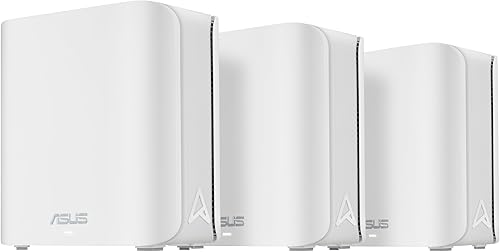
- Coverage up to 6,500 sq ft
- Dual-band WiFi 7 up to 3.6 Gbps
- Two 2.5G Ethernet ports
- AiProtection Pro
The three-unit BD4 has stated coverage up to 6,500 sq ft and dual 2.5G Ethernet ports. ASUS also highlights Ethernet backhaul for homes where units can connect by cable.
Pros
- Three-unit kit
- Two 2.5G Ethernet ports
- AiProtection Pro and parental controls
Cons
- Dual-band rather than tri-band
- Coverage depends on layout and placement
The ASUS ZenWiFi BD4 is a three-unit dual-band WiFi 7 system with stated coverage up to 6,500 sq ft. Its coverage estimate and unit count make it worth considering for a 3,000 sq ft home with rooms that need separate access points.
ASUS states speeds up to 3.6 Gbps and highlights dual 2.5G Ethernet ports. It also lists AiProtection Pro, parental controls, VPN support and Smart Home Master SSIDs.
The product highlights Ethernet backhaul for thick walls. If you can run cable between units, read our guide to Ethernet backhaul on mesh systems to understand how a wired link can affect your setup.
Choose BD4 if wired connections between units are part of your plan and you want a three-unit kit. Its dual-band design is simpler than the tri-band BT6 if you don't need that additional band.
8. ASUS ZenWiFi BD5 (3-pack): Best for dual-band WiFi 7 coverage
ASUS ZenWiFi BD5 (3-pack): Best for dual-band WiFi 7 coverage
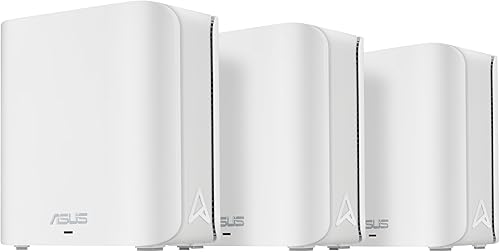
- Coverage up to 6,800 sq ft
- Dual-band WiFi 7 up to 5 Gbps
- Two 2.5G Ethernet ports
- AiProtection Pro
The BD5 is a three-unit dual-band WiFi 7 kit with stated coverage up to 6,800 sq ft. It offers two 2.5G Ethernet ports per its product highlights.
Pros
- Three-unit kit
- WiFi 7 up to 5 Gbps
- AiProtection Pro and parental controls
Cons
- Coverage depends on layout and placement
- Dual-band rather than tri-band
The ASUS ZenWiFi BD5 is another three-unit dual-band WiFi 7 kit, with stated coverage up to 6,800 sq ft. It gives a 3,000 sq ft home multiple placement options without moving to a tri-band system.
ASUS states speeds up to 5 Gbps. Product highlights include two 2.5G Ethernet ports, AiProtection Pro, parental controls, VPN support and Smart Home Master SSIDs.
The BD5 and BD4 share a three-unit, dual-band design. BD5 has the higher stated coverage and speed figures, while BD4 highlights Ethernet backhaul for thick walls; match those differences to your rooms and wiring.
Pick BD5 if you want a three-unit WiFi 7 system and its stated coverage suits your layout. For a home with thick walls and available Ethernet, compare it with the BD4 before deciding.
What matters when choosing mesh WiFi for 3,000 sq ft
For a 3,000 sq ft house, floor plan and wall material matter more than a single coverage number. A square, open home may need fewer units than a long house with several closed rooms.
Do you need two or three units for a 3,000 sq ft house?
Two units can work in a compact, open floor plan, while three units give you more options for distant rooms and multiple floors. The Orbi 770 is the two-unit option here; the other picks include three units.
Think about where the modem sits and which rooms need stable coverage. Our guide to placing mesh WiFi units explains how to position satellites so they can relay a useful signal.
How much coverage should a mesh system have?
A system with a stated coverage estimate above 3,000 sq ft gives you room to account for real-world signal loss, but it does not guarantee strong WiFi in every corner. Each brand's estimate depends on conditions that may differ from your home.
Avoid judging a kit by the headline figure alone. Look at the number of units, the location of dead spots and whether you can place the satellites between the router and weak-signal rooms.
Does WiFi 7 matter in a 3,000 sq ft home?
WiFi 7 is not required just because a home measures 3,000 sq ft. The eero Pro 6E can be a sensible fit if WiFi 6E meets your needs; the other picks provide WiFi 7.
Your devices and internet plan help decide whether newer WiFi features are useful. For a closer look at the upgrade question, read whether you need a WiFi 7 router yet.
Will mesh WiFi cover a two-story home?
A mesh system can help connect rooms across floors, but floor materials and where you place the units affect coverage. A satellite placed near the stairs or an open landing may have a clearer path than one tucked into a far bedroom.
For more floor-specific advice, see our guide to mesh WiFi for a 2-story house. You may need to adjust unit locations after setup to find a stronger connection between nodes.
Which mesh WiFi system should you pick for a 3,000 sq ft house?
Choose the eero 7 (3-pack) if you want a three-unit WiFi 7 setup with stated coverage up to 6,000 sq ft. Pick Orbi 770 if tri-band WiFi 7 matters and two well-placed units can cover your layout.
Consider ASUS BT6 if you want three units and its stated coverage up to 7,600 sq ft, or eero Pro 6E if WiFi 6E already meets your needs. Before you decide, map the rooms that need coverage and read our guide to choosing mesh nodes for your home.
Our top 3 picks at a glance
-
1
-
2
-
3
Frequently asked questions
How many mesh WiFi units do I need for 3,000 sq ft?
A 3,000 sq ft home often calls for a two- or three-unit system, depending on its shape, floors and walls. A two-unit kit may suit an open layout, while three units offer more placement options for long or divided homes.
Start with the manufacturer’s coverage estimate, then plan where each unit can connect reliably.
Is a mesh system rated for 6,000 sq ft too much for a 3,000 sq ft home?
Not necessarily. The coverage figure is an estimate, and walls, floors and unit placement affect the signal you get in each room.
A higher stated coverage can give you flexibility, but avoid placing units close together just because the system has a large coverage number.
Should I choose two or three mesh units?
Choose two units for a compact, open home where the router and satellite can both sit in useful locations. Choose three if the floor plan is long, has several separated rooms or needs coverage on multiple floors.
Our guide to how many mesh nodes you need explains the placement tradeoffs.
Where should mesh units go in a 3,000 sq ft house?
Place the main router near your modem and put each satellite partway toward the areas with weak WiFi, with as few dense walls between units as possible. Avoid hiding them in cabinets or placing every unit at one end of the house.
See our guide to where to place mesh WiFi units for more detail.
Does a mesh system need WiFi 7 for a 3,000 sq ft house?
No. WiFi 6E and WiFi 7 mesh systems can both cover a 3,000 sq ft home; choose based on your devices, internet plan and budget.
WiFi 7 can make sense if you want its newer features, while a WiFi 6E kit such as eero Pro 6E may fit a network that does not need WiFi 7.