Do Mesh WiFi Systems Need a Modem?
Most mesh WiFi systems need a modem or other internet-provider equipment for internet access. The modem brings the connection into your home; the mesh system shares it over WiFi.
On this page (7 sections)
- Do mesh WiFi systems need a modem for internet?
- What equipment do you need for each internet type?
- How do you connect mesh WiFi to a modem?
- Can you connect mesh WiFi to a modem router combo?
- Do all mesh systems work with every modem?
- What should you check before setting up mesh WiFi?
- Do mesh WiFi systems need a modem: what should you choose?
Most mesh WiFi systems need a modem or other internet-provider equipment to bring internet into your home. The modem handles the connection from your provider, and the mesh system sends that connection around the home over WiFi.
The exact setup depends on your internet type. Cable commonly uses a modem, fiber often uses an optical network terminal (ONT), and satellite or fixed wireless service may use a gateway or dish.
Do mesh WiFi systems need a modem for internet?
A mesh system needs an active internet connection from your provider, but that connection doesn't always come from a separate modem. Cable service usually needs a compatible cable modem, while other services may use different provider equipment.
Think of the modem and mesh system as doing separate jobs. The modem or provider device connects your home to the internet; the mesh router and its nodes extend your home network.
For an overview of the system itself, see how mesh WiFi units, coverage, and setup work. If you're deciding whether to keep a separate router, our guide to whether mesh WiFi replaces a router explains the common arrangements.
What equipment do you need for each internet type?
Start with the equipment your internet provider requires, then connect the mesh system to its router or Ethernet port. Check the provider's instructions before buying a modem or changing how a gateway works.
| Internet service | Equipment that may connect to mesh WiFi |
|---|---|
| Cable | A compatible cable modem, or a modem router combo |
| Fiber | An ONT, sometimes with a provider router or gateway |
| DSL | A DSL modem or gateway |
| Satellite or fixed wireless | A provider gateway, receiver, or dish equipment |
The equipment varies by provider and plan. For example, an ONT may have an Ethernet port for a mesh router, but the provider may still require its own gateway for certain services or settings.
Does fiber internet need a modem for mesh WiFi?
Fiber service often uses an ONT instead of a traditional cable modem. The ONT converts the provider's fiber connection into an Ethernet connection that can feed a compatible router or mesh system.
Some providers supply a gateway or require a specific setup. Check their instructions for the correct port, login details, and whether you need to keep their router connected.
For options that pair with fiber, see mesh WiFi systems for fiber internet. That choice still depends on the provider equipment and plan.
Does Starlink need a separate modem?
Use the equipment supplied for your satellite service as the connection to your mesh system. Starlink setups commonly use a router or power supply with an Ethernet connection, though the exact hardware and port availability can depend on the kit.
Follow the service's instructions for connecting a third-party router. Our guide to mesh WiFi systems that pair with Starlink covers that pairing question.
How do you connect mesh WiFi to a modem?
Connect the primary mesh router to the modem or provider gateway with Ethernet, then set up the nodes using the system's app or instructions. The primary unit needs to be near the provider equipment unless you have a suitable wired connection elsewhere.
A typical cable setup is:
- Connect the cable modem to its coaxial service line and power it on.
- Connect the modem's Ethernet port to the primary mesh router's internet or WAN port.
- Power on the mesh system and follow its setup steps.
- Place additional nodes where they can maintain a reliable connection to the primary unit.
Some modems need activation with the provider before a router can reach the internet. If setup fails, confirm service activation, restart equipment in the order recommended by the provider, and check that the Ethernet cable is seated in the correct ports.
The eero 7 3-pack is one option when you already have provider equipment and want mesh coverage. Its three units support internet plans up to 2.5 Gbps and coverage up to 6,000 sq. ft.
For placement advice, see where to place mesh WiFi units. If you plan to connect nodes with Ethernet, how wired connections work with mesh WiFi explains the options.
Can you connect mesh WiFi to a modem router combo?
Yes, a mesh router can often connect to a modem router combo over Ethernet. The combo may continue acting as a router, so check the instructions for using bridge mode or setting the mesh system to access point mode.
Two active routers can create a double NAT setup. It may work for everyday browsing, but some online games, remote access tools, or port forwarding settings may need extra configuration.
The NETGEAR Nighthawk CAX30 combines a DOCSIS 3.1 cable modem and a WiFi 6 router in one unit. It supports specified Xfinity, Spectrum, and Cox plans, with provider activation required; confirm compatibility before choosing it.
If you already have a working combo, there's no automatic need to replace it. You can connect a mesh system to it and follow the device instructions for the mode that fits your network.
Do all mesh systems work with every modem?
No, compatibility depends on both the mesh system and the provider equipment. The modem or gateway must support your internet service, and the mesh router needs a suitable Ethernet connection or another connection method specified by its maker.
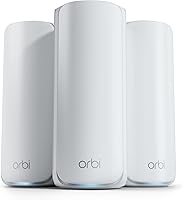
The NETGEAR Orbi 370 system is described as compatible with cable or fiber provider equipment and ready for plans up to 2.5 Gbps. NETGEAR says to connect it to an existing modem, so it doesn't replace that modem.
Check the provider's approved equipment list before buying a separate modem. For a provider gateway, check whether it supports bridge mode or allows a third-party mesh router.
What should you check before setting up mesh WiFi?
Confirm the internet service is active, identify the provider device, and find its Ethernet connection. These checks help you avoid buying equipment that your plan doesn't support.
- Cable: Check modem compatibility and whether the provider must activate it.
- Fiber: Find the ONT and ask whether a provider gateway must stay connected.
- Combo device: Check for bridge mode or access point instructions.
- Mesh system: Confirm its router supports your plan and the provider equipment's connection.
- Placement: Keep the primary mesh unit close enough to connect by Ethernet.
Mesh nodes don't need to sit beside the modem once the primary router is connected. Their placement depends on the home's layout and the connection between units; whether mesh nodes need wired connections covers wired and wireless backhaul.
Do mesh WiFi systems need a modem: what should you choose?
Keep or buy the provider equipment your internet service requires, then add mesh WiFi if you need broader coverage. Choose a separate modem for compatible cable service, use the ONT or gateway supplied for fiber, and follow the equipment instructions for satellite or fixed wireless.
Pick the Nighthawk CAX30 if you need a combo for a compatible cable plan and want modem and router functions in one device. Pick eero 7 or Orbi 370 when provider equipment is already in place and your goal is to spread WiFi through more rooms.
For your next step, learn how to set up a mesh WiFi system.
Frequently asked questions
Can mesh WiFi work without a modem?
A mesh system can create a local WiFi network without a modem, but that network won't have internet unless another service provides the connection. Cable and many fiber plans use provider equipment that connects to the mesh router.
Fixed wireless, satellite, and other services may use a gateway or dish instead of a separate modem.
Does a mesh WiFi system replace a modem?
Usually, no. A mesh system distributes WiFi through your home, while a modem or provider gateway connects to the internet service.
Some devices combine modem and router functions, but check that they support your internet provider and plan before replacing equipment.
Can I connect mesh WiFi to a modem router combo?
Yes, many mesh systems can connect by Ethernet to a modem router combo. The combo may keep its router functions active, which can create two layers of routing.
Check the equipment instructions for bridge mode or access point mode, and follow your provider's setup steps.
Does fiber internet need a modem for mesh WiFi?
Fiber service often uses an optical network terminal, or ONT, rather than a cable modem. Connect the mesh system to the provider equipment as directed, and check whether the provider requires a router or gateway for account, phone, or TV services.