8 Best Mesh WiFi System for Fiber (October 2026)
The best mesh WiFi systems for fiber internet include the eero Pro 7 (3-pack) for most fiber homes, the Netgear Orbi 770 (3-pack) for fiber up to 2.5 Gbps, and the eero Max 7 (1-pack) for a fast single node.
On this page (3 sections)
The eero Pro 7 (3-pack) is the best mesh WiFi system for fiber for most homes, with support for plans up to 5 Gbps and coverage up to 6,000 sq. ft. Choose Orbi 870 for a fiber plan up to 10 Gbps, or Orbi 770 if your plan is 2.5 Gbps or less.
Fiber service brings a fast connection to your home, but your mesh system still needs a suitable port and good node placement to share it around. Start by checking your plan speed and the Ethernet connection from your provider equipment.
If you need a primer on provider equipment, see whether mesh WiFi systems need a modem. Our mesh setup guide covers the first connection and placement steps.
Our picks at a glance
-
1

-
2

-
3
Which mesh WiFi systems work best with fiber internet?
The best match depends on your fiber plan's top speed, home size and whether you can wire the mesh units together. These picks are ranked by how well their stated plan support, coverage and ports fit common fiber setups.
We compared the listed Ethernet ports, plan limits and coverage claims for each system.
| Product | Best for | Plan support | Coverage | Ethernet | Our score |
|---|---|---|---|---|---|
| eero Pro 7 (3-pack) | most fiber homes | Up to 5 Gbps | Up to 6,000 sq. ft. | Two auto-sensing 5 GbE ports | 8.8 |
| Netgear Orbi 770 (3-pack) | fiber up to 2.5 Gbps | Up to 2.5 Gbps | Up to 8,000 sq. ft. | 2.5 Gig port | 8.7 |
| eero Max 7 (1-pack) | a fast single node | Up to 10 Gbps | Up to 2,500 sq. ft. | Two 10 Gigabit ports | 8.2 |
| eero Pro 6E (3-pack) | WiFi 6E coverage | Up to 2.5 Gbps | Up to 6,000 sq. ft. | 7.9 | |
| ASUS ZenWiFi BT10 (2-pack) | 10G wired links | 10G WAN and LAN ports | Up to 6,000 sq. ft. | Two 10G WAN and LAN ports | 7.8 |
| Netgear Orbi 870 (3-pack) | 10 Gbps fiber plans | Up to 10 Gbps | Up to 9,000 sq. ft. | 10 Gig internet port and 2.5 Gig LAN ports | 7.6 |
| ASUS ZenWiFi BT8 (2-pack) | wired backhaul | Dual 2.5G Ethernet ports | Up to 5,900 sq. ft. | Two 2.5G ports | 7.6 |
| ASUS ZenWiFi BQ16 Pro (2-pack) | large multi-gig homes | Dual 10-gigabit ports | Up to 8,000 sq. ft. | 7.3 |
How to choose the best mesh WiFi system for fiber
Choose a mesh system with a WAN port that can accept your plan's speed, then check whether its coverage and number of units fit your home's layout. Fiber plans above 1 Gbps need particular attention to multi-gig ports, because a 1 Gig port can cap the wired connection below the plan's full rate.
A mesh system's WiFi speed is separate from its internet plan limit. Your phone or laptop also needs compatible WiFi hardware, and walls, distance and interference affect the speed it receives.
eero Pro 7 (3-pack): Best for most fiber homes
- Plans up to 5 Gbps
- Coverage up to 6,000 sq. ft.
- Two auto-sensing 5 GbE ports
- Tri-band WiFi 7
This three-unit WiFi 7 system pairs fiber plan support up to 5 Gbps with coverage up to 6,000 sq. ft. and two 5 GbE ports on each unit.
Pros
- Supports plans up to 5 Gbps
- Three units cover up to 6,000 sq. ft.
- Two auto-sensing 5 GbE ports
Cons
- Coverage and speeds vary by home and devices
- Does not cover plans above 5 Gbps
The eero Pro 7 (3-pack) is the strongest all-around fit for fiber homes that want multi-gig service across several rooms. It supports internet plans up to 5 Gbps and includes two auto-sensing 5 GbE ports on each unit.
Three units are rated for up to 6,000 sq. ft. and more than 600 devices. Treat the coverage figure as a planning guide: walls, floors and node placement can change the result.
Its tri-band WiFi 7 design supports multi-link operation, and it is backward compatible with previous generations of eero. That helps if you have older eero devices, while the 5 Gbps plan limit gives you room for a fast fiber tier.
Choose it for most multi-gig fiber homes that want three nodes and 5 GbE ports. For a plan faster than 5 Gbps, compare the Orbi 870 or a system with an appropriate 10G WAN port.
Netgear Orbi 770 (3-pack): Best for fiber up to 2.5 Gbps
- Plans up to 2.5 Gbps
- Coverage up to 8,000 sq. ft.
- Tri-band WiFi 7
- Compatible with fiber provider equipment
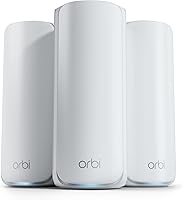
The Orbi 770 combines a stated 2.5 Gbps plan limit with up to 8,000 sq. ft. of coverage across a router and two satellites.
Pros
- Broad stated coverage
- Tri-band WiFi 7
- Works with fiber provider equipment
Cons
- Plan support stops at 2.5 Gbps
- Actual coverage depends on layout and placement
The Netgear Orbi 770 (3-pack) suits fiber plans up to 2.5 Gbps and homes where the provider equipment already supplies the fiber connection. Netgear says the system works with fiber provider equipment and is ready for plans up to 2.5 Gbps.
The kit includes a router and two satellites, with stated coverage up to 8,000 sq. ft. Its tri-band WiFi 7 design includes enhanced backhaul, while the 2.5 Gig port fits plans at or below that ceiling.
Use the Orbi app for guided setup and device management. The system also supports adding another Orbi 770 satellite for more coverage, though actual coverage depends on your layout and placement.
Choose it for a large home on a fiber plan no faster than 2.5 Gbps. If your plan is faster, the port limit makes the Orbi 870 a better match.
eero Max 7 (1-pack): Best for a fast single node
- Plans up to 10 Gbps
- Two 10 Gigabit Ethernet ports
- Coverage up to 2,500 sq. ft.
- Connects 250+ devices
This single WiFi 7 unit supports plans up to 10 Gbps and has two 10 Gigabit Ethernet ports. It can be expanded into an eero mesh network.
Pros
- Supports plans up to 10 Gbps
- Two 10 Gigabit ports
- Connects 250+ devices
Cons
- One unit covers up to 2,500 sq. ft.
- A single unit may not suit a large or spread-out home
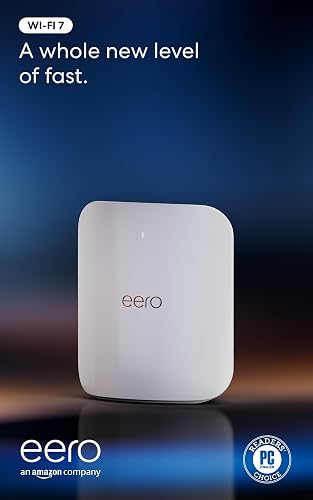
The eero Max 7 (1-pack) is a high-capacity starting point for fiber plans up to 10 Gbps when one unit can cover the space that needs WiFi. It has two 10 Gigabit Ethernet ports and a stated coverage area up to 2,500 sq. ft.
The single unit is rated for 250+ devices and supports WiFi 7 features including multi-link operation. eero says its TrueMesh software finds a path for data across the network, and the app guides setup and management.
The Max 7 can join a mesh network, so you can add compatible eero units if one node does not reach the rooms you use. Plan for more units if your home has multiple floors, dense walls or a long footprint.
Choose it when a single strong node and 10 Gigabit ports suit your setup. For whole-home coverage from the start, consider a multi-unit kit.
eero Pro 6E (3-pack): Best for WiFi 6E coverage

- Plans up to 2.5 Gbps
- Coverage up to 6,000 sq. ft.
- Supports 100+ devices
- WiFi 6E
A three-unit WiFi 6E kit with coverage up to 6,000 sq. ft. and support for plans up to 2.5 Gbps.
Pros
- Three units for whole-home coverage
- Supports 100+ connected devices
- Access to the 6 GHz band for WiFi 6E devices
Cons
- Plan support is below the fastest fiber tiers
- WiFi 7 features are not included
The eero Pro 6E (3-pack) fits fiber plans up to 2.5 Gbps and homes that need three nodes without requiring WiFi 7. Its 2.5 Gb Ethernet port supports gigabit-plus plans, and the system is rated for up to 6,000 sq. ft.
The WiFi 6E system can use the 6 GHz band with compatible devices. It supports more than 100 connected devices and is backward compatible with earlier eero generations.
For many households, the main tradeoff is the plan ceiling: it is a sensible match at or below 2.5 Gbps, while faster plans call for a higher-capacity WAN connection. See how many mesh nodes you need if you are deciding between this three-pack and a smaller system.
Choose it for a 2.5 Gbps-or-slower fiber plan and broad coverage from three units. Pick a WiFi 7 system if you want the newer generation.
ASUS ZenWiFi BT10 (2-pack): Best for 10G wired links
- Coverage up to 6,000 sq. ft.
- Two 10G WAN and LAN ports
- Tri-band WiFi 7
- Flexible wired or wireless backhaul
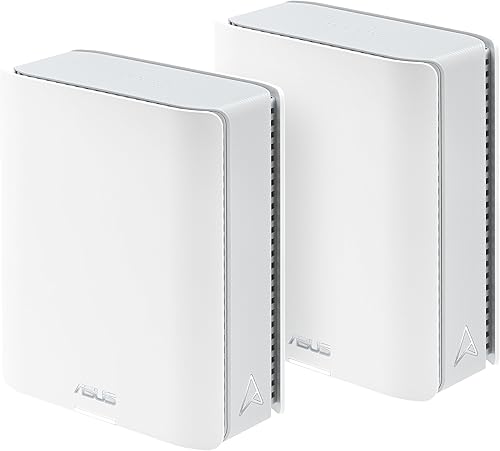
The two-unit BT10 gives you 10G WAN and LAN ports, with stated coverage up to 6,000 sq. ft. Confirm your fiber equipment and desired port setup before choosing it.
Pros
- Two 10G WAN and LAN ports
- Tri-band WiFi 7
- Coverage up to 6,000 sq. ft.
Cons
- The details do not state a fiber plan limit
- Coverage depends on home layout
The ASUS ZenWiFi BT10 (2-pack) offers two 10G WAN and LAN ports per unit, with coverage rated up to 6,000 sq. ft. Its port options make it a candidate for fiber equipment and wired devices that use 10 Gigabit Ethernet.
ASUS describes the BT10 as a tri-band WiFi 7 mesh system with flexible wired or wireless backhaul. It also supports AiMesh expansion with compatible ASUS routers, which can help if two units do not cover your home.
The supplied product facts do not give a specific fiber plan ceiling. Check that the WAN configuration works with your provider equipment, then confirm the plan speed you want to pass through the system.
Choose it if you want 10G ports and ASUS mesh expansion. If you want a clearly stated plan limit, the eero Pro 7 and Orbi systems offer one.
Netgear Orbi 870 (3-pack): Best for 10 Gbps fiber plans

- Plans up to 10 Gbps
- Coverage up to 9,000 sq. ft.
- 10 Gig internet port
- Tri-band WiFi 7
The Orbi 870 is the fit here for a fiber plan up to 10 Gbps, with a 10 Gig internet port and a router plus two satellites.
Pros
- Supports plans up to 10 Gbps
- Coverage up to 9,000 sq. ft.
- 10 Gig internet port
Cons
- May exceed the needs of slower plans
- Actual coverage varies by construction and placement
The Netgear Orbi 870 (3-pack) is the clearest fit here for fiber plans up to 10 Gbps. It has a 10 Gig internet port, 2.5 Gig LAN ports and a router with two satellites.
Netgear rates the system for coverage up to 9,000 sq. ft. and up to 150 devices. Tri-band WiFi 7 and enhanced backhaul are designed to keep the mesh units connected while devices use the network.
It works with fiber provider equipment, according to Netgear, and the Orbi app guides setup. The actual speed a device receives will still depend on its own WiFi hardware, distance and surrounding walls.
Choose it for a large home with a 10 Gbps fiber plan and devices that can use the available wired ports. For a slower plan, the Orbi 770 may be enough.
ASUS ZenWiFi BT8 (2-pack): Best for wired backhaul

- Coverage up to 5,900 sq. ft.
- Two 2.5G Ethernet ports
- Tri-band WiFi 7
- Wired backhaul support
The BT8 2-pack offers wired backhaul and two 2.5G Ethernet ports, useful when you can run cable between mesh units.
Pros
- Two 2.5G Ethernet ports
- Supports wired backhaul
- Coverage up to 5,900 sq. ft.
Cons
- The details do not state a fiber plan limit
- Coverage depends on layout and placement
The ASUS ZenWiFi BT8 (2-pack) is a useful pick when you can wire the mesh units together. Its dual 2.5G Ethernet ports support superfast wired backhaul, and ASUS rates coverage up to 5,900 sq. ft.
The BT8 uses tri-band WiFi 7 with 6 GHz WiFi, multi-link operation and 4K-QAM. ASUS also lists AiProtection Pro, parental controls and VPN features.
The supplied product facts do not state a fiber plan ceiling, so match the WAN port arrangement to your provider's equipment and plan. A wired link between nodes can help avoid relying on a wireless backhaul connection.
Choose it for a two-unit setup with wired backhaul. See what Ethernet backhaul means on a mesh system before planning cable runs.
ASUS ZenWiFi BQ16 Pro (2-pack): Best for large multi-gig homes

- Coverage up to 8,000 sq. ft.
- Quad-band WiFi 7
- Dual 10-gigabit ports
- Two-unit system
This two-unit quad-band WiFi 7 system has dual 10-gigabit ports and stated coverage up to 8,000 sq. ft. Choose it when both home size and wired capacity matter.
Pros
- Coverage up to 8,000 sq. ft.
- Dual 10-gigabit ports
- Quad-band WiFi 7
Cons
- The details do not state a fiber plan limit
- A two-unit system still needs sensible placement
The ASUS ZenWiFi BQ16 Pro (2-pack) combines quad-band WiFi 7 with dual 10-gigabit ports and stated coverage up to 8,000 sq. ft. It is aimed at larger homes where wired multi-gig connections and broad mesh coverage matter.
The system supports AiMesh expansion with compatible ASUS routers and offers Smart Home Master SSIDs for separating IoT devices. Its product details do not state a specific fiber plan limit, so check the WAN setup with your provider before relying on it for a 10 Gbps plan.
Two units still need thoughtful placement, especially in homes with thick walls or several floors. A wired link between them can be useful where you can run Ethernet.
Choose it for a large home with 10-gigabit wired needs. If plan speed is the main deciding factor, compare systems with an explicit fiber plan limit.
What should you check before connecting mesh WiFi to fiber?
Check whether your fiber provider uses an optical network terminal, a gateway or both, then confirm how the mesh router should connect. Some providers require their gateway for phone service or other features, so don't remove it without checking the provider's setup instructions.
Next, compare your plan speed with the mesh system's WAN port. A port with a lower maximum can limit the wired handoff even when the fiber plan is faster.
Mesh placement matters as much as the router's advertised coverage. Read where to place mesh WiFi units before setting up the satellites, and consider Ethernet backhaul if cable runs are practical.
Which mesh WiFi system should you choose for fiber?
Choose the eero Pro 7 for a balanced three-unit kit and fiber plans up to 5 Gbps. Pick the Orbi 870 for plans up to 10 Gbps and large coverage needs, or the Orbi 770 for a plan at or below 2.5 Gbps.
For a wired two-node setup, consider the ASUS ZenWiFi BT8, while the BT10 and BQ16 Pro have 10G ports for more demanding wired connections. Start with your provider's equipment and plan speed, then choose the mesh size that fits your layout.
Our top 3 picks at a glance
-
1
-
2
-
3
Frequently asked questions
Do I need a special mesh system for fiber internet?
No. A mesh system can work with fiber when it connects to the provider's gateway or optical network terminal in the right way.
Match the mesh system's Ethernet port and plan limit to your fiber speed, and check whether your provider requires its gateway for setup or phone service.
Can mesh WiFi deliver my full fiber speed?
It can, when the mesh router's WAN port, wireless link and client device can all handle the speed. WiFi speeds vary by distance, walls, interference and device capability, so a multi-gig fiber plan does not mean every wireless device will reach its full rate.
Should I use my fiber provider's router with mesh WiFi?
Often, yes. Some fiber setups use a gateway that handles routing, phone service or provider features, so connect mesh to it unless your provider supports bridge mode or direct router replacement.
If both devices route traffic, ask the provider how to avoid a double-router setup.
Is wired backhaul useful with fiber mesh?
Yes, Ethernet backhaul can keep mesh units connected over a cable instead of relying on a wireless link between them. It can help preserve more wireless capacity for your devices, especially across floors or thick walls, if you can run cable to each node.