8 Best Mesh WiFi for a 2-Story House (October 2026)
The best mesh WiFi systems for two-story houses include the eero 7 (2-pack) for balanced two-floor coverage, the eero 6+ (3-pack) for extra placement flexibility, and the Netgear Orbi 770 (2-pack) for larger two-story homes.
On this page (7 sections)
- Which mesh WiFi is best for a 2-story house?
- The best mesh WiFi systems for two floors
- How many mesh units should a two-story house use?
- Where should a mesh node go between floors?
- Does a bigger coverage number mean better upstairs WiFi?
- Should you use Ethernet backhaul in a 2-story house?
- Which mesh WiFi should you choose for a 2-story house?
The best mesh WiFi for a 2-story house is usually a two-unit system, with one unit near the modem and another placed to reach the other floor. The eero 7 is a balanced starting point; choose a 3-pack for more placement options or a larger system for a bigger home.
Coverage ratings describe broad estimates, not a guarantee for every upstairs bedroom or downstairs office. Floors, wall materials, room shape and where you place the units all affect the signal.
If you're unsure whether two units will be enough, start with our guide to how many mesh nodes you need. For setup, see where to place mesh WiFi units.
Our picks at a glance
-
1

-
2

-
3

Which mesh WiFi is best for a 2-story house?
The eero 7 is the best all-around fit for many two-story homes because its two units cover up to 4,000 sq. ft. and support Wi-Fi 7. A larger home may call for the Orbi 770, while a 3-pack can help when the layout makes unit placement difficult.
We compared the stated coverage, unit count, Wi-Fi generation, backhaul features and wired ports for each system. Our score weighs specs and features against the needs of a two-story home.
| Product | Best for | Coverage | Pack | Wi-Fi | Our score |
|---|---|---|---|---|---|
| eero 7 (2-pack) | balanced two-floor coverage | Up to 4,000 sq. ft. | 2 units | Wi-Fi 7 | 8.9 |
| eero 6+ (3-pack) | extra placement flexibility | Up to 4,500 sq. ft. | 3 units | Wi-Fi 6 | 8.6 |
| Netgear Orbi 770 (2-pack) | larger two-story homes | Up to 5,500 sq. ft. | Router and satellite | Wi-Fi 7, tri-band | 8.5 |
| Netgear Orbi 370 (2-pack) | Wi-Fi 7 on two floors | Up to 4,000 sq. ft. | Router and satellite | Wi-Fi 7, dual-band | 8.1 |
| ASUS ZenWiFi BT10 (2-pack) | multi-gigabit homes | Up to 6,000 sq. ft. | 2 units | Wi-Fi 7, tri-band | 7.8 |
| Google Nest Wifi Pro (3-pack) | three-unit Wi-Fi 6E coverage | Up to 6,600 sq. ft. | 3 units | Wi-Fi 6E | 7.7 |
| ASUS ZenWiFi BT8 (2-pack) | wired backhaul options | Up to 5,900 sq. ft. | 2 units | Wi-Fi 7, tri-band | 7.6 |
| Linksys Velop Micro 7 | app-free setup | Up to 2,200 sq. ft. per node | 3-pack | Wi-Fi 7, dual-band | 6.9 |
The best mesh WiFi systems for two floors
Each pick addresses a different home size or setup need. Treat coverage figures as a planning guide, then consider the shape of your floors and the distance between the units.
eero 7 (2-pack): Best for balanced two-floor coverage
- Up to 4,000 sq. ft. coverage
- 2-pack supports 120+ devices
- Wi-Fi 7
- Two auto-sensing 2.5 GbE ports
A two-unit kit with a stated coverage area that fits many two-story homes. Its Wi-Fi 7 support and two 2.5 GbE ports suit households planning for faster internet.
Pros
- Two units for placing across floors
- Supports internet plans up to 2.5 Gbps
- Backward compatible with earlier eero generations
Cons
- Coverage depends on layout, materials and placement
- Advanced security features require an optional subscription
The eero 7 (2-pack) is a sensible starting point for many two-story homes. Its up to 4,000 sq. ft. coverage and two-unit layout suit homes where the main router can sit near the modem and the second unit can serve the other floor.
It supports internet plans up to 2.5 Gbps and has two auto-sensing 2.5 GbE ports on each unit. The system supports 120+ devices, according to eero, and is backward compatible with earlier eero generations.
For the best chance of useful coverage upstairs, place the second unit where it can still receive a strong signal from the main one. A spot near an open stairway may work better than a far corner bedroom, depending on the home's layout.
Choose this kit if you want a straightforward two-unit Wi-Fi 7 system for a typical two-story home. If you need more placement options, compare it with the 3-pack below.
eero 6+ (3-pack): Best for extra placement flexibility
- Up to 4,500 sq. ft. coverage
- 3-pack supports 75+ devices
- Wi-Fi 6
- Built-in smart home hub
Three units give you another placement option when a stairwell, long hallway or difficult room makes two units hard to position. It also has a built-in hub for compatible Thread and Zigbee devices.
Pros
- Three units for flexible placement
- Supports internet plans up to a gigabit
- Built-in smart home hub
Cons
- Coverage depends on layout, materials and placement
- Some security and network features need a separate subscription
The eero 6+ (3-pack) gives you three units to place across floors or along a long layout. Its stated coverage reaches up to 4,500 sq. ft., which makes it worth considering when two nodes leave a distant room with a weak signal.
The system supports internet plans up to a gigabit and connects 75+ devices. It also has a built-in smart home hub for compatible Thread and Zigbee devices, which may save a separate hub for some households.
Wi-Fi 6 is a practical choice if you don't need Wi-Fi 7 features or multi-gigabit internet. The extra node can help with placement, but it still needs a usable connection to the rest of the mesh.
Pick the eero 6+ if your main concern is arranging three units around a complicated floor plan. See our mesh WiFi basics guide for how nodes work together.
Netgear Orbi 770 (2-pack): Best for larger two-story homes
- Up to 5,500 sq. ft. coverage
- Supports up to 100 devices
- Tri-band Wi-Fi 7
- Enhanced Backhaul
The Orbi 770 combines a router and satellite with a stated coverage area for larger homes. Its tri-band design and Enhanced Backhaul are aimed at keeping the connection between units stronger.
Pros
- Large stated coverage area
- Tri-band Wi-Fi 7
- Supports internet plans up to 2.5 Gbps
Cons
- Actual coverage varies with layout, materials and placement
- Made for use in the US only
The Orbi 770 (2-pack) is the higher-coverage choice here, with a router and satellite rated for up to 5,500 sq. ft. It suits a larger two-story home where a typical 2-pack may not provide enough reach.
Its tri-band Wi-Fi 7 design includes Enhanced Backhaul, which NETGEAR says helps keep WiFi fast across the home. The system supports up to 100 devices and internet plans up to 2.5 Gbps.
Actual coverage varies with the home's layout, construction materials and satellite placement. Start with the unit locations and check signal in the farthest rooms before adding more equipment.
Choose the Orbi 770 when your home is large and you want a two-unit system with a higher stated coverage figure. It's made for use in the US only.
Netgear Orbi 370 (2-pack): Best for Wi-Fi 7 on two floors

- Up to 4,000 sq. ft. coverage
- Supports up to 70 devices
- Dual-band Wi-Fi 7
- Enhanced Backhaul
This router-and-satellite kit pairs a 4,000 sq. ft. coverage rating with Wi-Fi 7. It's a fit for homes that want a two-unit layout without choosing a tri-band system.
Pros
- Two units for covering separate floors
- Supports internet plans up to 2.5 Gbps
- Works with Wi-Fi 6 and Wi-Fi 5 devices
Cons
- Coverage varies with layout, materials and placement
- Made for use in the US only
The Orbi 370 (2-pack) fits a two-story home that needs Wi-Fi 7 coverage across a more modest area. Its router and satellite are rated for up to 4,000 sq. ft., and the system supports up to 70 devices.
This is a dual-band system with Enhanced Backhaul. It supports internet plans up to 2.5 Gbps and works with Wi-Fi 6 and Wi-Fi 5 devices, so older phones and laptops can stay connected.
The Orbi app guides setup and can manage devices and guest WiFi. As with any mesh kit, the satellite needs a placement that balances distance from the router with reach into the weak-signal area.
Pick this kit if you want a two-unit Wi-Fi 7 system and don't need the Orbi 770's higher stated coverage. The system is made for use in the US only.
ASUS ZenWiFi BT10 (2-pack): Best for multi-gigabit homes
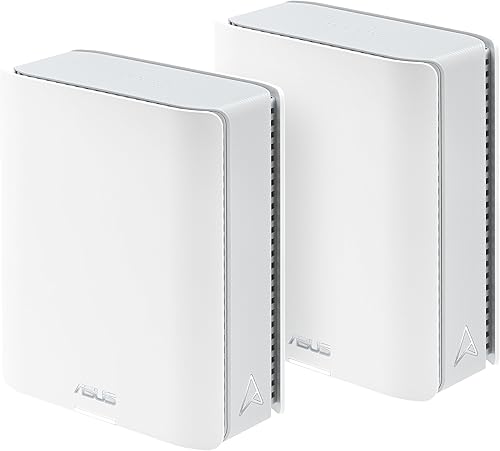
- Up to 6,000 sq. ft. coverage
- Tri-band Wi-Fi 7
- Dual 10G WAN and LAN ports
- AiMesh support
The BT10 is a high-capacity option for a large two-story home with multi-gigabit wired needs. Its two 10G ports and support for ASUS AiMesh add flexibility for a network built around compatible ASUS routers.
Pros
- Large stated coverage area
- Dual 10G WAN and LAN ports
- Tri-band Wi-Fi 7
Cons
- Coverage varies with layout, materials and placement
- May offer more capacity than a smaller home needs
The ASUS ZenWiFi BT10 (2-pack) is aimed at a larger home with demanding wired network needs. It has a stated coverage area of up to 6,000 sq. ft. and two 10G WAN and LAN ports.
Its tri-band Wi-Fi 7 system supports ASUS AiMesh, which can extend a network with compatible ASUS routers. The BT10 also offers network segmentation through Smart Home Master, with up to three SSIDs.
This may be more capacity than a smaller two-story home needs. Check whether your internet plan and wired devices can make use of its multi-gigabit connections before choosing it over a simpler system.
Choose the BT10 if you need its 10G ports or plan to expand an ASUS AiMesh setup. If you want wired connections between mesh units, read what Ethernet backhaul means.
Google Nest Wifi Pro (3-pack): Best for three-unit Wi-Fi 6E coverage

- Up to 6,600 sq. ft. coverage
- Three Wi-Fi 6E routers
- Three bands including 6 GHz
- Guest network
Three routers offer more placement options for a large or awkwardly shaped two-story home. Nest Wifi Pro uses Wi-Fi 6E, so it isn't compatible with earlier Google Wifi or Nest Wifi generations.
Pros
- Three units for flexible placement
- Wi-Fi 6E with a 6 GHz band
- Guest network with a separate password
Cons
- Coverage varies with layout, materials and placement
- Not compatible with previous Google Wifi or Nest Wifi generations
The Google Nest Wifi Pro (3-pack) provides three Wi-Fi 6E routers and coverage rated up to 6,600 sq. ft. More units can make it easier to place a node near each floor's main rooms, especially in a large or stretched-out home.
It uses three bands, including 6 GHz, and can create a guest network with a separate password. To use the 6 GHz band directly, your device needs Wi-Fi 6E support.
This system isn't compatible with earlier Google Wifi or Nest Wifi generations. If you're replacing an existing Google mesh network, factor that into your choice.
Choose Nest Wifi Pro if you want three units and are starting a new Wi-Fi 6E network. Compare the stated coverage with your floor plan rather than assuming every corner will receive the same signal.
ASUS ZenWiFi BT8 (2-pack): Best for wired backhaul options

- Up to 5,900 sq. ft. coverage
- Tri-band Wi-Fi 7
- Dual 2.5G Ethernet ports
- AiMesh support
The BT8 pairs a two-unit layout with tri-band Wi-Fi 7 and dual 2.5G Ethernet ports. Those ports make it a candidate for a home where you can connect the units by Ethernet.
Pros
- Two 2.5G Ethernet ports
- Tri-band Wi-Fi 7
- Compatible ASUS routers can extend AiMesh
Cons
- Coverage varies with layout, materials and placement
- A wired connection between floors requires suitable Ethernet runs
The ASUS ZenWiFi BT8 (2-pack) pairs two units with tri-band Wi-Fi 7 and a stated coverage area of up to 5,900 sq. ft. Its dual 2.5G Ethernet ports make it a candidate for a home where you can run Ethernet between floors.
A wired connection between units can be useful when floors or walls make wireless communication harder. The BT8 supports wired backhaul, and compatible ASUS routers can extend its AiMesh network.
The right choice depends on whether you can place the nodes well or connect them by Ethernet. A high coverage figure doesn't remove the need to put each unit in a useful location.
Choose the BT8 if wired backhaul and ASUS network features matter to you. For thick walls, our guide to mesh WiFi for older homes covers more layout factors.
Linksys Velop Micro 7: Best for app-free setup

- Up to 2,200 sq. ft. per node
- Wi-Fi 7
- Instant-Pair setup button
- No subscription required for stated security features
The Velop Micro 7 is a three-node option with a setup button that avoids app setup. Linksys gives a per-node coverage figure, so plan placement around the actual floor plan.
Pros
- Three nodes offer placement flexibility
- Instant-Pair setup button
- No subscription required for stated security features
Cons
- Coverage depends on placement and home layout
- Dual-band design
The Linksys Velop Micro 7 offers three Wi-Fi 7 nodes and a setup button designed to connect without an app. Linksys gives a coverage estimate of up to 2,200 sq. ft. per node, so use your home's shape and node placement to judge whether the system fits.
The system is dual-band and has a 2.5G auto-sensing Internet/LAN port. Linksys says no subscription is required for its stated security and network management features.
A three-node system can give you flexibility across floors, but each node still needs to connect well with the rest of the network. Place nodes in open areas rather than hiding them inside cabinets or behind large objects.
Choose the Velop Micro 7 if app-free setup is a priority and you want three nodes. Compare its per-node estimate with the full-home coverage figures of the other picks before deciding.
How many mesh units should a two-story house use?
A 2-pack is a reasonable starting point for many two-story houses, while a 3-pack can help with large floor plans or hard-to-reach rooms. The number of units matters less if they can't be placed where they receive and pass along a strong signal.
Begin with one unit near the modem and place another on the opposite floor, ideally in an open area between the router and the room that needs better WiFi. If the signal drops sharply between floors, try a position closer to the stairway or a central landing.
An extra node isn't a fix for poor placement. Read how many mesh nodes you need before choosing a pack size.
Where should a mesh node go between floors?
Place the second unit where it can still connect well to the main router while reaching the rooms with weak WiFi. A central landing or open area near the stairs can be a useful starting point in many homes.
Avoid putting a satellite at the far end of a dead zone, because it may have a weak connection to the router too. Move it toward the main unit if the far rooms still struggle, then check whether coverage improves on both floors.
For a more detailed placement process, use our guide to where to place mesh WiFi units. If your house has thick walls, our guide to mesh WiFi for older homes may help you weigh wired and wireless options.
Does a bigger coverage number mean better upstairs WiFi?
No. A larger coverage estimate doesn't guarantee a strong signal in every upstairs room, because construction materials and node placement affect how WiFi travels.
Use the figure to narrow your options, then account for the floor plan. A 3,000 sq. ft. home with dense walls or a long layout may need more careful placement than a larger home with open rooms.
For a closer match to a 3,000 sq. ft. floor plan, compare our mesh systems for a 3,000 sq. ft. home. Check the rooms that matter most after setup rather than relying on one number.
Should you use Ethernet backhaul in a 2-story house?
Ethernet backhaul can connect mesh units over a wired link when you have Ethernet available between floors. That can be useful if the wireless path between the router and satellite is weakened by floors or walls.
Not every home has a convenient cable route, so wireless backhaul may be simpler to install. Check that the system supports wired backhaul and that its ports match your plan before buying.
See our guide to Ethernet backhaul on mesh WiFi for more on when a wired link helps. For a basic setup walkthrough, follow how to set up a mesh WiFi system.
Which mesh WiFi should you choose for a 2-story house?
Choose the eero 7 for a balanced two-unit Wi-Fi 7 system, the eero 6+ when a third node would help with placement, or the Orbi 770 for a larger home with higher stated coverage needs. If you can run Ethernet between floors, consider a system with wired backhaul support such as the ASUS BT8.
Before you decide, compare the unit count with your floor plan and identify where each node can sit in the open. For a home around 3,000 sq. ft., see our guide to mesh WiFi systems for that size.
Our top 3 picks at a glance
-
1
-
2
-
3
Frequently asked questions
How many mesh WiFi units does a 2-story house need?
Many two-story homes can start with a 2-pack, placing one unit near the modem and another on the other floor. A 3-pack gives more placement options when the house is large, has long hallways or has walls that weaken signals.
Use coverage figures as a starting point, then check signal in the rooms you use.
Where should I put mesh WiFi units in a two-story home?
Place the main unit near your modem in an open spot, then put the satellite between it and the weak-signal area, often near the stairs or on the other floor. Avoid hiding units in cabinets or placing the satellite at the very edge of the main unit's signal.
See our guide to where to place mesh WiFi units for more placement steps.
Does a mesh system cover both floors equally?
No system can promise equal signal in every room. Floors, thick walls, metal, appliances and unit placement can all affect how WiFi travels, so a coverage number alone can't predict performance in a specific home.
Place units in open areas and check signal upstairs and downstairs after setup.
Is a 3-pack better than a 2-pack for a 2-story house?
A 3-pack can help when two units can't reach a far bedroom or when the house has a wide, irregular layout. Extra units don't automatically improve coverage if they're placed too close together or too far from the rest of the mesh.
Start with your floor plan and the rooms with weak signal.


