8 Best Mesh WiFi Systems for Security Cameras (October 2026)
The best mesh WiFi systems for security cameras include the eero 7 (2-pack) for most indoor camera setups, the eero 6+ (3-pack) for adding indoor coverage, and the eero Outdoor 7 for outdoor eero coverage.
On this page (4 sections)
The best mesh WiFi system for security cameras for most homes is the eero 7 (2-pack), with stated coverage up to 4,000 sq. ft. and support for 120+ devices. For outdoor cameras, pair a compatible mesh network with an outdoor-rated unit placed near the camera area.
Camera feeds depend on the signal at the camera, not just the speed beside the main router. A mesh system can help cover distant rooms and floors, but walls, building materials and node placement affect the connection.
Start with the camera maker's WiFi requirements, including supported bands and whether it needs a hub. Then map where the cameras will go and compare those spots with potential mesh unit locations.
For a quick explanation of how the system works, read Mesh WiFi Explained: Units, Coverage and Setup. You can also compare mesh WiFi for a 2-story house if cameras sit on different floors.
Our picks at a glance
-
1

-
2

-
3

Which mesh WiFi systems work well with security cameras?
The eero 7 leads for broad indoor device capacity, while the outdoor eero and ASUS units address camera locations beyond the house. The Orbi kits are options when you want NETGEAR to name security cameras among compatible devices.
These rankings weigh stated coverage, device capacity, outdoor suitability and connection options against a camera-focused home setup. Our score weighs specs, features and buyer feedback against what you're shopping for.
| Product | Best for | Coverage | Device support | Pack | Our score |
|---|---|---|---|---|---|
| eero 7 (2-pack) | most indoor camera setups | Up to 4,000 sq. ft. | 120+ devices | 2-pack | 8.9 |
| eero 6+ (3-pack) | adding indoor coverage | Up to 4,500 sq. ft. | 75+ devices | 3-pack | 8.6 |
| eero Outdoor 7 | outdoor eero coverage | 8.4 | |||
| Netgear Orbi 370 (2-pack) | a 2-unit WiFi 7 kit | Up to 4,000 sq. ft. | Up to 70 devices | Router and satellite | 8.1 |
| Netgear Orbi 360 (3-pack) | larger indoor homes | Up to 6,000 sq. ft. | Up to 70 devices | Router and 2 satellites | 7.7 |
| ASUS ZenWiFi BD4 (3-pack) | ASUS AiMesh homes | Up to 6,500 sq. ft. | 3-pack | 7.5 | |
| ASUS ZenWiFi BD5 (3-pack) | a wider ASUS mesh | Up to 6,800 sq. ft. | 3-pack | 7.4 | |
| ASUS ZenWiFi BD5 Outdoor | outdoor ASUS coverage | 7.2 |
The best mesh WiFi systems for security cameras
The right pick depends on where the cameras sit and how many devices share the network. Compare the room layout and camera count with each system's stated coverage before you decide.
eero 7 (2-pack): Best for most indoor camera setups
- Up to 4,000 sq. ft. coverage
- Supports 120+ devices
- Two auto-sensing 2.5 GbE ports
- WiFi 7
A two-unit WiFi 7 kit with broad stated coverage and capacity for many connected devices. It suits homes where cameras share the network with phones, TVs and smart-home devices.
Pros
- Up to 4,000 sq. ft. stated coverage
- Supports 120+ devices
- Two 2.5 GbE ports
Cons
- No outdoor weather rating stated for the indoor units
- eero Plus security features require an optional subscription
The eero 7 (2-pack) is the strongest all-around choice for indoor cameras in a typical home. Its two units are stated to cover up to 4,000 sq. ft. and support more than 120 devices, giving room for cameras alongside phones, streaming devices and smart-home gear.
Each unit has two auto-sensing 2.5 GbE ports. If a camera or another network device supports Ethernet, you can consider a wired connection where the unit's placement allows it.
The system supports WiFi 7 and internet plans up to 2.5 Gbps, but a camera's video quality and connection still depend on its own requirements and signal. The eero Plus subscription is optional and adds security and network features.
This is an indoor kit. If a camera is outside, check its signal at the intended spot and consider a dedicated outdoor mesh unit rather than placing an indoor unit in an exposed area.
eero 6+ (3-pack): Best for adding indoor coverage
- Up to 4,500 sq. ft. coverage
- Supports 75+ devices
- WiFi 6
- Smart home hub for compatible Thread and Zigbee devices
Three units provide a way to spread indoor WiFi through a larger or more divided home. Its stated device capacity is lower than the eero 7's, so count cameras and other devices before choosing.
Pros
- Three units for placement flexibility
- Up to 4,500 sq. ft. stated coverage
- Supports 75+ devices
Cons
- WiFi 6 rather than WiFi 7
- Online security and added network management features may require a subscription
The eero 6+ (3-pack) suits a home that needs three indoor placement points and doesn't need WiFi 7. It has stated coverage up to 4,500 sq. ft. and supports 75+ devices, so count cameras and household devices before deciding whether that capacity fits.
Its WiFi 6 system supports speeds up to a gigabit and includes a smart home hub for compatible Thread and Zigbee devices. The app guides setup and provides network management from anywhere.
Three units can make it easier to place a mesh point near camera areas while keeping a useful connection between units. The coverage figure is a maximum, so a house with thick walls or a detached garage may need a different layout.
Choose it when adding indoor coverage points matters more than the newest WiFi generation. For an older house with challenging walls, see our guide to mesh WiFi for older homes.
eero Outdoor 7: Best for outdoor eero coverage
- Up to 15,000 sq. ft. outdoor coverage
- IP66 weatherproof rating
- Supports 100+ devices
- AC or PoE+ power
This outdoor unit extends an eero network to yards and patios, where indoor mesh units aren't designed to remain. Its IP66 rating is for protection from dust, rain and snow.
Pros
- Designed for outdoor use
- IP66 rating
- AC or PoE+ power options
Cons
- Requires an eero network for mesh use
- Outdoor coverage is a maker-stated maximum
The eero Outdoor 7 is the eero pick for camera areas in a yard or patio. It has an IP66 rating for protection from dust, rain and snow, and eero states up to 15,000 sq. ft. of outdoor coverage.
It can connect 100+ devices and uses WiFi 7, with wireless speeds up to 2.1 Gbps. Power options include AC or PoE+, so the right setup depends on what's available at the installation point.
This unit is backward compatible with previous eero generations, making it an outdoor extension option for an existing eero mesh. The coverage figure is for outdoor space and shouldn't be treated as a guarantee through walls or across a property.
Choose it when the camera locations are outside and the network is built around eero. Plan the power route and mount location before settling on the camera position.
Netgear Orbi 370 (2-pack): Best for a 2-unit WiFi 7 kit

- Up to 4,000 sq. ft. coverage
- Supports up to 70 devices
- Enhanced Backhaul
- WiFi 7
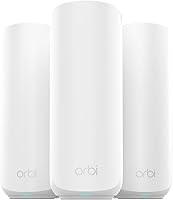
The router and satellite form a two-unit WiFi 7 mesh with a stated range of up to 4,000 sq. ft. NETGEAR names security cameras among its compatible devices.
Pros
- Security cameras listed among compatible devices
- Enhanced Backhaul
- Up to 4,000 sq. ft. stated coverage
Cons
- Made for use in the US only
- NETGEAR Armor requires a separate subscription after its 30-day trial
The Netgear Orbi 370 (2-pack) fits a home that needs a router and one satellite, with up to 4,000 sq. ft. of stated coverage. NETGEAR lists security cameras among compatible devices, and the system supports up to 70 devices.
Its dual-band WiFi 7 system uses Enhanced Backhaul to help deliver WiFi across the home. The Orbi app guides setup and lets you manage connected devices and guest WiFi.
The security features include automatic firmware updates and Advanced Router Protection. NETGEAR Armor has a 30-day free trial, then requires a separate subscription.
Choose this kit when two units cover the planned camera locations and you prefer Orbi. It is made for use in the US only, so confirm regional compatibility before buying.
Netgear Orbi 360 (3-pack): Best for larger indoor homes

- Up to 6,000 sq. ft. coverage
- Supports up to 70 devices
- Enhanced Backhaul
- WiFi 7
Three units and a stated coverage figure of up to 6,000 sq. ft. make this a candidate for homes that need more placement points indoors. NETGEAR names security cameras among its compatible devices.
Pros
- Three units for spreading coverage
- Security cameras listed among compatible devices
- Enhanced Backhaul
Cons
- Made for use in the US only
- NETGEAR Armor requires a separate subscription after its 30-day trial
The Netgear Orbi 360 (3-pack) suits a larger indoor layout where cameras are spread across more rooms or floors. The router and two satellites have stated coverage up to 6,000 sq. ft., and NETGEAR names security cameras among compatible devices.
It supports up to 70 devices and uses dual-band WiFi 7 with Enhanced Backhaul. The Orbi app helps with setup, guest WiFi and device management.
The extra satellite gives you another placement option, but it still needs a strong link to the rest of the mesh. NETGEAR says coverage can vary with home layout, construction materials and satellite placement.
Choose the 3-pack when the camera map shows a need for more than one satellite. As with the Orbi 370, this system is made for use in the US only.
ASUS ZenWiFi BD4 (3-pack): Best for ASUS AiMesh homes
- Up to 6,500 sq. ft. coverage
- Dual 2.5G Ethernet ports
- AiMesh extendibility
- AiProtection Pro
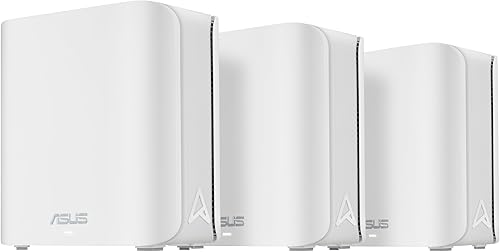
Three AiMesh units suit buyers who want wired connection options and the ability to extend coverage with compatible ASUS routers. Its stated coverage is a maker estimate, so placement and building materials still matter.
Pros
- Dual 2.5G Ethernet ports
- AiMesh extendibility with compatible ASUS routers
- AiProtection Pro
Cons
- Security camera compatibility isn't specified
- Coverage varies with layout and placement
The ASUS ZenWiFi BD4 (3-pack) is a fit for homes that want three WiFi 7 mesh units and dual 2.5G Ethernet ports. ASUS states coverage up to 6,500 sq. ft. and supports extension with compatible ASUS AiMesh routers.
Its AiProtection Pro includes network protection features, and ASUS lists IoT Network and parental controls. The available information doesn't specify camera compatibility, so check the camera requirements and connection method before choosing this system.
Ethernet backhaul can be useful if you can wire units between rooms or floors. Read what Ethernet backhaul is on a mesh system to see whether a wired link suits your home.
Choose the BD4 if you want an ASUS system with wired options and compatible router expansion. Treat the coverage number as a planning starting point, since placement and construction affect real reach.
ASUS ZenWiFi BD5 (3-pack): Best for a wider ASUS mesh
- Up to 6,800 sq. ft. coverage
- Dual-band WiFi 7
- AiMesh extendibility
- AiProtection Pro
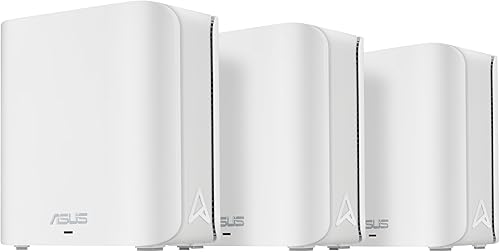
The BD5 three-pack has the largest stated indoor coverage among these kits. It can be extended with compatible ASUS routers, which may help when the home needs more mesh points.
Pros
- Largest stated indoor coverage in this group
- AiMesh extendibility
- AiProtection Pro
Cons
- Security camera compatibility isn't specified
- Coverage varies with layout and placement
The ASUS ZenWiFi BD5 (3-pack) has the largest stated indoor coverage in this group, up to 6,800 sq. ft. It uses dual-band WiFi 7 and can extend through compatible ASUS AiMesh routers.
The system includes AiProtection Pro, IoT Network, parental controls and VPN setup features. Camera compatibility isn't specified, so confirm that your camera model can join the network and whether it needs a hub.
A larger coverage estimate can be useful when camera locations are spread across a big home, but it doesn't remove the need to place each node carefully. The satellite nodes need a suitable link back to the main unit.
Choose the BD5 when broad indoor coverage and ASUS AiMesh expansion are priorities. If the cameras are outdoors, use an outdoor-rated unit for the exposed location.
ASUS ZenWiFi BD5 Outdoor: Best for outdoor ASUS coverage
- IP65 water-resistant and dustproof enclosure
- PoE or AC power
- Two 2.5G PoE-in ports
- AiMesh with compatible ASUS routers
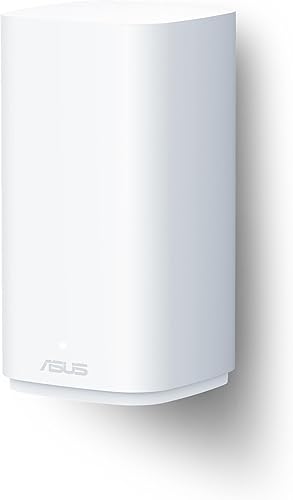
This outdoor mesh unit is designed for compatible ASUS AiMesh networks and offers PoE or AC power. The maker states coverage up to 2,500 sq. ft. for outdoor use.
Pros
- IP65 enclosure
- PoE or AC power options
- Two 2.5G PoE-in ports
Cons
- Requires compatible ASUS AiMesh equipment
- Outdoor coverage is a maker-stated maximum
The ASUS ZenWiFi BD5 Outdoor is the ASUS option for extending compatible AiMesh WiFi to outdoor camera areas. It has an IP65 water-resistant and dustproof enclosure, plus PoE or AC power options.
ASUS states up to 2,500 sq. ft. of coverage and includes two 2.5G PoE-in ports. The unit can be wall-mounted, pole-mounted or placed on a flat surface.
It needs a compatible ASUS AiMesh network, and camera compatibility should be checked against the camera's own WiFi requirements. Plan the cable and power path along with the outdoor mounting point.
Choose this unit when you already use compatible ASUS equipment and need a purpose-built outdoor mesh point. Its stated outdoor range is lower than the eero Outdoor 7's, so compare the camera area and placement needs.
How should you choose mesh WiFi for camera locations?
Choose by camera placement, mesh link quality and device count, then check whether outdoor hardware or Ethernet is needed. A system's coverage estimate is only a starting point because walls and node position change how far a usable signal reaches.
How many cameras can a mesh system support?
Count cameras plus phones, computers, TVs and smart devices, then compare that total with the system's stated device capacity. The eero 7 supports 120+ devices, while the Orbi 370 and Orbi 360 support up to 70, and the eero 6+ supports 75+.
Device count alone doesn't guarantee smooth video. Camera resolution, recording method and simultaneous activity also affect network demand, so leave capacity for devices you may add later.
Where should you place mesh units for cameras?
Place a mesh unit where it can serve the camera area and still maintain a strong link to the main router or another node. Avoid hiding units inside cabinets or behind dense obstacles.
For a camera at a detached garage, the home signal may not reach far enough across the gap. Our guide to extending WiFi to a detached garage covers options for that situation.
Do cameras need a wired backhaul?
No, a camera-focused mesh network can work without Ethernet backhaul, but wiring mesh units can improve the link between nodes where cable is available. Wired backhaul doesn't replace the camera's own connection requirements.
Check where Ethernet can run and whether the mesh system supports it. If wiring isn't practical, place nodes so each one can maintain a useful wireless connection to the next.
Should outdoor cameras use outdoor mesh units?
Use an outdoor-rated mesh unit when the equipment will be exposed to weather. The eero Outdoor 7 has an IP66 rating, and the ASUS ZenWiFi BD5 Outdoor has an IP65 enclosure.
Indoor units belong in protected indoor locations. A strong indoor coverage estimate does not show that a unit can withstand rain, dust or temperature changes.
Which mesh system should you choose for security cameras?
Choose the eero 7 for a general indoor camera network with a high stated device capacity. Pick the eero Outdoor 7 for outdoor eero coverage, the ASUS BD5 Outdoor for compatible ASUS AiMesh, or an Orbi kit when you want a brand that lists security cameras among compatible devices.
Map camera positions, count all connected devices and check the camera makers' WiFi requirements before choosing. For another layout factor, read how to extend WiFi range at home.
Our top 3 picks at a glance
-
1
-
2
-
3
Frequently asked questions
What matters most in a mesh WiFi system for security cameras?
Reliable signal where each camera is mounted matters most. Check the system's coverage, plan node locations around walls and floors, and count cameras alongside phones and other connected devices.
For outdoor cameras, use an outdoor-rated unit or another connection method made for that location.
Can a mesh WiFi system connect security cameras?
Yes, WiFi cameras can connect to a mesh network if they support the network's WiFi standards and band requirements. NETGEAR lists security cameras among compatible devices for its Orbi 370 and Orbi 360 systems.
Check each camera's setup requirements before buying a router.
Should a security camera connect to the nearest mesh node?
A camera usually benefits from a strong signal from a nearby mesh node, but the nearest unit isn't always the best connection if a wall or other obstacle sits between them. Place nodes where they can still communicate well with the main router.
See our guide to where to place mesh WiFi units for placement basics.
Do outdoor security cameras need an outdoor mesh unit?
An outdoor mesh unit can help when an indoor signal doesn't reach a yard, driveway or detached structure. Choose equipment with an outdoor protection rating and power setup that fits the location.
A high indoor coverage number alone doesn't mean a unit can stay outdoors.
How many mesh units do security cameras need?
The number depends on home size, walls, floors, camera locations and how well the units can link to each other. Start with the router and one satellite for a smaller layout, then add a unit only where coverage remains weak.
Our guide to how many mesh nodes you need explains the planning factors.