Mesh WiFi vs a Single Router: Which Fits Your Home? (October 2026)
Choose mesh WiFi for more even coverage across a larger or divided home; choose a single router for a smaller, open layout. Mesh WiFi vs router is mainly a choice between adding access points and keeping one central WiFi source.
On this page (8 sections)
- Mesh WiFi vs router: which fits your home?
- What does mesh WiFi change compared with one router?
- Is one router enough for your coverage needs?
- When is mesh WiFi worth choosing?
- Which setup suits a small home, a large home or multiple floors?
- Which option fits your devices and internet plan?
- Mesh WiFi vs router: which should you choose?
- How we scored these options
Choose mesh WiFi for more even coverage across a larger or divided home; choose a single router for a smaller, open layout. In this mesh WiFi vs router comparison, the main question is whether one central unit reaches every room where you need a reliable connection.
A single router keeps the network in one place. Mesh systems add satellite units that extend WiFi into other parts of the home.
Neither option makes a slow internet plan faster. Mesh can help address weak coverage, while a well-placed router can be all you need if its signal reaches your rooms.

Mesh WiFi vs router: which fits your home?
Choose mesh when your home has far rooms, multiple floors or signal-blocking walls; choose one router when the layout is compact and open. Measure your home and check where your current signal drops before choosing.
A router sends WiFi from one location. Its signal has to reach every device directly, so distance, floors and walls can make far rooms harder to serve.
Mesh adds satellite units in other parts of the home. Those units communicate with the main unit and provide additional WiFi access points, which can help connect rooms that a single router struggles to reach.
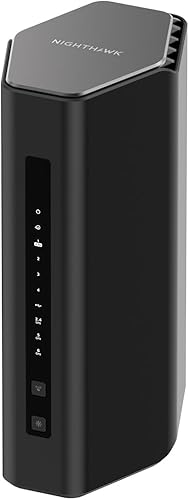
The eero 7 (3-pack) and Orbi 370 (3-pack) are mesh options with coverage claims of up to 6,000 sq ft. The standalone Nighthawk RS500 lists coverage up to 3,000 sq ft, but actual coverage depends on walls, floors and interference.
What does mesh WiFi change compared with one router?
Mesh gives you multiple access points that work as one network; a single router broadcasts from one location. That difference matters most when the signal has to travel a long way or through several barriers.
A mesh system starts with a main unit connected to your modem or gateway. Satellites placed in other areas extend the network, so a phone or laptop may connect to a closer unit as you move around.
The units still need to communicate with each other. A satellite placed too far from the main unit may receive a weak connection itself, so putting units in the right spots matters more than simply adding more.
For a fuller explanation of how the units work, read our guide to mesh WiFi coverage and setup. If you already know you need mesh, learn how to choose the number of nodes.
Does mesh WiFi replace a router?
A mesh system's main unit performs the router's WiFi role, but it doesn't usually replace the modem or gateway that connects you to your internet provider. It connects to that equipment, commonly by Ethernet.
Some provider gateways combine modem and router functions. Depending on the system, you may need to change the gateway settings or use bridge mode to avoid having two devices routing your network.
The Nighthawk RS500 is a standalone router, so it needs a separate modem or gateway. The Orbi 370 also connects to existing modem equipment, while the eero 7 supports connecting to compatible internet equipment.
For more on what stays in the setup, see whether mesh WiFi replaces your router and whether a mesh system needs a modem.
Is one router enough for your coverage needs?
One router is enough when it reaches the rooms and devices you use at the speeds you need. Check your signal in the farthest bedroom, upstairs rooms, garage and any spot where calls or streaming tend to stall.
Start by placing the router in a central, open spot rather than inside a cabinet or at one end of the home. A better location may solve a coverage problem without adding hardware.
The Nighthawk RS500 is one standalone option. NETGEAR lists coverage up to 3,000 sq ft and support for up to 120 devices, but it also notes that walls, floors and interference can reduce range.
A coverage number isn't a promise that every room will get the same speed. A smaller home with thick walls or a long, narrow layout may have more trouble than a larger open space.
If you want to improve your current router's reach first, try these ways to extend WiFi range at home. When a better location and range still leave dead spots, a mesh system may fit better.
When is mesh WiFi worth choosing?
Mesh is worth considering when a single router leaves weak spots that a better location can't fix. It can also make sense when multiple areas on different floors need consistent access.
A mesh kit spreads units through the home rather than relying on one source. The eero 7 three-pack supports plans up to 2.5 Gbps and is rated for up to 6,000 sq ft of coverage, while the Orbi 370 three-pack has the same stated coverage and plan limit.
Those figures are manufacturer claims, not a guarantee for every floor plan. Thick walls, satellite placement and interference affect how much of the rated area gets usable WiFi.
If you can run Ethernet between locations, a wired connection may help the mesh units communicate. Read what Ethernet backhaul means to see whether that option fits your home.
How should you place mesh units?
Place the main unit near your modem or gateway, then put satellites between it and the rooms with weak coverage. Each satellite needs a strong connection to the rest of the mesh, so avoid placing it in the dead spot itself.
Use the system's app or setup guidance to check the connection before settling on a location. Small moves can make a difference, especially around stairwells, walls and large appliances.
See where to place mesh WiFi units for a room-by-room approach. If a detached garage is the problem, compare ways to extend WiFi to it.
Which setup suits a small home, a large home or multiple floors?
A compact, open home often suits one router, while a large or multi-story home is more likely to benefit from mesh. Treat square footage as a starting point and let the layout guide the final choice.
A single router avoids managing several units and takes up less space. It may be the simplest fit for an apartment or small house where the router can sit near the center.
Mesh can help when bedrooms are far from the internet equipment, when the signal must cross floors, or when a thick interior wall separates key rooms. The Orbi 370 is designed as a router plus 2 satellites, and the eero 7 option here includes 3 units.
For a two-story home, consider where the stairs and main living areas sit. Our guide to mesh WiFi for a two-story house covers the placement problem in more detail.
Which option fits your devices and internet plan?
Match the system to your plan and the devices that need WiFi, then check the connection where you use them. A high maximum speed doesn't guarantee that every device will reach it.
The Nighthawk RS500 is a tri-band WiFi 7 router with speeds up to 12 Gbps across its bands and support for plans up to 2.5 Gbps through its 2.5 Gig WAN port. Its LAN connections include a second 2.5 Gig port and 3 Gigabit ports.
The Orbi 370 is a dual-band WiFi 7 mesh system with speeds up to 5 Gbps and support for plans up to 2.5 Gbps. NETGEAR says its router and satellites can support up to 70 devices.
The eero 7 three-pack supports internet plans up to 2.5 Gbps and wireless speeds up to 1.8 Gbps. Three units support 120 or more devices, according to eero.
These speed figures describe different things and aren't direct measures of the speed a particular device will get. Your internet plan, device capabilities, distance and obstacles all affect real-world results.
Mesh WiFi vs router: which should you choose?
Pick a single router if one central location can cover your home; pick mesh if distant rooms or multiple floors still have weak WiFi. The right choice follows your layout and coverage needs, not the biggest number on a box.
If a router already reaches your everyday spaces, keep the simpler setup. If it doesn't, try a better location before moving to mesh, then place satellites where they can still connect strongly to the main unit.
Explore the mesh WiFi basics guide if you want to compare system types, or use the guide to choosing mesh node count to plan a multi-unit setup.
How we scored these options
Our score weighs specs and features against what you're shopping for. These products serve different layouts, so the scores reflect how closely each fits its role in a mesh WiFi vs router decision.
The eero 7 (3-pack) scores 9 for its three-unit setup, stated coverage up to 6,000 sq ft and plan support up to 2.5 Gbps. The Orbi 370 (3-pack) scores 8.6 for similar stated coverage with a router and 2 satellites, while the Nighthawk RS500 scores 8.4 as a single router option for homes its coverage can reach.
Frequently asked questions
Is mesh WiFi better than a single router?
Mesh WiFi can provide more even coverage when rooms are far apart, split across floors or blocked by walls. A single router is often enough for a smaller, open home where one central spot reaches the places you use.
The better choice depends on your layout and existing coverage.
Does mesh WiFi replace a router?
A mesh system includes a main unit that connects to your modem or gateway and coordinates with its satellites. It can take over WiFi duties from a standalone router, but your internet service still needs a modem or gateway.
Check your provider equipment and setup instructions before connecting a new system.
Will a mesh system make my internet plan faster?
Mesh WiFi doesn't increase the speed your internet provider sends to your home. It can improve the connection in rooms where a single router's signal is weak, but actual speeds depend on your plan, devices, placement and home construction.
How many mesh nodes does a home need?
Start with the number of areas where coverage is weak and how far they are from the main unit. A router plus 1 or 2 satellites may fit a larger or multi-story home, but walls and placement change the result.
See our guide to choosing how many mesh nodes you need.
Can I use a mesh system with a wired connection?
Many mesh setups can use Ethernet between units, but support depends on the system and its setup. A wired link can help when you can run cable between locations.
Read how Ethernet backhaul works on mesh WiFi before choosing a placement or buying cable.



