How to Extend WiFi Range at Home
To extend WiFi range at home, move your router to a central, open spot, then add a mesh system or a powerline adapter if distant rooms still have weak coverage. The right fix depends on your home's layout and whether you need WiFi or a wired connection.
On this page (7 sections)
To extend WiFi range at home, place your router in a central, open spot, then add mesh WiFi for weak rooms or a powerline adapter for a device that can use Ethernet. The best choice depends on where the signal drops and whether you need broader wireless coverage or a connection for one room.
Start with placement before buying equipment. A router tucked behind a TV or inside a cabinet can have a harder time reaching the rest of the home.
How can you extend WiFi range at home?
Move the router to a central, raised, open location and check the weak rooms again. If walls, floors, or distance still limit the signal, use mesh WiFi to spread coverage or a powerline adapter to connect a device through your home's electrical wiring.
Try one change at a time so you can tell what helps. Put the router out in the open, away from large objects, and test the rooms where you need a stronger connection.
If the router's location is fixed, a mesh system can add nodes in other parts of the home. Our guide to mesh WiFi and how it works explains how a router and additional units share coverage.
What should you try before adding equipment?
Check the router's location, the affected devices, and the pattern of weak coverage first. A problem in one device may call for troubleshooting that device, while several weak rooms suggest a placement or coverage issue.
Move the router away from enclosed spaces and place it where the signal can reach more of the home. Retest the same spots after moving it, including rooms on other floors.
If only one room struggles, note what sits between that room and the router. Several walls, a floor, or a long distance can make it harder for WiFi to reach the area.
Don't expect one placement change to solve every layout. If the router can't sit near the center, an extra mesh unit may help carry coverage toward distant rooms.
Does a mesh system extend WiFi to distant rooms?
Mesh WiFi can extend coverage by placing additional units around the home. Each unit needs a useful location, so adding more nodes won't help if they sit where the signal is already poor.
Set the main router near your modem, then place another unit between it and the area with weak coverage. Check the signal in the target room and adjust the unit's position if needed.
The eero 6+ 3-pack supports internet plans up to a gigabit and coverage up to 4,500 sq. ft., according to eero's stated coverage figure. Its app guides setup, and the system is backward-compatible with previous-generation eero devices.
The stated coverage is not a promise for every home. Walls, floors, and unit placement affect how far WiFi reaches, so consider your layout when comparing coverage figures.
For placement ideas, read where to place mesh WiFi units. If you're unsure how many units your layout needs, see how many mesh nodes you need.
When does a powerline adapter make sense?
Choose a powerline adapter when you want to connect a device in a far room through your home's electrical wiring. It can suit a smart TV or game console with an Ethernet port, but it isn't a WiFi device.
The NETGEAR PLP2000 Powerline Adapter Kit sends an Ethernet connection through existing household electrical wiring. It has an extra power outlet built into each adapter and is designed for devices such as smart TVs, streaming players, and game consoles.
This option won't extend wireless coverage to phones or laptops by itself. Powerline performance can depend on the home's wiring, so check the connection where you plan to use it.
If you want WiFi throughout the house, compare powerline with mesh WiFi and a single router. For an outbuilding, see how to extend WiFi to a detached garage.
Should you choose a larger mesh system?
A larger mesh system may suit a multi-floor home or a layout with several distant rooms. Compare the coverage figure, the number of units, and the space you need to cover, then place nodes where they can connect back to the main router.
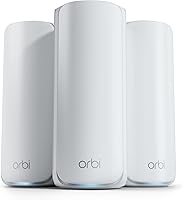
The Netgear Orbi 360 3-pack includes a router and 2 satellites. NETGEAR states coverage up to 6,000 sq. ft. and support for up to 70 devices; actual coverage may vary with layout, building materials, and satellite placement.
The Orbi 360 is a WiFi 7 system that works with WiFi 6 and WiFi 5 devices. It connects to existing cable or fiber internet equipment, and its app guides setup.
A stated coverage area is a starting point, not a guarantee for a specific home. Thick walls, long distances, and poor satellite placement can affect the result, so read how many mesh nodes you may need before choosing a kit.
How do you decide which solution fits?
Use mesh WiFi when you need wireless coverage in multiple rooms, and powerline when you mainly need an Ethernet connection for a device in one far room. First see whether a better router location solves the problem, then choose equipment for the remaining weak spots.
- Choose mesh if phones, laptops, and other wireless devices lose connection in several areas.
- Consider powerline if the main need is to connect an Ethernet device across the house.
- Compare the number of floors, walls, and rooms between the router and the target area.
- Recheck coverage after setup, and adjust unit locations if the weak spot remains.
For a mesh system, choose nodes that can reach each other instead of placing a satellite in the dead zone. For powerline, remember that the adapter carries the network over electrical wiring and does not create WiFi.
What is the simplest way to improve home WiFi?
Start by moving the router into an open, central spot. Add mesh WiFi if several rooms need better wireless coverage, or consider powerline if one wired device is far from the router.
For mesh placement help, use our guide to positioning mesh units. If your problem is a detached garage, follow the more specific advice in our garage WiFi guide.
If your router already sits in a good spot, choose based on the weak area and the devices that need a connection. A mesh setup fits broader home coverage; a powerline adapter fits a far-room Ethernet connection.
Frequently asked questions
How can I extend WiFi range at home without buying anything?
Move the router to a central, raised, open location, away from cabinets and large obstructions. Check whether the weak area improves, and make sure devices connect to the network you intend to use.
If distance, walls, or floors still block the signal, a mesh system or another connection method may be needed.
Does a WiFi extender make internet faster?
A WiFi extender can help a device connect in a weak-signal area, but it doesn't increase the speed your internet plan provides. Its connection to the router and the home's layout affect results.
Test the room after setup, and compare mesh or wired options if speed remains poor.
Is mesh WiFi better than a powerline adapter?
Mesh WiFi is usually the better fit when you want WiFi coverage across several rooms and devices. A powerline adapter sends a network connection through household electrical wiring and is useful for connecting a device in a far room.
Its performance depends on the home's wiring and setup.
Where should you place a mesh WiFi unit?
Place a mesh unit in an open spot between the router and the weak-coverage area, where it can still receive a solid connection. Avoid hiding it in a cabinet or putting it at the very edge of coverage.
Try a few locations and check the signal in the target room.