Dual-Band vs Tri-Band Mesh WiFi: Which Do You Need? (November 2026)
Pick tri-band if your home is busy or large, and dual-band if you have a modest home and a simple device list. In the dual band vs tri band mesh wifi choice, the extra radio in a tri-band system eases backhaul traffic, but it costs more and only pays off when your network is under load.
On this page (9 sections)
- What is the difference between dual-band and tri-band mesh WiFi?
- The two mesh systems side by side
- Which band class fits your internet plan?
- Which system handles more devices?
- Does your home size decide it?
- Do you need Wi-Fi 7 to get tri-band?
- Which should you buy?
- How does setup differ between the two?
- Verdict: dual-band or tri-band for your home?
Pick tri-band if your home is busy or large, and dual-band if you have a modest home and a simple device list. The dual band vs tri band mesh wifi decision comes down to how much traffic your network carries and how much you want to spend.
A tri-band mesh adds a third radio. That extra lane helps when many devices compete for bandwidth or when the units talk to each other over Wi-Fi.
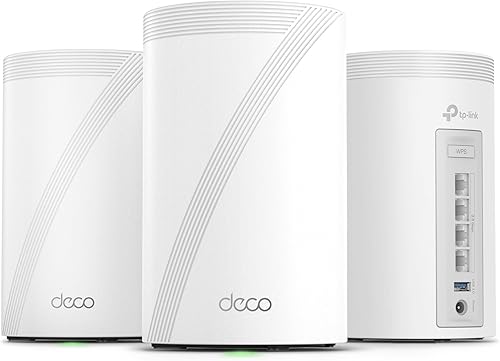
A dual-band mesh keeps costs down and still covers a typical home. The two TP-Link kits below make the trade-off concrete.
One is a Wi-Fi 6 dual-band kit at a lower price tier. The other is a tri-band Wi-Fi 7 system built for heavier loads.

What is the difference between dual-band and tri-band mesh WiFi?
Dual-band uses two radios (2.4 GHz and 5 GHz); tri-band adds a third band, usually 6 GHz on newer systems. That third radio is the core of the dual band vs tri band mesh wifi comparison.
More bands mean more separate lanes for traffic. A dual-band system splits devices and mesh backhaul across two radios.
A tri-band system can dedicate one band to backhaul or spread clients wider. The trade-off is cost and complexity, since extra radios raise the price tier.
The benefit only shows up when your network is genuinely busy. If your device list is short and your internet plan is modest, the extra band rarely earns its keep.
How each band class splits its radios
The Deco X15 runs Wi-Fi 6 on 2.4 GHz and 5 GHz. It reaches 1,201 Mbps on 5 GHz and 300 Mbps on 2.4 GHz, with dynamic backhaul across those two bands.
The Deco 7 Pro runs Wi-Fi 7 across 6 GHz, 5 GHz and 2.4 GHz. TP-Link lists up to 5,188 Mbps on 6 GHz, 4,324 Mbps on 5 GHz and 574 Mbps on 2.4 GHz.
Those numbers describe radio capacity, not the speed you'll see at a device. Walls, distance and your internet plan cap real-world results.
The gap between the two kits is not just the number of bands. It's also the width of each lane.
Wi-Fi 7 is built around wider channels on the 6 GHz band, so the tri-band kit's top radio has more room per stream than the dual-band kit offers.
The Deco 7 Pro also lists a 6-stream design on its BE10000 rating. More streams give the mesh more paths to serve several devices at once.
Why the third band matters for mesh backhaul
Mesh units talk to each other over a wireless link called backhaul. On a dual-band kit, that traffic shares the same radios your devices use.
A tri-band system can move backhaul onto its own band. The Deco 7 Pro supports simultaneous wired and wireless backhaul, balancing traffic between units for more stable coverage.
The dynamic backhaul on the Deco X15 adapts across its two bands, which keeps a modest network running smoothly. The difference appears when the link is busy: on a dual-band kit, backhaul traffic and device traffic take turns on the same radios.
If your internet plan is modest and your device count is low, this separation rarely shows. If you stream in several rooms at once or run a busy smart home, it helps.
The two mesh systems side by side
The Deco X15 wins on fit for ordinary homes and the Deco 7 Pro wins on speed, coverage and device capacity. The table shows where each one pulls ahead.
| Product | Best for | Band class | Coverage | Wi-Fi standard | Our score |
|---|---|---|---|---|---|
| TP-Link Deco 7 Pro Tri-Band WiFi 7 | busy homes | Tri-band | 7,600 sq ft | Wi-Fi 7 (BE10000) | 9.5 |
| TP-Link Deco X15 Dual-Band AX1500 WiFi 6 | smaller homes | Dual-band | 5,600 sq ft | Wi-Fi 6 (AX1500) | 9.7 |
Coverage and device load
The Deco X15 covers up to 5,600 sq ft with its three units and supports up to 120 devices. That suits a typical house with phones, laptops, a TV and a handful of smart plugs.
The Deco 7 Pro covers up to 7,600 sq ft and handles over 200 devices. A larger footprint and a longer device list are the two clearest reasons to move up.
Both figures assume the units are spread through the home. Three units packed into one room won't cover either rated area.
Ports and wired options
Each Deco X15 unit has 2 Gigabit Ethernet ports, 6 in total for the 3-pack. Wired Ethernet backhaul is supported, and any unit can act as the router.
The Deco 7 Pro adds four 2.5G WAN/LAN ports and a USB 3.0 port, plus a 10G WAN/LAN port for multi-gig internet plans. TP-Link says tri-band Wi-Fi 7 and 10G Ethernet work together to balance traffic between units.
If your broadband is above 1 Gbps, the 2.5G and 10G ports matter. If not, the Gigabit ports on the Deco X15 are enough.
The USB 3.0 port on the Deco 7 Pro gives you a place to attach a drive or another wired device. The Deco X15's wired side is purely Ethernet.
Wi-Fi standard and future-proofing
The Deco X15 is Wi-Fi 6. It's backward compatible with older Wi-Fi generations and works with any ISP, so older devices still connect.
The Deco 7 Pro is Wi-Fi 7. That standard brings the 6 GHz band and wider channels, but the fastest gains need Wi-Fi 7 devices in your home.
Both systems share TP-Link's Deco platform. They use the same app and the same AI-driven roaming approach, and both include HomeShield security.
TP-Link says its Deco products can work together to form a mesh. Neither kit needs a special ISP, and both replace your router and need a separate modem, which we cover below.
Which band class fits your internet plan?
Match the band class to your broadband speed before anything else. A tri-band system can't make a slow plan faster, and a dual-band kit can bottleneck a very fast one.
The Deco X15's Gigabit ports cap wired connections near 1 Gbps. That's fine for common cable and fiber plans in the hundreds of megabits.
The Deco 7 Pro's 2.5G and 10G ports suit multi-gig plans. If you pay for speeds above 1 Gbps, the dual-band kit's ports will hold you back.
Note that the port is only one link in the chain. Your modem and the devices on the wired end need to keep up too, so a 2.5G port helps most when the rest of the path matches it.
Check your plan's actual speed, not the marketing tier. Then decide whether the ports or the radios are your real limit.
Which system handles more devices?
The tri-band kit handles more devices and spreads them across three radios. That matters in homes with many phones, laptops, cameras, TVs and smart-home gear.
The Deco X15 supports up to 120 devices. That's comfortable for most families and a modest smart-home setup.
The Deco 7 Pro supports over 200 devices. A home full of smart bulbs, cameras, tablets and streaming boxes fits its ceiling better.
Device count isn't just about the number. Devices that stream or game push more data, and the third band gives that traffic more room.
TP-Link rates both kits with AI-driven roaming and a dynamic mesh. On the tri-band kit, backhaul has an extra band to move into, which is why it can hold a longer device list without slowing everyone down.
Does your home size decide it?
Home size is the simplest tiebreaker: the tri-band kit covers more square feet. The Deco X15 covers up to 5,600 sq ft, while the Deco 7 Pro covers up to 7,600 sq ft.
Square footage is a rough guide. Walls, floors and the shape of your home change how far each unit reaches.
A long, narrow home may need more units than its total area suggests. A compact home with thick walls can also need careful placement.
Place units centrally and avoid stacking them in corners. If you want the extra band, our look at the WiFi 7 mesh system options helps you compare kits with the same approach.
Do you need Wi-Fi 7 to get tri-band?
No, but the tri-band kit here is Wi-Fi 7, so the two features often arrive together. Wi-Fi 7 is what makes the 6 GHz band part of the standard on this model.
Wi-Fi 6E mesh systems also use a 6 GHz band without Wi-Fi 7. The band, not the standard, is the core of the tri-band advantage.
Wi-Fi 7 adds wider channels and other speed features on top. Those gains need Wi-Fi 7 devices to show up fully.
If your phones and laptops are older, a Wi-Fi 6 dual-band kit may serve them just as well. Our guide on whether you need a WiFi 7 router walks through the device question.
Which should you buy?
Buy the Deco X15 dual-band kit for most homes; buy the Deco 7 Pro tri-band kit for large or busy homes. Our score weighs specs, features and buyer feedback against what you're shopping for.
The Deco X15 earns a 9.7 for everyday homes. Its dual-band Wi-Fi 6 design, 5,600 sq ft coverage and 120-device ceiling cover the common case.
The Deco 7 Pro earns a 9.5 for heavy loads. Its tri-band Wi-Fi 7 radios, 7,600 sq ft coverage and 200-plus device capacity fit big homes and crowded networks.
Choose the dual-band kit if
Your home sits under roughly 5,600 sq ft and your device list stays moderate. You want Wi-Fi 6 and wired backhaul without paying for a third radio.
You also don't need multi-gig ports. The six Gigabit ports across the 3-pack handle ordinary wired connections and Ethernet backhaul.
This kit also fits renters and people who move often. The app-based setup makes it easy to reset and rebuild a network in a new place.
Choose the tri-band kit if
Your home is large or packed with devices. You want the 6 GHz band for backhaul and client traffic, plus 2.5G and 10G ports for a fast internet plan.
You'll also benefit if you plan to add Wi-Fi 7 devices. The extra band and the newer standard give you more room to grow.
A home office with heavy uploads or a household that runs several 4K streams at once is another good fit. The third band keeps that traffic from competing with the mesh link.
How does setup differ between the two?
Both kits set up through the Deco app, and both need a separate modem. Neither one replaces your modem, only your router.
The Deco X15 includes 3 units, 3 power adapters, 1 RJ45 Ethernet cable and a quick install guide. The Deco 7 Pro kit ships the same essentials with its 3 Deco BE63 units.
Both work with any internet service provider. Most ISPs require a modem, so plan for one in either case.
If you're unsure how the modem fits, our explainer on whether mesh WiFi systems need a modem covers the connection order.
Setup differences come down to features, not the basic steps. The Deco app handles a unified network name, and both kits support voice control through Alexa and Google Assistant.
The Deco 7 Pro adds VPN client and server support. That lets home devices reach a remote VPN without installing software on each one, and it can run a VPN connection alongside normal internet use.
HomeShield appears on both kits. The free tier covers basic network security, IoT device identification, basic parental controls, QoS and weekly or monthly reports.
Wired or wireless placement
Wired backhaul gives the most stable mesh link, and both kits support it. The Deco 7 Pro also supports simultaneous wired and wireless backhaul for balancing traffic.
Wireless placement is simpler. Put each unit within good range of the next and away from thick walls and metal.
If you're weighing cable runs, our guide on whether mesh WiFi needs to be wired explains when a cable is worth the effort.
Verdict: dual-band or tri-band for your home?
For most homes, the dual-band Deco X15 is the better buy; go tri-band with the Deco 7 Pro when your home is large or crowded. That's the short version of the dual band vs tri band mesh wifi call.
The dual-band kit wins on fit. It covers up to 5,600 sq ft and supports 120 devices, with wired backhaul and six Gigabit ports.
The tri-band kit wins on headroom. It covers up to 7,600 sq ft, handles over 200 devices and adds the 6 GHz band plus 2.5G and 10G ports.
Pick by your home size and device list first, then by your internet speed. If both are modest, the dual-band kit is the practical choice.
If either is heavy, the tri-band kit earns its extra cost.
Frequently asked questions
Is tri-band always better than dual-band mesh WiFi?
No. Tri-band adds a third radio, which helps when many devices or a large home put pressure on the network.
A dual-band mesh is cheaper and plenty for a modest home with a normal device count.
What does the third band actually do in a tri-band mesh?
It gives the mesh an extra radio to move traffic between units or to serve devices. The Deco 7 Pro runs 6 GHz, 5 GHz and 2.4 GHz bands, so backhaul and client traffic can spread across more lanes.
Will a dual-band mesh handle a whole house?
Often, yes. The Deco X15 covers up to 5,600 sq ft with three units and supports up to 120 devices.
A very large home or a heavy smart-home setup may still want the extra band.
Do both mesh systems need a modem?
Yes. Both the Deco X15 and the Deco 7 Pro work with any internet service provider and need a separate modem for most ISPs.
The mesh replaces your router, not the modem.