Do You Need a WiFi 7 Router Yet?
You probably don't need a WiFi 7 router yet if your current WiFi meets your needs and your devices don't support WiFi 7. Consider upgrading when you have compatible devices, a fast internet plan, or a clear coverage problem your current setup can't solve.
On this page (7 sections)
You probably don't need a WiFi 7 router yet if your current WiFi works well and your devices don't support WiFi 7. An upgrade is easier to justify when you have compatible devices, a fast internet plan, or a specific network limitation that a new router can address.
WiFi 7 brings features such as multi-link operation, but buying a new router won't make every device use them. Your internet plan and the devices connecting to the network also shape what you can gain.
When do you need a WiFi 7 router?
You may need a WiFi 7 router when compatible devices and your internet plan can make use of its features, or when replacing an older router solves a problem you already have. If your current setup meets your needs, there is no need to upgrade just because WiFi 7 exists.
Check your most demanding devices first. A router's WiFi 7 features only help a device that can use them, and you may still have many older phones, computers, TVs, and smart home devices on the network.
Then consider your internet plan and connection. A router with multi-gig ports may suit a multi-gig plan, but it can't deliver a faster internet connection than your provider supplies.
If your main frustration is a weak signal in a far room, a newer single router may not be the answer. Learn how mesh WiFi compares with a single router before choosing a replacement.
What should you check before upgrading?
Check your devices, internet plan, and coverage problem before buying. These details help you tell whether WiFi 7 solves a real limit or simply adds a newer label to your setup.
Do your devices support WiFi 7?
WiFi 7 matters most when you have devices that support it and use them for work, streaming, gaming, or other demanding tasks. Check the wireless capabilities for the specific phones, computers, or other devices you care about.
A WiFi 7 router remains backward compatible with older WiFi devices, but those devices won't gain WiFi 7 features from the router. If you're upgrading just for one newer device, consider whether its current connection is actually limiting you.
Is your internet plan fast enough to benefit?
A faster router can't raise the speed of your internet plan. It may still help with local traffic between devices or with a wireless link, but those are different from getting a faster connection from your provider.
If you pay for a multi-gig plan, check whether the router has a WAN port that can accept it. The Netgear Nighthawk BE9300 has a 2.5 Gig WAN port, while the ASUS RT-BE82U includes five 2.5GbE ports.
The Nighthawk is a standalone router, so it pairs with an existing modem or gateway over Ethernet. Some modem-router combos may need bridge mode.
Is the problem speed or coverage?
Slow speeds in every room can point to an internet plan, modem, router, or device limit. Weak WiFi in one distant room points more toward coverage, placement, walls, or interference.
A single WiFi 7 router may not fix a signal that struggles to reach multiple floors or rooms behind thick walls. See how many mesh nodes you may need if your problem is coverage across the home.
What does WiFi 7 change for a home network?
WiFi 7 adds features such as multi-link operation (MLO), which lets a compatible device connect across multiple bands at the same time. To use that feature, both the router and the client device need to support it.
Router designs vary. The eero 7 is a dual-band mesh router with MLO, while the Nighthawk BE9300 is a tri-band standalone router with a 6 GHz band.
The ASUS RT-BE82U is a dual-band router with AiMesh support and MLO.
Those differences don't make one type right for every home. A mesh system can address coverage across rooms, while a standalone router can suit a home where one central unit reaches the areas you use.
For a closer look at mesh options with the newer standard, see our guide to WiFi 7 mesh systems.
Which WiFi 7 router fits a single-router home?
A WiFi 7 router can suit a single-router home when you want newer wireless features in one central unit and its connection options fit your internet service and wired devices. Choose based on your setup, not the WiFi generation alone.
Who should consider the eero 7 (1-pack)?
Consider the eero 7 if you want a single eero to replace your current router, or you want to add it to an existing eero network. It supports internet plans up to 2.5 Gbps, has two auto-sensing 2.5 GbE ports, and covers up to 2,000 sq. ft. according to eero.
Its dual-band design and 1-pack format make it a possible fit for a central location where one unit can reach the rooms you use. For a larger or multi-story home, check whether one router can cover your layout before you buy.
Who should consider the Netgear Nighthawk BE9300?
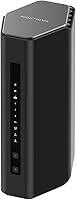
Consider the Nighthawk BE9300 if you want a standalone tri-band router with a dedicated 6 GHz band and a 2.5 Gig WAN port. NETGEAR gives it coverage up to 2,500 sq. ft. for up to 100 devices, though walls, floors, and interference can reduce range.
It connects to a modem or gateway over Ethernet and works with most cable, fiber, DSL, and satellite providers. Some gateway and modem-router combos may need bridge mode.
Who should consider the ASUS RT-BE82U?
Consider the ASUS RT-BE82U if you want five 2.5GbE ports and the option to extend an ASUS network with AiMesh-compatible routers. ASUS describes it as a dual-band WiFi 7 router with MLO and AiProtection Pro.
This router may suit someone who values wired connections or expects to build out an AiMesh network. Check your preferred devices and setup needs before choosing a dual-band router over a tri-band option.
Should you upgrade from WiFi 6 or WiFi 6E?
Keep your WiFi 6 or WiFi 6E router if it already meets your needs. A newer generation is a reason to compare options, not a reason by itself to replace working equipment.
Look for a clear need: compatible WiFi 7 devices, a multi-gig internet plan, or features that your current router lacks. If you're choosing between an older eero and its newer model, our eero 7 vs eero 6+ comparison covers the upgrade question.
If the router is only a few years old and you have no speed or coverage complaints, waiting can be a sensible choice. You can reconsider when you replace devices or change your internet plan.
When is WiFi 7 not worth it yet?
WiFi 7 may not be worth buying yet if you have no compatible devices, a slower plan, and no problem with your current WiFi. In that case, you may pay for features that won't change your everyday connection.
It may also be the wrong fix for dead spots. A new router in the same location may still struggle to reach a distant room, especially across floors or walls.
Start by identifying the issue and checking your current router's placement. Our guide to placing mesh WiFi units explains how location affects coverage when you use a mesh setup.
How do you decide if you need a WiFi 7 router?
For the question “do I need a WiFi 7 router?”, use this rule: upgrade when compatible devices or a fast plan can use the features, or when a replacement addresses a known network limit. Keep your current router if it works well and your devices won't benefit yet.
Consider the eero 7 for a single eero unit that can replace or extend an eero network. Consider the Nighthawk BE9300 for a tri-band standalone router with a 2.5 Gig WAN port, or the ASUS RT-BE82U for five 2.5GbE ports and AiMesh support.
If coverage is the main issue, compare mesh with a single router before you shop. A WiFi 7 label can't guarantee a signal reaches every room.
Frequently asked questions
Do I need a WiFi 7 router for a WiFi 7 phone?
No, a WiFi 7 phone can still connect to an older router, but it won't get WiFi 7 features over that connection. A WiFi 7 router makes sense when you have compatible devices and want to use newer features such as multi-link operation, provided the devices support them too.
Is WiFi 7 worth it with a 1 Gbps internet plan?
It can be, but the plan speed alone doesn't make WiFi 7 necessary. The upgrade may help if you have compatible devices, many simultaneous demands, or want a router with multi-gig wired ports.
If your current network already meets your needs, waiting is reasonable.
Will a WiFi 7 router make my internet faster?
Not by itself. Your internet plan, modem or gateway, router, device, distance, walls, and interference all affect speed.
A new router may improve the wireless connection in some situations, but it cannot raise the speed your internet provider delivers.
Should I replace my router or add mesh WiFi?
Replace a router when you want newer features or your current router is the main limit. Consider mesh when the main issue is weak coverage across rooms or floors, since extra mesh units can extend the network.
First identify whether the problem is speed, coverage, or the internet connection.