Does Mesh WiFi Work With Xfinity?
Yes, mesh wifi works with Xfinity. You plug the mesh router into your Xfinity gateway or modem with an Ethernet cable, then turn off the gateway's own wifi so the mesh system handles your network.
On this page (9 sections)
- Does mesh wifi work with Xfinity internet?
- How do you connect a mesh wifi system to an Xfinity gateway?
- Should you put the Xfinity gateway in bridge mode?
- What do you do if bridge mode is not available?
- Does mesh wifi slow down an Xfinity plan?
- Which mesh wifi system fits an Xfinity home best?
- Do you still need an Xfinity gateway or modem with mesh?
- Where should you place mesh nodes in an Xfinity home?
- Which setup should you choose for Xfinity?
Yes, mesh wifi works with Xfinity. You connect a mesh router to your Xfinity gateway or modem with an Ethernet cable, and the mesh system takes over wifi for your home.
The two boxes talk to each other without any special Xfinity plan or add-on.
The main thing to get right is turning off the gateway's built-in wifi so it doesn't compete with the mesh. Once that's done, your phones and laptops see one network name and move between mesh nodes as you walk around the house.
This guide covers the hookup, the settings to change, and which mesh hardware fits an Xfinity setup best.
Does mesh wifi work with Xfinity internet?
Yes. A mesh wifi system connects to any Xfinity internet plan the same way a standalone router does.
Xfinity sells its own gateways, but the service itself is a standard cable connection, so third-party routers and mesh kits work on it.
The mesh router becomes the device that broadcasts wifi. The Xfinity gateway or modem just passes the internet connection through to it.
You set up the mesh in its own app, create your network name and password, and manage everything from there instead of the Xfinity app.
Xfinity also supports its own mesh hardware, the xFi Pods, if you'd rather stay inside the Xfinity ecosystem. If that sounds easier, our guide to whether Spectrum offers a mesh wifi system covers how provider-branded mesh compares to buying your own kit.
How do you connect a mesh wifi system to an Xfinity gateway?
Connect the main mesh node to the Xfinity gateway with an Ethernet cable. Then use the mesh app to finish setup.
The order matters less than the cabling and the settings, so take these steps in sequence.
- Plug the main mesh node into power and into a LAN port on the Xfinity gateway with the cable in the box.
- Open the mesh app and follow its setup prompts to create your network name and password.
- Put the Xfinity gateway in bridge mode so it stops routing and stops broadcasting its own wifi.
- Place the extra mesh nodes around the house and let the app add them.
- Test wifi in the rooms that used to drop and move a node if one area is still weak.
If your Xfinity gateway won't go into bridge mode, the next section covers the alternative. Either way, keep the gateway plugged into the coax and powered on, because it's still your internet source.
Should you put the Xfinity gateway in bridge mode?
Yes, bridge mode is the cleanest setup for most homes. It turns the gateway into a plain modem, so the mesh router handles routing, wifi and the network address translation.
You avoid two routers fighting over the same job.
Running both routers active is the double NAT setup. It usually still works, but it can cause trouble with port forwarding, some smart home devices and game consoles.
A single router is simpler to manage and easier to troubleshoot.
Bridge mode is set in the Xfinity app or the gateway's admin page. The exact menu name varies by gateway model, so look for bridge mode or modem mode in the gateway settings.
Once it's on, the gateway's own wifi network disappears and only the mesh network remains.
What do you do if bridge mode is not available?
If your Xfinity gateway can't be bridged, leave it in router mode and connect the mesh router in access point mode. The mesh system then handles wifi only while the gateway keeps routing.
You still get mesh coverage and roaming.
Access point mode also works when you'd rather keep the Xfinity gateway's wifi as a backup. In that case, give the gateway network and the mesh network different names so your devices don't flip between them.
Either way, the goal is one wifi network doing the heavy lifting. Two networks covering the same rooms cause dropped connections as devices jump back and forth.
Does mesh wifi slow down an Xfinity plan?
Not if the mesh system's ports and wifi match your plan's speed. A mesh kit rated below your Xfinity tier becomes the bottleneck.
The connection between the gateway and the main node is the first place speed gets capped.
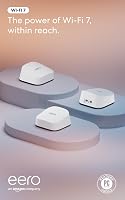
The eero 7 kit handles internet plans up to 2.5 Gbps with its two auto-sensing 2.5 GbE ports. That covers most Xfinity tiers without clipping the connection at the router.
Its three units cover up to 6,000 sq. ft. and support 120+ devices.
Wifi speed also depends on how the nodes talk to each other. Wired Ethernet between nodes keeps more of your plan's speed than a wireless link, so run a cable to a node in a far room if you can.
Which mesh wifi system fits an Xfinity home best?
The eero 7 3-pack is the best fit for most Xfinity homes. Its 2.5 GbE ports keep pace with fast plans, and three nodes cover a typical two-story house.
Its Wi-Fi 7 hardware also leaves room to grow when you upgrade your Xfinity tier.
Best overall for Xfinity: eero 7 (3-pack)
The eero 7 3-pack covers up to 6,000 sq. ft. with three units. It supports internet plans up to 2.5 Gbps and wireless speeds up to 1.8 Gbps.
Setup runs through the eero app, and TrueMesh software keeps devices on the best node as you move around.
Its backward compatibility means you can add older eero units or an eero Outdoor 7 later without replacing the kit. A three-year warranty backs the hardware.
If your gateway is in a closet or corner, the mesh nodes do the work of spreading wifi from there.
Best value for gigabit plans: TP-Link Deco X55
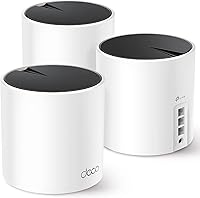
The Deco X55 3-pack covers up to 6,500 sq. ft. and connects up to 150 devices. Its three units each have three Gigabit Ethernet ports, and the system supports wired Ethernet backhaul for better speeds between nodes.
TP-Link says it works with Xfinity and other cable providers, with a modem required.
Each port is Gigabit, so the Deco X55 suits Xfinity plans up to about 1 Gbps. If you're on a faster tier, the eero 7's 2.5 GbE ports give you more headroom.
Best for backyard coverage: eero Outdoor 7
The eero Outdoor 7 adds mesh wifi outside the house. One unit covers up to 15,000 sq. ft. outdoors, a 70 foot radius, and connects 100+ devices.
It's rated IP66 for dust, rain and snow and tested to run between -40°F and 131°F.
It's backward compatible with earlier eero generations, so it slots into an eero 7 network. It runs on AC power or PoE+, which makes mounting easier if you already have an Ethernet run outside.
Pick it only if outdoor coverage matters; for indoor-only homes the three eero 7 nodes are enough.
If your internet comes from a dish instead of cable, our roundup of the best mesh wifi for Starlink covers that hookup. Fiber homes should see the best mesh wifi system for fiber instead.
Do you still need an Xfinity gateway or modem with mesh?
Yes, you need a modem to translate the cable signal. A mesh router can't do that job on its own.
You either keep the Xfinity gateway and put it in bridge mode, or buy a standalone cable modem and connect the mesh router to that.
The second option often costs less over time because you stop paying the gateway rental fee. Check that the modem is approved for Xfinity and rated for your plan's speed before you buy.
If you're unsure how the modem and mesh router fit together, our explainer on whether mesh wifi systems need a modem walks through the chain from wall to node.
Where should you place mesh nodes in an Xfinity home?
Put the main node near the gateway and space the others one or two rooms apart. The nodes should be close enough to stay linked and far enough to spread coverage.
Avoid closets, metal cabinets and spots behind the TV.
Place nodes off the floor and away from microwaves and cordless phone bases. In a two-story home, put one node upstairs and keep the main node central on the ground floor if the gateway allows it.
Add a node only where wifi still drops. Too many nodes in a small area can slow the network as they hand devices back and forth.
Which setup should you choose for Xfinity?
For most homes, the eero 7 3-pack is the pick, with the Xfinity gateway in bridge mode and nodes spread across the floors. It handles fast plans without capping speed and gives you room to add outdoor coverage later.
Choose the Deco X55 if your Xfinity plan sits around a gigabit and you want three Ethernet ports on each unit. Add the eero Outdoor 7 only if you need wifi in the yard.
Whichever kit you choose, bridge mode and sensible node placement are what make mesh wifi work well with Xfinity.
Frequently asked questions
Can I use my own mesh wifi router with Xfinity internet?
Yes. Xfinity lets you use your own router, including a mesh system, in place of or alongside its gateway.
You connect the mesh router to the modem with Ethernet and manage wifi from the mesh app instead of the Xfinity app.
Does mesh wifi work with the Xfinity xFi gateway?
Yes. The xFi gateway has Ethernet ports you can use to connect a mesh router.
Put the gateway in bridge mode so it only handles the internet connection and let the mesh system run wifi and routing.
Will a mesh system slow down my Xfinity plan?
A mesh system only limits speed if its ports or wifi are slower than your plan. Match the router to your tier, and use wired Ethernet between the gateway and the main mesh node when you can.
How many mesh nodes do I need for an Xfinity setup?
Start with a two or three node kit for most homes and add nodes only where wifi still drops. Extra nodes too close together can hurt performance more than they help.