Can I Use a Mesh Router With Spectrum?
Yes, you can use a mesh router with Spectrum. Put your Spectrum modem in bridge mode or plug the mesh router into it and turn off the Spectrum router's Wi-Fi, then set up the mesh system in its app.
On this page (9 sections)
- Can you use a mesh router with Spectrum internet?
- How do you connect a mesh router to a Spectrum modem?
- Should you put the Spectrum modem in bridge mode?
- What is double NAT and why does it matter for mesh Wi-Fi?
- Does mesh Wi-Fi replace your Spectrum router?
- Which mesh system fits your Spectrum plan?
- What should you do with the Spectrum router you replace?
- How do you set up mesh Wi-Fi with Spectrum step by step?
- What matters most when you mesh with Spectrum?
Yes, you can use a mesh router with Spectrum. Your Spectrum modem handles the connection, and the mesh system takes over the Wi-Fi, so you're not tied to the router Spectrum supplies.
The main job is getting the two boxes to talk to each other cleanly.
This guide covers the hookup order, the settings that avoid double NAT, and which mesh features matter when your ISP is Spectrum. It ends with three systems that fit common Spectrum plans.
Can you use a mesh router with Spectrum internet?
Yes. Spectrum lets you use your own router, and the mesh system replaces the Wi-Fi from the router Spectrum rents you.
You still need a modem, either the Spectrum one or a compatible model you own.
Spectrum service works with any standards-based router, including mesh kits. The company doesn't lock the Wi-Fi to its own hardware.
A typical setup is a coaxial or fiber line into the modem, an Ethernet cable from the modem to the mesh router, and the extra mesh units placed around the house.
The catch is configuration, not compatibility. If you leave the Spectrum router running alongside the mesh system, you end up with two Wi-Fi networks and possible address conflicts.
The next sections explain how to avoid that.
How do you connect a mesh router to a Spectrum modem?
Power down the modem, connect the mesh router's WAN port to the modem's LAN port, then power both back up in order. The mesh app then walks you through naming the network and placing the satellites.
- Unplug the Spectrum modem and any Spectrum router from power.
- Run an Ethernet cable from the modem's LAN port to the main mesh unit's WAN port.
- Plug in the modem first and wait for its online lights to settle.
- Plug in the main mesh unit and open its app to finish setup.
- Place the extra units within range of the main one and confirm each connects.
If your modem has a single Ethernet port, use that one for the mesh router. Leave the mesh satellites wireless unless your house has Ethernet jacks you can use for wired backhaul.
Should you put the Spectrum modem in bridge mode?
Yes, bridge mode is the cleanest option when you use your own router. It turns off the modem's routing and Wi-Fi so the mesh system handles addresses and wireless for the whole house.
Some Spectrum gateways combine modem and router in one box. In that case, bridge mode disables the built-in router so only the mesh system broadcasts Wi-Fi.
The mesh router then gets a public address directly and avoids double NAT.
If bridge mode isn't available on your equipment, call Spectrum and ask them to set it. A support agent can usually switch it remotely.
Once it's done, restart the modem and the mesh router so they pick up the change.
What is double NAT and why does it matter for mesh Wi-Fi?
Double NAT happens when two routers both hand out addresses, and it can break video calls, game consoles, and some smart home devices. It's the most common problem when a Spectrum router and a mesh system run at once.
The symptom is subtle: the internet works, but certain apps fail or show strict NAT types. Some devices can't reach each other on the local network either.
Streaming usually survives, but online gaming and remote access often don't.
The fix is to have one router, not two. Either bridge the Spectrum gateway or put the mesh system in access point mode so it extends the Spectrum network instead of routing.
Bridge mode is better when you want the mesh system's full features, like parental controls and device management.
Does mesh Wi-Fi replace your Spectrum router?
Mesh Wi-Fi replaces the router function, not the modem. The mesh system becomes your router and your Wi-Fi, while the Spectrum modem stays in place to bring the connection into the house.
For a deeper look at what changes and what stays, see does mesh wifi replace router. The short version: you keep paying Spectrum for internet, return or store the rented router, and manage the network through the mesh app instead.
If you'd rather buy a mesh kit from Spectrum itself, our guide to whether Spectrum offers a mesh wifi system covers that route and how it compares to buying your own.
Which mesh system fits your Spectrum plan?
Match the mesh system to your Spectrum speed tier and your square footage. A system rated for 2.5 Gbps keeps up with fast plans, while an older dual-band kit suits standard tiers.
Here are three systems that work well on Spectrum service. Our score weighs specs, features and how each fits a Spectrum hookup.
Best for Spectrum plans up to 1 Gbps
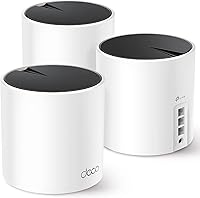
The TP-Link Deco X55 AX3000 covers up to 6,500 sq. ft. with three units and connects up to 150 devices. It's rated for internet service up to 1 Gbps and includes three Gigabit ports per unit for wired backhaul.
Our score is 9.6, the top pick here.
Its Wi-Fi 6 speeds reach 2402 Mbps on the 5 GHz band and 574 Mbps on 2.4 GHz. The Deco app handles setup and management, and the system works with all major internet service providers.
Each unit can act as a router or a satellite.
Best for fast Spectrum plans and WiFi 7
The eero 7 2-pack supports internet plans up to 2.5 Gbps and covers up to 4,000 sq. ft. Its two auto-sensing 2.5 GbE ports and Wi-Fi 7 features like multi-link operation make it a fit for Spectrum's faster tiers.
Our score is 8.9.
It supports 120+ devices and is backward compatible with earlier eero hardware. The optional eero Plus subscription adds security and parental controls.
A three-year warranty backs the hardware.
Best for large homes on a mid-range plan
The ASUS ZenWiFi BD4 3-pack covers up to 6,500 sq. ft. with dual-band Wi-Fi 7 speeds up to 3600 Mbps. Its dual 2.5G Ethernet ports and AiMesh technology suit big or multi-floor homes.
Our score is 7.5.
Four internal antennas and four high-power front-end modules help cut dead zones. AiProtection Pro adds security without a subscription.
The kit also supports Ethernet backhaul for thick walls.
What should you do with the Spectrum router you replace?
Return rented Spectrum equipment once the mesh system is running well. Keeping it costs a monthly fee you no longer need, and storing it risks a lost-equipment charge later.
Test the mesh network for a week before returning anything. Check the rooms where you work, stream and game.
If the coverage holds, take the router to a Spectrum store or follow the return instructions on your bill.
Keep the modem unless you've bought your own compatible model. If you later switch to a fiber provider, our guide to the best mesh wifi system for fiber covers what changes.
Starlink users can compare options in our mesh wifi for starlink roundup.
How do you set up mesh Wi-Fi with Spectrum step by step?
Bridge the modem, connect the main unit, run the app, then place the satellites. The order matters less than having one router and one Wi-Fi network at the end.
Start by deciding whether to bridge the Spectrum gateway or run the mesh in access point mode. Bridge mode gives you the mesh system's full routing features.
Access point mode is simpler when you want to keep the Spectrum router in charge.
Then follow the app's placement prompts. Put the main unit near the modem and central to the house.
Place satellites about halfway between the main unit and the weak spots, not in the far corner.
Finish by testing speed in several rooms and checking that devices roam between units. If a satellite shows a weak link, move it closer to the main unit.
What matters most when you mesh with Spectrum?
One router, one Wi-Fi network, and hardware rated for your speed tier. That combination gives you the coverage of a mesh system without the double NAT problems that trip up mixed setups.
For most Spectrum homes, bridge the modem and let the mesh system run the network. Pick a kit rated for your plan, then return the rented router once coverage checks out.
If you're unsure where to start, the Deco X55 suits gigabit plans, the eero 7 handles faster tiers, and the ZenWiFi BD4 covers large layouts.
Test before you return anything, and keep the modem in place. A clean hookup plus the right speed rating is what makes a mesh router work well with Spectrum.
Frequently asked questions
Does Spectrum charge a fee to use your own router?
Spectrum doesn't charge extra to use your own router, though the monthly equipment fee for its Wi-Fi router may drop off once you return it. Check your bill after swapping so you're not paying for hardware you no longer use.
Can I keep my Spectrum router and add a mesh system?
Yes, but it's cleaner to avoid running two Wi-Fi networks. Either put the Spectrum router in bridge mode or plug the mesh router into the modem and turn off the Spectrum router's Wi-Fi so only the mesh system broadcasts.
How many mesh units do I need for a Spectrum plan?
Two units cover most homes up to about 4,000 sq. ft., and three suit larger or multi-floor layouts. The right count depends on square footage and wall density more than on your Spectrum speed tier.
Do I need a new modem to use a mesh router with Spectrum?
No, a compatible Spectrum modem is enough. If your modem is old or only has one Ethernet port, ask Spectrum about a newer model before you add the mesh router, so the router's WAN port has a clean connection.
Will a mesh router slow down my Spectrum internet?
A mesh router rated above your plan's speed won't cap it. Match the router's WAN and Wi-Fi ratings to your tier; a system rated for 2.5 Gbps keeps up with fast plans, while an older unit may bottleneck a gigabit connection.