9 Best WiFi Mesh Systems With Wired Backhaul (November 2026)
The best wifi mesh systems with wired backhaul include the TP-Link Deco XE75 AXE5400 Tri-Band WiFi 6E for most homes, the TP-Link Deco X15 Dual-Band AX1500 WiFi 6 (best budget wired backhaul), and the TP-Link Deco 7 Dual-Band BE5000 WiFi 7 for a 2.5G wired link.
On this page (4 sections)
The best WiFi mesh system with wired backhaul for most homes is the TP-Link Deco XE75 AXE5400, a tri-band 2-pack whose 6 GHz band handles node traffic by default. If you want a low-cost WiFi 6 route to use cable you already have, the Deco X15 does it for less.
For multi-gig fiber and a large floor plan, the Deco 7 Pro Tri-Band WiFi 7 is the stronger fit.
Ethernet backhaul changes what a mesh can do. Instead of sharing the air between your laptop and the link to the next node, each wired node sends traffic down a cable.
That leaves the WiFi bands for phones, TVs and consoles, and speeds stop falling off at the far end of the house.
The picks below all support a wired link between units. They differ in how many ports each node offers, how fast those ports run, and whether a third radio covers homes where a cable is not practical.
Our guide to what Ethernet backhaul is covers the basics if the term is new to you.
Our picks at a glance
-
1

-
2
 Best budget wired backhaul
TP-Link Deco X15 Dual-Band AX1500 WiFi 6
9.7/10 our score
See it on Amazon -
3

- 4
 Check it
TP-Link Deco 7 Pro Tri-Band WiFi 7
Best for large homes and multi-gig - 5
 Best for a dedicated wireless backhaul bandCheck it
- 6
 Best for simple setupCheck it
- 7
 Check it
Tenda Nova Mesh WiFi System MW6
Best for a first mesh network - 8
 Best for very large homesCheck it
- 9
 Check it
DBIT AX1800 WiFi 6 Mesh System
Best for wired runs on a tight budget
The best mesh systems for Ethernet backhaul, by home and budget
The top pick suits most people, while each system below is the best answer for a named need: the lowest cost, the fastest port, the widest coverage or the simplest setup. Sort your priorities before you compare speeds.
TP-Link Deco XE75 AXE5400 Tri-Band WiFi 6E: Best for most homes
- Tri-band WiFi 6E
- Dedicated 6 GHz backhaul by default
- Up to 5,500 sq ft with 2-pack
- Gigabit Ethernet ports
A tri-band 2-pack whose 6 GHz band works as backhaul by default, so a wired link and the third radio keep node traffic away from your devices.
Pros
- 6 GHz band used as backhaul by default
- Tri-band speed up to 5,400 Mbps
- AI-driven mesh with roaming
Cons
- Six GHz benefits need WiFi 6E clients
- 2-pack covers less area than the largest 3-packs here
This is the pick we would make for a typical two or three bedroom house with cable already run to a couple of rooms. The 2-pack covers up to 5,500 sq ft, and its tri-band design means the 6 GHz band can carry the node link while the 5 GHz and 2.4 GHz bands serve your devices.
Plug a cable into a node and the system switches that link to Ethernet. The third radio then stops spending its time repeating data between units.
Speeds up to 5,400 Mbps across the three bands leave room for about 200 connected devices. Each unit also has Gigabit Ethernet ports for the cable side of the setup.
The 6 GHz band only helps WiFi 6E devices. Older laptops and phones still connect on 5 GHz and 2.4 GHz.
That is a real limit if most of your gear predates WiFi 6E. Some 3-packs here cover more ground than this 2-pack, so a very large house may want more nodes.
The Deco app handles setup and the AI-driven mesh keeps one network name as you move around. HomeShield adds a free security scan, basic parental controls and QoS.
Pick it when you want a balanced tri-band system and your home is not huge. Our roundup of the best WiFi 7 mesh systems is the next step if you plan to buy WiFi 7 gear.
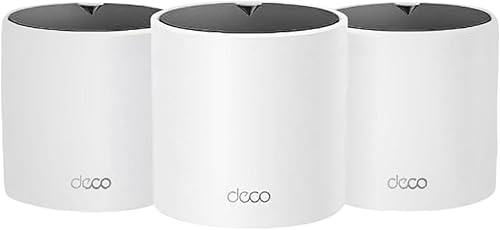
TP-Link Deco X15 Dual-Band AX1500 WiFi 6: Best budget wired backhaul
- WiFi 6 dual-band AX1500
- Supports wired Ethernet backhaul
- 6 Gigabit ports in the 3-pack
- Up to 5,600 sq ft
A cheap 3-pack that still supports Ethernet backhaul and puts 6 Gigabit ports in the box, a good fit when your runs are already installed.
Pros
- Low-cost way to get Ethernet backhaul
- Two Gigabit ports on each unit
- Covers 5,600 sq ft in a 3-pack
Cons
- Dual-band only
- AX1500 speeds are modest for heavy households
This is the system to choose when the cable runs already exist and the budget is the hard limit. It supports wired Ethernet backhaul and each of the three units has 2 Gigabit ports, so 6 ports in total are ready for consoles, TVs or a desktop.
Coverage reaches 5,600 sq ft, and the dual-band AX1500 radio supports up to 120 devices. The AI-driven mesh keeps one network name and moves your phone to the closest node as you walk through the house.
Two radios share the load: 1,201 Mbps on 5 GHz and 300 Mbps on 2.4 GHz.
The trade-off is speed. AX1500 is modest next to the WiFi 6E and WiFi 7 systems here, so a household with several 4K streams and heavy downloads may feel the ceiling.
It is also dual-band, so there is no third radio for the node link. On a fully wired setup the cable does that job, which softens the gap.
The app manages guest WiFi and restarts, and Alexa or Google Assistant can switch guest access by voice. Choose it for a smaller home with cable in place and a plan up to a gigabit.
Move up to a tri-band system if your devices keep multiplying.
TP-Link Deco 7 Dual-Band BE5000 WiFi 7: Best for a 2.5G wired link
- WiFi 7 dual-band BE5000
- Two 2.5G ports per unit
- Simultaneous wired and wireless backhaul
- Up to 6,600 sq ft
A 3-pack with 2.5G Ethernet on every unit, so the cable run can keep pace with newer fiber plans and WiFi 7 devices.
Pros
- 2.5G ports on all three units
- WiFi 7 with MLO and 240 MHz channels
- Covers 6,600 sq ft
Cons
- Dual-band only, so no dedicated third radio
- Top speed needs WiFi 7 clients and a matching plan
This 3-pack is the best fit when your internet plan has climbed past a gigabit and you want the cable to keep up. Each of the three units carries two 2.5G ports, so the wired link between nodes can run faster than plain Gigabit.
WiFi 7 brings Multi-Link Operation, 240 MHz channels and 4K-QAM, with speeds up to 5 Gbps. Coverage reaches 6,600 sq ft for over 150 devices.
Simultaneous wired and wireless backhaul lets the system balance traffic between units, so a cable where you have one and radio where you do not both count.
It stays dual-band, so there is no dedicated third radio for the node link. The fast ports and WiFi 7 radios make up much of that gap on a wired setup, but a house with many walls may do better with a tri-band pick.
The four-stream design is what pushes speeds past older WiFi 6 systems.
Pick it if you have fiber at 2 Gbps or more and want WiFi 7 without paying for the tri-band top model. The app also adds VPN client support and HomeShield security features.
Our mesh WiFi system for fiber guide covers matching a system to your plan.
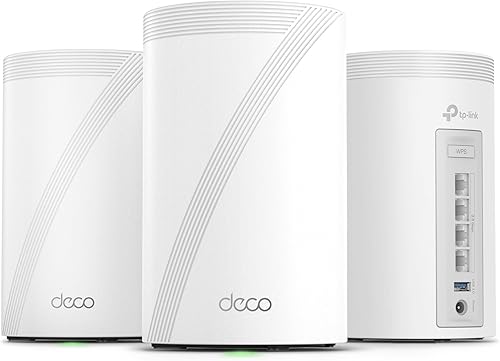
TP-Link Deco 7 Pro Tri-Band WiFi 7: Best for large homes and multi-gig
- WiFi 7 tri-band BE10000
- 10G WAN/LAN port and four 2.5G ports
- Simultaneous wired and wireless backhaul
- Up to 7,600 sq ft
A tri-band WiFi 7 3-pack with a 10G port and four 2.5G ports, built for big houses and internet plans that climb past a gigabit.
Pros
- 10G port for multi-gig plans
- Tri-band WiFi 7 up to 10 Gbps
- Four 2.5G ports and USB 3.0
Cons
- Premium price and larger footprint
- Overkill for a gigabit plan
This is the system for a large home on a multi-gig plan. The 3-pack covers up to 7,600 sq ft for more than 200 devices, and its tri-band WiFi 7 radios reach up to 10 Gbps across the 6 GHz, 5 GHz and 2.4 GHz bands.
The 10G WAN/LAN port matters for wired backhaul. Four 2.5G ports and a USB 3.0 port are spread across the units, so a gaming PC or a NAS drive gets a fast cable while the mesh keeps the air clear.
Tri-band WiFi 7 and 10G Ethernet balance traffic between nodes. The three radios split as 5,188 Mbps on 6 GHz, 4,324 Mbps on 5 GHz and 574 Mbps on 2.4 GHz.
The downside is cost and size. It is a premium system with a larger footprint, and a household on a gigabit plan will not use the headroom it offers.
The 10G port only pays off when your provider hands you more than a gigabit.
The Deco app manages firmware, guest access and the HomeShield security and parental controls. VPN client and server support is built in.
Choose it when the house is big, the plan is fast and you want one system to last. Compare the best WiFi 7 mesh systems if you are still weighing WiFi 6E against WiFi 7.
Netgear Orbi 770 (3-pack): Best for a dedicated wireless backhaul band
- WiFi 7 tri-band
- Enhanced dedicated backhaul band
- Up to 8,000 sq ft
- 2.5G port
A router plus two satellites with a band kept for the node link, useful when only part of the house can be cabled.
Pros
- Dedicated backhaul band
- Covers up to 8,000 sq ft
- Ready for plans up to 2.5 Gbps
Cons
- Higher price than the Deco XE75
- Works best when every node is on the same band
Orbi 770 suits a house where you can cable only part of it. The router plus two satellites cover up to 8,000 sq ft for about 100 devices, and a dedicated backhaul band carries the node link so your devices do not compete with it.
That dedicated band is the reason to consider it over the Deco XE75. When some nodes must stay wireless, the reserved band keeps the link stable.
A 2.5G port covers plans up to that speed, and seven ports across the three pieces give you room for wired gear.
The tri-band WiFi 7 radios reach up to 11 Gbps. The Orbi app handles setup and guest WiFi, and NETGEAR includes a 30-day Armor trial plus advanced router protection and automatic firmware updates.
The price sits above the Deco XE75, so the dedicated band has to be worth it to you. Adding a satellite later extends coverage by about 2,750 sq ft.
Pick it for a large or multi-storey home with mixed wired and wireless nodes. For a fully wired house, a system with faster Ethernet ports gives more per dollar.
It is sold for US use only.
eero 6+ (3-pack): Best for simple setup
- WiFi 6 dual-band
- TrueMesh routing
- Built-in smart home hub
- Up to 4,500 sq ft
A compact 3-pack with TrueMesh routing and Thread and Zigbee radios built in, so smart home devices join without a separate hub.
Pros
- TrueMesh reduces drop-offs
- Built-in Thread and Zigbee hub
- Supports plans up to a gigabit
Cons
- Smallest coverage in this group
- Dual-band only
The eero 6+ is the simplest system to set up in this group. The app walks you through the steps, and TrueMesh routing moves traffic to reduce drop-offs and dead spots.
It supports plans up to a gigabit and covers up to 4,500 sq ft for 75 or more devices.
The 160 MHz radio channel gives extra bandwidth for the whole family to work, stream and video chat at once. The built-in smart home hub connects Thread and Zigbee devices through Alexa, so you can skip a separate hub.
That is a practical bonus for a house full of smart bulbs and sensors. Automatic updates keep the network current, and phone support is available in the US.
Coverage is among the smallest here at 4,500 sq ft. It is also dual-band, so a wired setup carries the node link on the same bands your devices use.
In a smaller home with cable in place, that is rarely a problem. Some security and network features need a separate subscription.
Choose it when easy setup and smart home support matter more than top speed. Our guide on what WiFi mesh system do I need helps size a system to your home.
Tenda Nova Mesh WiFi System MW6: Best for a first mesh network
- AC1200 dual-band
- Gigabit ports
- Up to 3,500 sq ft
- MU-MIMO and beamforming
A low-cost 3-pack with Gigabit ports on each unit, aimed at small homes replacing a router and an extender.
Pros
- Gigabit ports on every unit
- Supports up to 90 devices
- Lowest price in this group
Cons
- AC1200 speed ceiling
- Smallest coverage here
The Tenda Nova MW6 is the budget entry to mesh with wired backhaul. Each unit has Gigabit ports, so a cable between nodes is supported on a system that costs less than the others here.
Two ports per unit means six Gigabit ports in the 3-pack.
Coverage reaches 3,500 sq ft for up to 90 devices, with MU-MIMO and beamforming to spread bandwidth. WPA2 encryption and a guest network cover the security basics.
The Tenda app handles setup and management, and a new node joins an existing Nova network in a few steps.
The limits are real. AC1200 is the slowest radio set here, and 3,500 sq ft is the smallest coverage in this group.
It suits a small house or an apartment where one cable run solves the weak spot. Older devices still connect fine on the dual bands.
Pick it when the cable is already there and the budget is tight. Step up to the Deco X15 for WiFi 6 and more coverage at a modest jump.
NETGEAR Orbi 970 Series: Best for very large homes
- WiFi 7 quad-band
- Dedicated backhaul band
- Up to 10,000 sq ft
- 10G WAN and LAN ports
A three-piece quad-band system for very large homes, with a dedicated lane for node traffic and 10G wired ports.
Pros
- Widest coverage here at 10,000 sq ft
- Quad-band with dedicated backhaul
- 10G internet and LAN ports
Cons
- Highest price here
- Largest units and footprint
The Orbi 970 Series is the pick for a very large home: up to 10,000 sq ft for 200 devices across a router and two satellites. Its quad-band design reserves a dedicated band for node traffic, so the mesh stays fast when every device is online at once.
Wired ports are the standout. A 10 Gig internet port plus 10 Gig and 2.5 Gig LAN ports handle a NAS drive, a home office or a gaming PC.
It works with cable or fiber providers and plans up to 10 Gbps. Adding a satellite extends coverage by about 3,300 sq ft when the house is even bigger.
That capability comes at a high price. The units are also large, which matters if you want nodes hidden on a shelf.
For most homes, the extra bands and ports go unused. The Orbi app and the 30-day Armor trial round out the package.
Choose it when the house is huge and the plan is multi-gig. A smaller tri-band system covers more typical homes for less.
It is made for US use only.
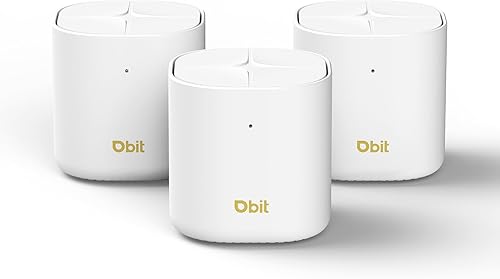
DBIT AX1800 WiFi 6 Mesh System: Best for wired runs on a tight budget
- WiFi 6 dual-band AX1800
- Supports Ethernet backhaul
- 6 Gigabit ports in the 3-pack
- Up to 6,500 sq ft
A 3-pack that combines wide claimed coverage with Gigabit ports for Ethernet backhaul, aimed at buyers watching the budget.
Pros
- Covers 6,500 sq ft in a 3-pack
- Gigabit Ethernet backhaul support
- WPA3 encryption
Cons
- AX1800 speeds below the WiFi 7 picks
- Fewer management features than the Deco app
The DBIT AX1800 covers up to 6,500 sq ft in a 3-pack and supports Ethernet backhaul through 2 Gigabit ports per unit. For a large house with cable already installed and a tight budget, it is a practical way to put a wired node in each zone.
WiFi 6 AX1800 radios reach up to 1.8 Gbps across 2.4 GHz and 5 GHz. OFDMA and MU-MIMO handle up to 150 devices, and WPA3 encryption protects the network.
Each unit can act as a router or an access point, and a mesh button on the unit pairs a new node without going through the app first.
Speeds sit below the WiFi 7 systems here, and the management features are simpler than the Deco app. Coverage claims are wide for the class, so read them as a guide for open layouts.
The three units cover more area on paper than several pricier systems here, which is the main draw.
Pick it when square footage matters more than peak speed. For a gigabit plan and WiFi 6E devices, the Deco XE75 is the better buy.
Check that your rooms are laid out so the units can see each other, since the mesh still leans on radio in unwired spots.
How these mesh systems compare
The table below puts the key wired-backhaul details side by side: bands, port speed and coverage. Use it to shortlist two or three systems, then read the write-ups for the daily-use trade-offs.
| Product | Best for | Bands | Coverage | LAN ports | Our score |
|---|---|---|---|---|---|
| TP-Link Deco XE75 AXE5400 Tri-Band WiFi 6E | most homes | Tri-band | 5,500 sq ft | Gigabit | 9.7 |
| TP-Link Deco X15 Dual-Band AX1500 WiFi 6 | budget wired backhaul | Dual-band | 5,600 sq ft | Gigabit, 2 per unit | 9.7 |
| TP-Link Deco 7 Dual-Band BE5000 WiFi 7 | a 2.5G wired link | Dual-band | 6,600 sq ft | 2.5 Gbps | 9.5 |
| TP-Link Deco 7 Pro Tri-Band WiFi 7 | large homes and multi-gig | Tri-band | 7,600 sq ft | 2.5 Gbps plus 10 Gbps | 9.5 |
| Netgear Orbi 770 (3-pack) | a dedicated wireless backhaul band | Tri-band | 8,000 sq ft | 2.5 Gbps | 8.7 |
| eero 6+ (3-pack) | simple setup | Dual-band | 4,500 sq ft | 8.6 | |
| Tenda Nova Mesh WiFi System MW6 | a first mesh network | Dual-band | 3,500 sq ft | Gigabit | 8.5 |
| NETGEAR Orbi 970 Series | very large homes | Quad-band | 10,000 sq ft | 10 Gbps | 8.5 |
| DBIT AX1800 WiFi 6 Mesh System | wired runs on a tight budget | Dual-band | 6,500 sq ft | Gigabit, 2 per unit | 8.2 |
Our score weighs specs, features and buyer feedback against what you're shopping for. Each product gets one score across the site.
How we compared these systems
We compared the specs that decide a wired-backhaul setup: how many Ethernet ports each unit has, how fast those ports run, whether the system is dual-band or tri-band, and how much area and device load each pack covers. Coverage and speed figures are the maker's claims and vary with walls, layout and distance.
We also weighed what each system offers when a cable is not possible. A tri-band system with a dedicated radio handles wireless nodes better than a dual-band one.
The score reflects that balance, not just peak speed. We based this comparison on published specifications and buyer feedback rather than in-person testing, and we did not measure throughput in a house.
Which mesh system fits a wired backhaul setup?
The right system depends on how much cable you can run, how fast your plan is and how much area you need to cover. A short answer for each situation follows.
Should you pick dual-band or tri-band for wired backhaul?
Tri-band is the better fit when your home has some wireless nodes. The third radio can carry the node link without using the bands your devices share.
A fully wired house gets less from it, because the cable already does that job.
Dual-band systems cost less and still support Ethernet backhaul. The Deco X15 and Tenda MW6 are dual-band and fine for a smaller home where most nodes are cabled.
The Deco XE75 and Orbi 770 are tri-band, which helps when part of the house stays wireless. The Orbi 970 goes further with a fourth band kept for the node link.
How fast do the Ethernet ports need to be?
Match the port speed to your internet plan and your wired devices. Gigabit ports are enough for a plan up to a gigabit.
If you have fiber at 2 Gbps or more, or a NAS drive you reach often, 2.5G ports keep the cable from becoming the bottleneck.
The Deco 7 and Deco 7 Pro both carry 2.5G ports, and the Deco 7 Pro adds a 10G port. The Orbi 970 offers 10G ports across the units.
The Orbi 770 tops out at 2.5G. The Deco X15, Tenda MW6 and DBIT use Gigabit ports.
A faster port than your plan is only worth paying for if you also move big files between wired devices.
How much coverage does a wired mesh system really need?
Buy for the area you must cover, not the biggest number. A wired node reaches less far than a wireless one because the cable does the linking, so a 3-pack in a 2,500 sq ft house often covers more than enough.
The coverage claims here run from 3,500 sq ft for the Tenda MW6 to 10,000 sq ft for the Orbi 970. In a wired setup, the number of units and where you place them matter more than the headline figure.
A cable to a far room beats a bigger system in the middle of the house. Treat each claim as a ceiling for open space and subtract for thick walls and floors.
Do you need WiFi 7 for wired backhaul?
No. WiFi 6E or WiFi 6 handles a wired setup well, because the cable carries the node link.
WiFi 7 matters when you have WiFi 7 devices, a multi-gig plan or a house that needs the extra capacity.
The Deco XE75 is WiFi 6E and a strong fit for most homes. The Deco 7 and Deco 7 Pro add WiFi 7 for buyers with newer gear.
If you plan to keep the system for years, WiFi 7 gives more room to grow. If the plan stays at a gigabit and your gear is older, the savings go toward cable runs instead.
How many nodes should you wire?
Wire the nodes on the rooms that need speed most, such as a home office, a living room TV or a bedroom used for video calls. One wired node in the right place often does more than three wireless ones spread evenly.
Start with the router and one satellite on cable, then add more as needed. The Deco 7 and Orbi 770 both let each node use Ethernet when present and wireless when not.
The Deco X15 puts two ports on every unit, so a room can host a TV and a console on the same node. For the setup order, see our ethernet backhaul guide.
The verdict: which wired backhaul mesh system should you buy?
Buy the TP-Link Deco XE75 if you want the best mix of tri-band speed, 6 GHz backhaul and coverage for a normal house. It is the pick we would make for most people, and its wired support means a cable to one or two rooms fixes the weak spots.
Choose the Deco X15 for the lowest cost on cable you already have. Take the Deco 7 when your plan is 2 Gbps or more, the Deco 7 Pro for a big house with multi-gig fiber, or the Orbi 770 when some nodes must stay wireless.
The Orbi 970 suits very large homes, and the eero 6+, Tenda MW6 and DBIT cover smaller spaces and tighter budgets.
The best WiFi mesh system with wired backhaul is the one whose ports, bands and coverage match your house. Measure your floor plan, count the rooms you can cable and check your plan speed before you order.
Then pick the cheapest system that clears all three.
Our top 3 picks at a glance
-
1
-
2
Best budget wired backhaul
TP-Link Deco X15 Dual-Band AX1500 WiFi 6
9.7/10 our score
See it on Amazon -
3
Frequently asked questions
Does wired backhaul make a mesh system faster?
Yes, in most homes it does. A cable carries traffic between nodes without using the WiFi bands, so the air stays free for your devices and speeds hold up across the house.
Can I mix wired and wireless backhaul on the same mesh?
Yes. Most mesh systems switch each node to Ethernet when a cable is present and fall back to wireless where there is none.
The Deco 7 and Orbi 770 both support this mix.
How many Ethernet ports do I need on each mesh node?
Two per node is enough for most rooms. One port takes the cable from the router, and the second feeds a TV, console or desktop.
Pick a system with more ports where you plan to wire several devices.
Is wired backhaul worth it in a small apartment?
Usually no. One router covers most apartments, and adding cable runs costs more than the gain.
Wired backhaul pays off in houses with thick walls or several floors.
Do all mesh nodes have to be wired for backhaul to work?
No. You can wire the nodes that are easy to reach and leave the rest on wireless.
Each node uses the cable when it finds one and the radio when it does not.