7 Best WiFi 6E Mesh Routers for Home (November 2026)
The best WiFi 6E mesh routers for home include the Google Nest Wifi for most homes, the Amazon eero 6 mesh wifi router for smart-home setups, and the Amazon eero Pro 6E mesh wifi router for multi-gig plans.
On this page (10 sections)
- The best WiFi 6E mesh routers for home, pick by pick
- How these WiFi 6E mesh routers compare
- How we compared these mesh routers
- Does a 6E mesh router need to be wired to work well?
- How much coverage does one 6E mesh unit give?
- Which 6E router fits a multi-gig internet plan?
- Do you need the 6 GHz band in a mesh system?
- How many mesh units does your home need?
- Is a 6E mesh router worth it over a WiFi 6 model?
- The verdict on the best 6E mesh router for home
The best 6E mesh router for most homes is the Google Nest Wifi, which covers up to 2200 sq ft per router and adds more coverage as you add units. It is not a WiFi 6E model, though, so read on if you specifically want the 6 GHz band.
For a true 6E system, the eero Pro 6E is the strongest all-round pick.
WiFi 6E opens a new 6 GHz band that only newer phones, laptops and tablets can use. That band is less crowded, so those devices get a cleaner path while everything else stays on 2.4 GHz and 5 GHz.
The catch is that you only see the benefit on hardware that supports it.
If you are still deciding whether mesh is the right shape for your home at all, our guide on whether mesh WiFi replaces your router walks through what changes. For a straight comparison of shapes and costs, see mesh WiFi vs a single router.
Our picks at a glance
-
1

-
2
-
3

- 4
 Best for large open-plan homesCheck it
- 5
 Check it
TP-Link Deco XE75 Pro AXE5400 Tri-Band WiFi
Best for wired gaming rooms - 6
 Check it
ASUS RT-AX1800S Dual Band WiFi 6 Extendable
Best budget start - 7
 Check it
NETGEAR Orbi Whole Home Tri-Band WiFi 6
Best for very large homes
The best WiFi 6E mesh routers for home, pick by pick
The best 6E mesh router for home use balances band support, coverage and ports against what your internet plan can actually deliver. Each pick below wins on one of those needs.
Google Nest Wifi: Best for most homes
- AC2200 dual-band
- Up to 2200 sq ft per router
- Up to 4400 sq ft with multiple routers
- Voice control through Amazon Alexa
The easiest mesh to live with for a typical home, with coverage that scales as you add routers.
Pros
- Simple app setup
- Coverage grows with extra routers
- Alexa voice control built in
Cons
- WiFi 5 rather than 6E
- Dual-band only
Google Nest Wifi is the easiest mesh to recommend to a typical household. One router covers up to 2200 sq ft, and Google rates a multi-router setup at up to 4400 sq ft, so you can start small and grow.
It is a dual-band AC2200 system, not WiFi 6E. That sounds like a step back, but for streaming, video calls and a house full of smart plugs it is plenty, and the setup is about as simple as mesh gets.
Voice control through Amazon Alexa means you can pause or check the network without opening an app. The dual-band design also means your older phones and smart plugs are not fighting a third radio for attention.
The trade-off is future-proofing. If you have already bought 6E laptops or plan to, this one leaves that band unused.
For everyone else, it is the calmest, least fiddly way into mesh and the pick we would make first for most homes.
Amazon eero 6 mesh wifi router: Best for smart-home setups
- WiFi 6
- Up to 1500 sq ft
- Supports plans up to 900 Mbps
- Built-in Zigbee smart home hub
A tidy entry point to mesh WiFi 6 with a smart-home hub inside, so Zigbee devices connect without a separate bridge.
Pros
- Zigbee hub built in
- TrueMesh traffic routing
- Automatic updates
Cons
- 900 Mbps plan ceiling
- Smallest coverage here
Amazon eero 6 is the smart-home pick. A Zigbee hub is built in, so Zigbee bulbs, sensors and locks join your network without a separate bridge plugged into a port.
It is WiFi 6 with coverage up to 1500 sq ft and support for internet plans up to 900 Mbps. TrueMesh routing moves traffic around drop-offs, and automatic updates keep the firmware current.
If your plan sits under a gigabit and your smart devices are Zigbee, this covers both jobs with one box. The eero app also lets you manage the network from anywhere, which helps when you are away and want to check on things at home.
The limit is reach. At 1500 sq ft per unit, a larger or oddly shaped home needs more nodes than the Nest Wifi.
For a flat or a small house, that smaller footprint is not a problem and the smart-home hub earns its place. The 900 Mbps plan ceiling is the other thing to check before you buy.
Amazon eero Pro 6E mesh wifi router: Best for multi-gig plans
- WiFi 6E with 6 GHz band
- Up to 2000 sq ft
- Supports plans up to 2.5 Gbps
- 2.5 Gb Ethernet port
The pick for gigabit-plus internet and a growing pile of 6 GHz phones and laptops.
Pros
- 2.5 Gb Ethernet port
- 100+ device support
- Backward-compatible with older eero units
Cons
- Security extras need a subscription
- Higher price tier
The eero Pro 6E is the true 6E pick for people with fast internet. It supports plans up to 2.5 Gbps and has a 2.5 Gb Ethernet port to match, plus the 6 GHz band when you use 6E devices. eero also rates it for 100+ connected devices, which covers a busy family network of phones, laptops, TVs and smart gear.
Coverage reaches 2000 sq ft per unit. It is backward-compatible with older eero units, so a house already on eero can add this as the gateway.
That upgrade path is the quiet advantage here, since you can swap in one unit without throwing out the rest of the system.
Two things to weigh. Some security and network-management features sit behind a separate subscription.
And at this price tier, the 6 GHz payoff only arrives with 6E client devices. If your plan is under a gigabit, the eero 6 does the same daily work for less.
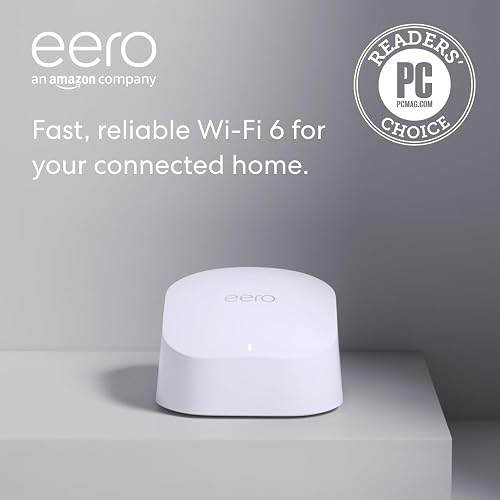
Google Nest WiFi Pro: Best for large open-plan homes
- WiFi 6E tri-band
- Up to 4400 sq ft per router
- 2-pack mesh setup
- Self-monitoring and self-diagnosis
Big coverage from a two-pack, with network monitoring that fixes some common issues on its own.
Pros
- Very wide coverage per router
- Three bands including 6 GHz
- Guest network with its own password
Cons
- Not compatible with older Google Wifi or Nest Wifi
- Wants an app to manage
Google Nest WiFi Pro is the coverage play. One router is rated for up to 4400 sq ft, and this two-pack sets up as a mesh from the start, which suits long open-plan floors and homes where one node never reaches the far corner.
It is tri-band 6E with 2.4 GHz, 5 GHz and 6 GHz, and Google says it monitors the network and fixes some common issues on its own. A guest network with its own password and the ability to pause unknown devices are the practical extras for a family network.
Google also says it prioritises video calls and helps websites load quickly, which matters when several people work from home at once.
Read the compatibility note before buying: Nest WiFi Pro does not work with older Google Wifi or Nest Wifi units. It is a fresh start, not an add-on.
If you already own Nest Wifi gear, keep your current system and add routers rather than mixing generations.
TP-Link Deco XE75 Pro AXE5400 Tri-Band WiFi: Best for wired gaming rooms
- WiFi 6E tri-band, 5400 Mbps total
- 2.5 Gbps WAN/LAN port
- Covers up to 2900 sq ft
- Works with all Deco mesh units
A 2.5 Gbps port and two gigabit LAN ports make it the friendliest 6E pick for consoles and PCs on cable.
Pros
- 2.5 Gbps WAN/LAN port
- Two extra gigabit LAN ports
- 6 GHz band free of older devices
Cons
- 2900 sq ft is modest for the price tier
- Premium security features are paid
The TP-Link Deco XE75 Pro is built for the desk and the living room. One 2.5 Gbps WAN/LAN port and two 1 Gbps LAN ports let you wire a gaming PC, a console and a TV while the mesh handles the rest of the house.
TP-Link rates the total bandwidth at 5400 Mbps and the device load at 200 devices.
It is tri-band 6E with coverage up to 2900 sq ft per unit. The 6 GHz band is reserved for 6E traffic, so newer devices avoid the congestion of older ones.
It also works with other Deco mesh units, which gives you an expansion path. The Deco app handles setup and firmware updates, so keeping the network current is a few taps.
The 2900 sq ft rating is larger than the Nest Wifi's 2200 sq ft but well below the Nest WiFi Pro's 4400 sq ft per router, so a big house may still need more units. Buy it if wired ports and multi-gig internet matter more than raw coverage.
ASUS RT-AX1800S Dual Band WiFi 6 Extendable: Best budget start
- WiFi 6 dual-band, 1800 Mbps
- Five gigabit ports
- AiMesh compatible
- AiProtection Classic security
A low-cost WiFi 6 router you can add to later with AiMesh units, so the first spend stays small.
Pros
- Five gigabit ports
- Subscription-free security
- AiMesh expansion path
Cons
- No 6 GHz band
- Coverage not rated in square feet
The ASUS RT-AX1800S is the budget way in. It is WiFi 6 dual-band at 1800 Mbps with five gigabit ports, and it is AiMesh compatible, so you can add ASUS mesh units later instead of replacing it.
The four external antennas and dual-core processor are aimed at keeping several devices fed at once.
ASUS bundles AiProtection Classic, a subscription-free security layer, plus parental controls and a built-in VPN option. That set is unusual at the budget tier.
Coverage is rated as wide area rather than in square feet, so plan on adding a node if a far room is weak. The five gigabit ports give you room for wired devices without adding a switch.
It has no 6 GHz band. That is the honest trade: you save money and give up the newest band.
For a first mesh on a budget, or a home that will grow unit by unit, it is the sensible start.
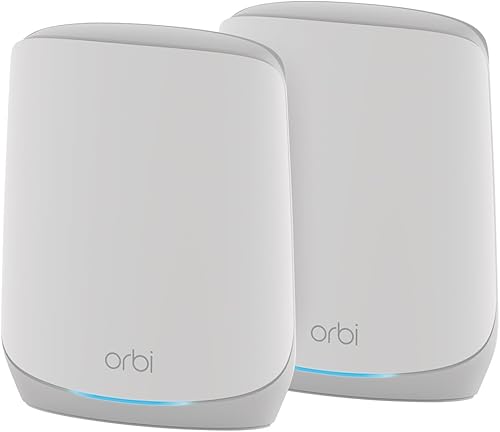
NETGEAR Orbi Whole Home Tri-Band WiFi 6: Best for very large homes
- WiFi 6 tri-band AX5200
- Router plus satellite, up to 5000 sq ft
- Supports up to 75 devices
- Three gigabit ports on the router
The widest coverage in this group from a router and satellite pair, built for big floors and many devices.
Pros
- 5000 sq ft from two units
- 75-device support
- Wired ports on both units
Cons
- No 6 GHz band
- Highest price tier
The NETGEAR Orbi Whole Home system is the big-house option. A router and one satellite together cover up to 5000 sq ft and support up to 75 devices, which suits multi-floor homes with a lot of connected gear.
Each extra satellite extends coverage by up to 2500 sq ft if you need more later.
It is tri-band WiFi 6 at AX5200, with three gigabit ports on the router and two on the satellite. Those ports matter in a large home, where a wired backhaul or a wired TV box saves wireless capacity.
NETGEAR includes a 30-day Armor security trial. The Orbi app handles setup and management, and the system connects to any provider up to 1 Gbps.
The Orbi sits at the top of the price range and is a WiFi 6 system rather than a 6E model. You are paying for coverage and wired ports, not the newest radio.
Buy it when square footage and device count are the problem to solve.
How these WiFi 6E mesh routers compare
Our score weighs specs, features and buyer feedback against what you are shopping for. Here is how the seven line up on the specs that matter most.
| Product | Best for | WiFi standard | Coverage | Band class | Our score |
|---|---|---|---|---|---|
| Google Nest Wifi | most homes | WiFi 5 (AC2200) | 2200 sq ft per router | Dual-band | 9.6 |
| Amazon eero 6 mesh wifi router | smart-home setups | WiFi 6 | 1500 sq ft | Dual-band | 9.5 |
| Amazon eero Pro 6E mesh wifi router | multi-gig plans | WiFi 6E | 2000 sq ft | Tri-band | 9.4 |
| Google Nest WiFi Pro | large open-plan homes | WiFi 6E | 4400 sq ft per router | Tri-band | 9.4 |
| TP-Link Deco XE75 Pro AXE5400 Tri-Band WiFi | wired gaming rooms | WiFi 6E | 2900 sq ft | Tri-band | 9.3 |
| ASUS RT-AX1800S Dual Band WiFi 6 Extendable | budget start | WiFi 6 | Wide area, not rated in sq ft | Dual-band | 9.2 |
| NETGEAR Orbi Whole Home Tri-Band WiFi 6 | very large homes | WiFi 6 | 5000 sq ft | Tri-band | 8.4 |
The pattern is simple. The top three scores go to systems that are easy to live with and well matched to typical homes.
The 6E models cluster just below because the newest band costs more and only helps some devices. The Orbi lands last on score but first on coverage, which shows why the ranking depends on what your home needs.
How we compared these mesh routers
We compared the systems on the facts that change daily use: band support, rated coverage, port speed, device count and how the mesh expands. A router that cannot pass through your plan's speed is a bottleneck no matter how many bands it has.
That is why a 6E model without a port above gigabit would not earn a high score here.
We also weighed setup and management. An app-driven system with self-diagnosis is easier for a family to run than one that needs a browser panel for every change.
Then we matched each system to the home it fits, from a flat to a 5000 sq ft house. Expansion mattered too, since a mesh you can grow unit by unit is a safer buy than one you have to replace.
We did not run speed tests. Scores come from the published specs and how well each system meets the needs of someone shopping for a 6E mesh router for home use.
Does a 6E mesh router need to be wired to work well?
No. Every system here meshes over WiFi and works out of the box without Ethernet between units.
A wired backhaul helps in a large home or one with thick walls, but it is optional. The main router still needs a modem, so the cable from your provider stays in place.
The catch is that wireless links between nodes share airtime. If you can run one cable from the main router to the farthest node, you free up wireless capacity for devices.
That is where the extra LAN ports on the Deco XE75 Pro and Orbi pay off. Our guide on whether mesh WiFi needs to be wired covers when the cable is worth the effort.
How much coverage does one 6E mesh unit give?
Plan on one unit per 1500 to 2200 sq ft for most systems, and up to 4400 sq ft for the widest Google models. The differences between brands are real, so read the rating before you count units.
The eero 6 is the smallest at 1500 sq ft and the Nest WiFi Pro the largest per unit at 4400 sq ft.
A 2500 sq ft home usually lands between two and three units. Add one when a room drops below a usable signal, and remember that walls, floors and metal appliances cut the rated number.
Google notes that thick walls and long, narrow layouts may need extra units.
Which 6E router fits a multi-gig internet plan?
The eero Pro 6E is the clear fit, with a 2.5 Gb Ethernet port and support for plans up to 2.5 Gbps. The TP-Link Deco XE75 Pro is the second choice, with a 2.5 Gbps WAN/LAN port of its own.
Both let a fast plan reach your devices instead of stopping at the router.
What to look for on the box
Check for a port rated above gigabit before you buy. A 6E radio on a 1 Gb port cannot pass a 2 Gbps plan through to your devices.
Both picks above clear that bar. The eero Pro 6E also rates wireless speeds up to 1.6 Gbps and wired speeds up to a gigabit through its standard port.
When a gigabit port is enough
Most homes on a 500 Mbps or 1 Gbps plan do not need the faster port. The eero 6 and Nest Wifi handle those plans without leaving speed on the table.
The ASUS RT-AX1800S and Orbi also top out around a gigabit, which suits a typical cable or fiber plan.
Do you need the 6 GHz band in a mesh system?
Only if you own devices that support it. WiFi 6E adds the 6 GHz band, and only 6E phones, laptops and tablets can use it.
For those devices, the band is less crowded and the connection is cleaner. The band is also limited to indoor use, which is fine for a home network.
For everything else, a WiFi 6 mesh does the same daily work. If your household is mostly older phones, streaming sticks and smart plugs, the 6 GHz band goes unused and the extra spend buys little.
Google notes that 6E specs assume a device that supports 160 MHz channels, so the benefit is tied to fairly new hardware.
Who should pay for 6E now
Buy 6E if you have already bought a 6E laptop or phone, or you plan to within a year or two. The eero Pro 6E and Nest WiFi Pro are the strongest 6E options here.
The eero Pro 6E wins on ports and plan speed, while the Nest WiFi Pro wins on coverage.
Who should stay on WiFi 6 for now
Stay on WiFi 6 if your gear is a few years old and your plan is under a gigabit. The Google Nest Wifi, eero 6 and ASUS RT-AX1800S cover those homes for less.
The Orbi is the other option if you need 5000 sq ft of coverage and do not need a 6E system.
How many mesh units does your home need?
Count rooms with weak signal first, then match them to rated coverage. One unit covers a small flat, two cover most houses, and three or more suit long layouts and thick walls.
The mesh works best when units are spread out rather than stacked in one room.
Start with the coverage number on each unit. The Google Nest Wifi covers up to 2200 sq ft per router, the eero Pro 6E 2000 sq ft and the Deco XE75 Pro 2900 sq ft.
The Orbi pair covers 5000 sq ft together.
Small homes and flats
One unit is usually enough. The eero 6 at 1500 sq ft is a good fit for a flat or a small house, and its Zigbee hub covers smart devices too.
The ASUS RT-AX1800S is the other single-unit start if you want to keep the first spend low.
Large and multi-floor homes
Two or three units, or the Orbi pair. The 4400 sq ft rating on Nest WiFi Pro per router makes it the coverage leader, and the Orbi's 5000 sq ft pair is the simplest big-house answer.
In either case, put the second unit where the weak room is, not in the middle of the house.
Is a 6E mesh router worth it over a WiFi 6 model?
Yes for a household with 6E devices and a fast plan. No for most homes on older gear.
The 6E band is a real upgrade, but only for the devices that can reach it. The eero Pro 6E and Nest WiFi Pro cost more than the WiFi 6 picks for that reason.
If you are unsure what shape your network should take, our guide on what WiFi mesh system you need starts with your home and your plan rather than the radio spec. That order saves money.
A WiFi 6 mesh that covers every room beats a 6E system that leaves a corner dark.
The verdict on the best 6E mesh router for home
The Google Nest Wifi is the best 6E mesh router for home for most people, even though it is not a 6E model. Its coverage, simple setup and growth path make it the safest buy for a typical house.
Buy the eero Pro 6E if you have a 2.5 Gbps plan or a growing set of 6E devices. Choose the Nest WiFi Pro for the widest coverage from two units.
For a very large home, the Orbi pair covers 5000 sq ft. And if budget leads, the ASUS RT-AX1800S starts small and expands with AiMesh.
Our top 3 picks at a glance
-
1
-
2
-
3
Frequently asked questions
Do I need WiFi 6E or is WiFi 6 enough?
WiFi 6E only pays off if you own phones, laptops or tablets that support the 6 GHz band. Those devices get a cleaner channel with less interference.
Everything else in your home connects on 2.4 GHz and 5 GHz either way, so a plain WiFi 6 mesh can be the better value.
Will a 6E mesh router speed up my internet?
Only up to the speed of your internet plan. A 6E router can pass through multi-gig speeds on its wired port and move data faster between devices on your own network.
If your plan tops out at 500 Mbps, a cheaper WiFi 6 system will feel the same on downloads.
How many mesh units does a 6E router need for my house?
Start with the coverage each unit is rated for and add one node when a room drops below a usable signal. A 2,000 sq ft home usually needs two units.
Thick walls, long layouts and metal appliances can push that number up.
Can I mix a 6E mesh router with my old router?
You can keep your old router as a modem-side gateway if your ISP requires it, but don't mesh two brands together. WiFi 6E mesh systems are designed to work with units from the same family.
Replacing the old router outright is the simpler path.
Is WiFi 6E safe to use at home?
Yes. The 6 GHz band is approved for indoor home use in the US, and 6E gear uses the same power limits as other home WiFi.
It is limited to indoor operation, which suits a home network.
What is the main trade-off with a 6E mesh system?
Price and compatibility. 6E units cost more than WiFi 6 models, and the speed benefit only shows on 6E devices.
If most of your gear is a few years old, a WiFi 6 mesh covers the same rooms for less.