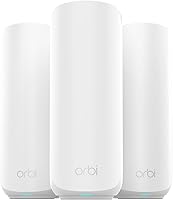
NETGEAR Orbi 770 Mesh WiFi Review: Worth It? (November 2026)
The NETGEAR Orbi 770 is a strong buy for big, busy homes that want WiFi 7 speeds and room for up to 100 devices. Pick the Orbi 370 instead if 6,000 sq ft of coverage covers your home.
On this page (9 sections)
The NETGEAR Orbi 770 is a strong buy for large, device-heavy homes that want WiFi 7 and can use up to 8,000 sq ft of mesh coverage. Its tri-band design keeps a band free for the link between units, which helps when everyone streams and games at once.
Homes under 6,000 sq ft should look at the Orbi 370 first.
This NETGEAR Orbi 770 review focuses on what the spec sheet means for daily life: coverage, device load, speed, setup and the trade-offs. Our score weighs specs, features and buyer feedback against what you're shopping for.
The NETGEAR Orbi 770 at a glance
The Orbi 770 is a three-piece tri-band WiFi 7 kit built to cover a large home in one network name. The router and two satellites work as one mesh, so you don't juggle separate networks as you move room to room.
Netgear Orbi 770 (3-pack): Best for large homes with many devices

- Up to 8,000 sq ft coverage
- Up to 11 Gbps tri-band WiFi 7
- Up to 100 devices
- 2.5 Gbps port
A router and two satellites that blanket a large home in tri-band WiFi 7. Built for households that stream, game and work online at the same time.
Pros
- Covers up to 8,000 sq ft with the router and two satellites
- Tri-band design keeps a band free for the link between units
- Handles up to 100 connected devices
- 2.5 Gbps port matches fast cable and fiber plans
- Works with existing WiFi 6 and WiFi 5 devices
Cons
- Higher price tier than the Orbi 370
- The three-unit kit is more coverage than many homes need
- NETGEAR Armor needs a separate subscription after the trial
Netgear rates the kit for up to 8,000 sq ft and up to 100 devices. The tri-band radio setup reaches up to 11 Gbps, and a 2.5 Gbps port matches fast cable or fiber plans.
The box holds the Orbi WiFi 7 router (RBE771), two Orbi WiFi 7 satellites (RBE770), three power adapters, one 2 m Ethernet cable and a quick start guide. The model number is RBE773-100NAS and the kit is sold as three items.
It's made for use in the US only.
Who the Orbi 770 suits
This kit fits large households where many people are online at once. If your current router drops in the back bedroom and slows whenever another device joins, the extra satellites and tri-band design address both problems.
It also makes sense for homes with fast internet plans up to 2.5 Gbps. The 2.5 Gbps port means the router won't bottleneck a plan in that range.
Heavy streamers, gamers and people who work from home will feel the headroom most.
The compatible device list covers gaming consoles, personal computers, security cameras, smart TVs and smartphones, so a mixed household is the target. A family running several of those at once is exactly the load the 100-device rating is meant for.
It's less of a fit for a small apartment or a home that already gets solid WiFi from one router. Three units in a compact space can overlap coverage you don't need.
If your home sits under 6,000 sq ft and your device count is modest, the smaller Orbi kit saves money without giving up the app or the WiFi 7 base.
The specs that matter in daily use
Coverage and device load are the two numbers to weigh first. Netgear rates the kit at up to 8,000 sq ft and 100 devices.
That suits a large home with smart TVs, phones, laptops, cameras and consoles all pulling on the network.
The tri-band design is the quiet advantage. One band can be dedicated to the link between the router and satellites, so the connection between units stays strong while your devices use the other bands.
A 4K TV or gaming laptop can keep its bandwidth even when the rest of the house is busy. The frequency listing includes 6 GHz, which is where the newer WiFi 7 spectrum sits.
The rated 11 Gbps is a ceiling, not a promise. Netgear notes that real-world speeds vary with your devices and internet plan.
Your internet provider's speed caps what you'll see on a speed test, so the WiFi 7 headroom mostly matters for local traffic between devices and for future plans.
Compatibility is broad. The kit connects WiFi 6 and WiFi 5 phones, laptops and TVs without replacements.
The 2.5 Gbps port works with cable or fiber provider equipment, and the LAN port bandwidth matches that 2,500 Mbps figure. Connectivity runs over both WiFi and Ethernet, so wired devices can join the same network.
Setting up the Orbi 770
Setup runs through the Orbi app in guided steps. You connect the router to your modem, power on the satellites and follow the prompts to name the network and set a password.
The app then manages the network from anywhere. You can see connected devices, set up guest WiFi and check the satellites' status.
Placing each satellite well matters more than the app steps: keep them out in the open, not in a cupboard, and spread them toward the rooms that need coverage.
Netgear enables security features out of the box. Advanced Router Protection and automatic firmware updates work without you lifting a finger.
The NETGEAR Armor trial adds hacker, malware and identity-theft protection for 30 days, then needs a separate subscription if you want to keep it.
One practical note: measure your rooms and pick satellite spots before you unbox. Moving a unit later is easy, but the first placement decides how much of that 8,000 sq ft you actually use.
Our Orbi 370 review walks through the same setup on the smaller kit if you're comparing.
Where to place the two satellites
Start the router where your modem sits, then work outward. Put the first satellite roughly halfway between the router and the far end of the house, and the second beyond it, toward the back rooms or upstairs.
Keep each unit off the floor and out of cabinets. A shelf or side table in an open spot beats a corner behind a sofa.
Thick walls and metal in the construction weaken the link, so a satellite on the far side of a brick wall may do less than one placed before it.
The basement and rooftop wording in Netgear's coverage claim describes a spread across levels, not a single flat area. In a multi-storey home, one satellite per floor is usually the simplest plan.
You can check signal in the app as you go.
Living with the Orbi 770 day to day
Day to day, the kit's value shows up as fewer dead spots and steadier speeds. With a dedicated backhaul band, the satellites don't have to share their link with your devices as heavily as a dual-band mesh would.
Guest WiFi is a tap away in the app, which helps when visitors want the network without your main password. Device management lets you see what's connected and spot anything unexpected.
For security, the built-in features run quietly in the background. If you keep Armor after the trial, it extends protection beyond the home network to devices you use on the go.
That's a subscription decision rather than a setup requirement.
The kit is made for use in the US only, so check that before buying if you're outside the country. Expansion is simple: adding another Orbi 770 Series satellite extends coverage by up to 2,750 sq ft for a garage, basement or new extension.
Coverage varies with layout, building materials and where you place each unit.
Care and upkeep for the mesh
Care is mostly about keeping the units ventilated and the firmware current. Set each unit on an open surface with room to breathe rather than inside a cabinet or behind furniture.
Let automatic firmware updates run. They carry security fixes, so leaving them on is the easiest maintenance step.
If you add a satellite later, the app walks you through pairing it.
Wipe dust from the vents now and then, and keep the units away from direct heat. If speeds drop, check satellite placement first: a unit tucked behind a thick wall or a metal cabinet can weaken the mesh link.
Keep your network password and app login in a safe place. Guest access is easy to reset in the app, so you can rotate the guest password when needed without touching the main network.
The three power adapters are unit-specific enough that losing one leaves a gap, so note which adapter belongs to which unit. A spare Ethernet cable is cheap to keep on hand too, since the kit includes one 2 m cable and you may want a longer run to a satellite.
The trade-offs of the Orbi 770
The main trade-off is price tier against the Orbi 370. The 770 costs more because it adds a third band, more coverage and a higher device limit.
If your home is medium-sized and your device count is moderate, the 370 delivers the same WiFi 7 base and app for less.
The three-unit kit can also be more coverage than a smaller home needs. Overlapping satellites don't hurt, but they can be overkill for an apartment.
Armor is another consideration. The 30-day trial is included, but keeping the full security suite means a separate subscription.
The router's built-in protections and firmware updates still work without it.
Finally, the rated 11 Gbps won't show up fully on most home internet plans. The kit's speed headroom pays off more for local device-to-device traffic and for plans that reach the 2.5 Gbps port.
If your plan is slower, the tri-band design still helps with congestion, but the top speed figure stays theoretical.
Alternatives to the NETGEAR Orbi 770
The right alternative depends on your home size and budget. Here are three kits worth comparing before you buy.
Netgear Orbi 370 (3-pack)
The Orbi 370 is the closest sibling. It keeps the Orbi app, the WiFi 7 base and the 2.5 Gbps port, but it's dual-band and rated for up to 6,000 sq ft and 70 devices.
Its satellites are the RBE370 and the router is the RBE371, so the hardware family is the same. Pick it when your home fits within that footprint and you'd rather spend less.
Our Orbi 370 vs eero 7 comparison lines up the dual-band Orbi against a rival kit.
TP-Link Deco S4 Whole Home Mesh WiFi
The Deco S4 is the budget pick. It's a two-unit WiFi 5 mesh rated for up to 3,800 sq ft and 75 devices, with parental controls and four Gigabit ports.
It suits smaller homes where the newest standard matters less than solid basics. Its 1 Gbps LAN port sets a lower ceiling than the Orbi kits, and each unit has two Gigabit Ethernet ports for wired devices.
The Deco app handles setup, and Alexa voice commands can toggle guest WiFi. For another small-home option, our eero 6 mesh wifi system review covers a comparable budget kit.
eero Outdoor 7
If your weak spot is the yard or patio rather than the house, the eero Outdoor 7 is built for outside coverage. It extends mesh WiFi to outdoor spaces where a standard indoor satellite struggles.
Our eero Outdoor 7 review explains what it adds and when it's worth pairing with an indoor mesh.
Verdict: is the NETGEAR Orbi 770 worth it?
Buy the NETGEAR Orbi 770 if your home runs past 6,000 sq ft or your device count pushes toward 100. The tri-band design, 2.5 Gbps port and WiFi 7 speeds give a busy large home the headroom it needs, and the Orbi app keeps setup and guest access simple.
For most large homes, this is the kit we'd pick.
Skip it if your home sits comfortably under 6,000 sq ft with a modest device count. The Orbi 370 covers that ground for less with the same app and WiFi 7 base.
If you mainly need outdoor coverage, the eero Outdoor 7 addresses that directly.
Start by measuring your home and counting your devices. If both numbers land near the Orbi 770's ratings, it's the right fit.
If they fall short, the smaller Orbi kit or a budget mesh saves money without leaving you short. The 7 wired ports across the kit also matter if you have a console, desktop or printer that does better on Ethernet than WiFi.
Frequently asked questions
How much area does the NETGEAR Orbi 770 cover?
Netgear rates the three-pack at up to 8,000 sq ft for the router and two satellites together. That figure assumes open conditions, so walls, floors and where you place each unit change what you get in a real home.
Is the Orbi 770 worth it over the Orbi 370?
The Orbi 770 earns its higher tier when your home runs past 6,000 sq ft or packs in more than 70 devices. The Orbi 370 keeps the same app and WiFi 7 base for smaller homes, but it is dual-band with a lower top speed.
Does the Orbi 770 work with older WiFi devices?
Yes. Netgear says the Orbi 770 connects WiFi 6 and WiFi 5 phones, laptops and TVs alongside WiFi 7 gear.
You don't need to replace older devices to use the mesh network.
Do I need to pay for NETGEAR Armor?
No. The Orbi 770 includes a 30-day Armor trial, and a separate subscription is needed to keep it after that.
The router's built-in security features and automatic firmware updates work without Armor.
Can I add more satellites to the Orbi 770?
Yes. Netgear says an extra Orbi 770 Series satellite adds up to 2,750 sq ft of coverage.
That helps when you extend into a garage, basement or a new extension later.