eero Outdoor 7 Review: Mesh WiFi for Yards and Patios (October 2026)
The eero Outdoor 7 suits patios and yards that need an outdoor mesh access point, with an IP66 rating and AC or PoE+ power options. Check your mounting spot and power route first, since the stated outdoor coverage is not a guarantee for every yard.
On this page (8 sections)
- The eero Outdoor 7 at a glance
- How much yard can the Outdoor 7 cover?
- What do the IP66 rating and temperature range mean?
- How can you power and set up the Outdoor 7?
- eero Outdoor 7 vs. ASUS ZenWiFi BD5 Outdoor
- When does an eero 7 three-pack make more sense?
- What should you check before buying?
- Is the eero Outdoor 7 a good buy?
The eero Outdoor 7 is an outdoor mesh WiFi unit for yards and patios, with an IP66 weatherproof rating and AC or PoE+ power. It makes the most sense if you already use eero and can plan a suitable mounting point and power route.
eero claims outdoor coverage up to 15,000 sq. ft., described as a 70 ft radius. Treat that as a coverage estimate: walls, distance from the indoor network and the shape of your yard can affect the signal you get.
The eero Outdoor 7 at a glance
The eero Outdoor 7 is built to extend an eero mesh network outdoors. Its main buying points are weather protection, flexible power and the eero app for setup and network management.
eero Outdoor 7: Best for patios and yards

- IP66 weatherproof rating
- Up to 15,000 sq. ft. outdoor coverage claim
- AC or PoE+ power
An outdoor eero mesh unit for extending WiFi toward a patio or yard. Its weather protection and two power options make placement more flexible, though you still need to plan the cable and mounting location.
Pros
- IP66 rating for dust, rain and snow protection
- AC or PoE+ power options
- eero app guides setup and network management
- Backward compatible with previous eero generations
Cons
- Outdoor coverage depends on the placement and yard
- Power and cable routing need planning
- Requires an eero network for mesh use
Our score weighs specs and features against what someone shopping for outdoor mesh WiFi needs.
Who should consider the eero Outdoor 7?
Consider it if you want to bring your existing eero network to an outdoor space, such as a patio or garden. Its backward compatibility with previous eero generations may also help if you already have eero equipment.
It may be a poor fit if you need a standalone outdoor router or don't have a workable power and mounting plan. The eero home router guide can help you decide whether eero fits your indoor network before you add an outdoor unit.
How much yard can the Outdoor 7 cover?
eero says the Outdoor 7 can cover up to 15,000 sq. ft. outdoors, with a 70 ft radius. That figure can help you start planning, but it doesn't promise the same reach in every yard.
The unit still needs a useful connection to your home network. A distant mounting point, dense walls or a layout that puts the signal path behind several obstacles may reduce the coverage you get.
Think about the area where you want a reliable connection, not just the total square footage of the yard. Mark a likely mounting spot and consider how far it is from the indoor eero and from the devices you want to connect.
If the weak spot is a detached garage, an outdoor unit may be one option, but the distance and path between buildings matter. Our guide to extending WiFi to a detached garage covers other placement choices.
What do the IP66 rating and temperature range mean?
The Outdoor 7 has an IP66 rating for protection from dust, rain and snow. eero also says the unit is tested to operate between -40°F and 131°F.
Those details make it suited to outdoor installation, but they don't tell you whether a particular location or installation method is right. Follow the installation guidance, and choose a spot where the unit can be mounted securely and its power connection is appropriate for outdoor use.
The body is listed at 2.4 lb, so plan for a mount that can support it. Check the mounting instructions and the surface before you decide where to install it.
How can you power and set up the Outdoor 7?
The Outdoor 7 supports AC or PoE+ power, and includes a 30W PoE+ adapter. Choose the power method that works with the cable route and nearby connections at your intended location.
PoE+ can combine network and power over an Ethernet cable, which may help when the outdoor unit is away from an indoor outlet. It still takes planning to route the cable safely and connect it to your network.
After installation, the eero app guides setup and lets you manage the network. The app also provides automatic updates, according to eero.
For stronger whole-home coverage, check where the indoor units sit before adding another point. Our guide to placing mesh WiFi units explains how placement can affect the connection between mesh units.
eero Outdoor 7 vs. ASUS ZenWiFi BD5 Outdoor
The eero Outdoor 7 is the natural fit for an eero network, while the ASUS ZenWiFi BD5 Outdoor is designed for compatible ASUS AiMesh routers. Match the outdoor unit to the system you already use.
ASUS ZenWiFi BD5 Outdoor: Best for an ASUS AiMesh network
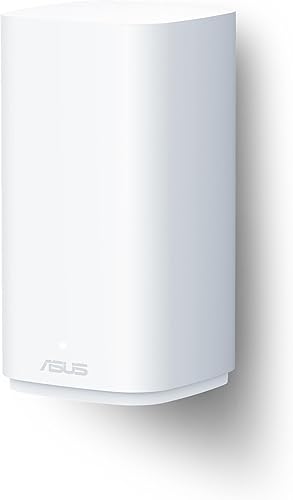
- IP65 water-resistant and dustproof enclosure
- AC or PoE power
- Wall, pole or flat-surface mounting
An outdoor option for a compatible ASUS AiMesh setup. It supports AC or PoE power and several mounting approaches, so compare those needs with the eero system you already use.
Pros
- Works with compatible ASUS routers through AiMesh
- AC or PoE power options
- Wall, pole and flat-surface mounting choices
- IP65 water-resistant and dustproof enclosure
Cons
- Designed to extend a compatible ASUS network
- Check the placement and coverage fit for your space
The ASUS model has an IP65 water-resistant and dustproof enclosure, supports AC or PoE power, and can be wall-mounted, pole-mounted or placed on a flat surface. It also has two 2.5G PoE-in ports.
The Outdoor 7 has an IP66 rating and includes a 30W PoE+ adapter. If you already own compatible ASUS equipment, the BD5 Outdoor may fit your network better; for eero users, the Outdoor 7 is the straightforward match.
See the wider eero, Orbi and ASUS comparison guide for help comparing systems before you expand your network.
When does an eero 7 three-pack make more sense?
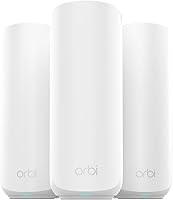
An eero 7 three-pack makes more sense when your coverage problem is indoors across several rooms. It includes three routers and eero gives the set a coverage claim of up to 6,000 sq. ft.
eero 7 (3-pack): Best for extending coverage indoors

- Three mesh routers
- Up to 6,000 sq. ft. coverage claim
- Two auto-sensing 2.5 GbE ports per router
A three-unit eero 7 kit for indoor coverage across rooms. Choose it when you need more indoor mesh points; the Outdoor 7 is the more direct fit when the weak signal is outside.
Pros
- Three mesh units for indoor placement
- Backward compatible with previous eero generations
- Supports internet plans up to 2.5 Gbps
Cons
- Not an outdoor-rated unit
- Indoor coverage claims don't predict yard coverage
The eero 7 three-pack is not described as weatherproof, so it isn't a substitute for an outdoor-rated unit. If your indoor eero signal is already strong and the problem is only in the yard, the Outdoor 7 is the more direct choice.
If you're weighing a mesh upgrade, compare Orbi 370 and eero 7 to see how two indoor WiFi 7 systems differ.
What should you check before buying?
Check these practical details before choosing the Outdoor 7:
- Network fit: Confirm that you have an eero system to extend.
- Mounting: Pick a stable location with a useful path toward the devices you want to connect.
- Power: Decide whether AC or PoE+ fits the location and cable route.
- Coverage expectations: Use eero's stated radius as a starting point, then account for your yard's layout and obstructions.
- Setup: Review the installation guidance and make sure you can reach the unit and its connections when needed.
A good installation spot needs to balance signal reach with safe, practical access. A mount at the edge of the yard may reach more of the space, but only if the unit can still connect reliably to the indoor network.
Is the eero Outdoor 7 a good buy?
The eero Outdoor 7 is a sensible choice if you want to extend an existing eero mesh network outdoors and can support its power and mounting needs. Its IP66 rating and AC or PoE+ options are useful features for a dedicated outdoor unit.
Choose the ASUS ZenWiFi BD5 Outdoor if your home runs compatible ASUS AiMesh equipment. Choose the eero 7 three-pack when you need more indoor mesh coverage, and pick the Outdoor 7 when the main gap is the patio or yard.
Frequently asked questions
Is the eero Outdoor 7 worth it?
The eero Outdoor 7 is worth considering if you already use eero and need WiFi outside near a patio, garden or yard. Its IP66 rating and AC or PoE+ power options suit outdoor placement, but check the route for power and mounting before buying.
The stated coverage is an estimate, not a guarantee.
Does the eero Outdoor 7 need an eero router?
The Outdoor 7 is a mesh WiFi unit, so plan to use it with an eero network. eero says it is backward compatible with previous eero generations. If your home network uses another brand, compare an outdoor unit made for that system, such as an ASUS AiMesh-compatible option.
Can the eero Outdoor 7 stay outside all year?
eero gives the Outdoor 7 an IP66 rating for protection from dust, rain and snow, and says it is tested to operate from -40°F to 131°F. Follow the installation guidance for your location and check that the chosen mount and power route are suitable for outdoor use.
Does the eero Outdoor 7 need Ethernet?
The Outdoor 7 can use AC power or Power over Ethernet, and a 30W PoE+ adapter is included. The power choice affects where you can install it and how you route cables.
Check your home network and the installation instructions to see which setup fits your location.