Mesh WiFi vs Powerline Adapters for Far Rooms: Which Is Better? (October 2026)
Choose mesh WiFi for broader wireless coverage, or a powerline adapter when you need an Ethernet connection in one far room. Your home's layout and electrical wiring can affect how well either option works.
On this page (8 sections)
- Mesh WiFi vs powerline adapter: which fits a far room?
- How does each option reach a far room?
- Which option gives you WiFi in more places?
- Which is easier to set up?
- What should you check before choosing?
- Which products suit each approach?
- Is mesh WiFi or powerline better for gaming and streaming?
- Which should you choose for a far room?
Choose mesh WiFi for broader wireless coverage, or a powerline adapter when you need an Ethernet connection in one far room. Your home's layout and electrical wiring can affect how well either option works.
Mesh systems use multiple units to extend WiFi across a home. A powerline kit carries a network connection through electrical wiring and connects to devices over Ethernet.
The key difference is what reaches the far room: wireless coverage across multiple devices, or a wired connection for specific equipment. For a broader look at how mesh WiFi works, start with the units and coverage involved.


Mesh WiFi vs powerline adapter: which fits a far room?
Choose mesh WiFi when phones, laptops and other devices need wireless access in several rooms. Choose powerline when a device with Ethernet needs a connection in one distant room.
A mesh network includes a router and one or more additional units. The units work together to extend WiFi, so you can move around the home without relying on one router's signal to cover every room.
A powerline adapter kit has at least two adapters. One connects to the router by Ethernet, and the other connects to a device in the far room; the network signal travels between them over household electrical wiring.
That makes powerline a fit for a desktop computer, game console or television with an Ethernet port. It won't give phones or tablets WiFi on its own.
How does each option reach a far room?
Mesh units use WiFi to link the home, while powerline adapters use electrical wiring for the connection between rooms. Walls, distance and wiring conditions can affect the practical result.
With mesh, placement matters. A satellite needs a usable connection to the router or another mesh unit, so placing it inside a weak-signal room may not solve the problem.
Put the extra unit where it can still receive a good signal while extending coverage toward the problem area. Our guide to placing mesh WiFi units covers that balance.
Powerline adapters need outlets in both locations and Ethernet ports on the devices you want to connect. Their performance can vary with the home's electrical wiring and the outlets used, so avoid assuming that the advertised data rate is the speed you'll get.
Can mesh WiFi work without wires between units?
Most mesh setups can use a wireless link between units, though some systems also support a wired connection. Check the system's instructions to see which setup it supports.
For a mesh network with a wired link between units, Ethernet backhaul explains how that connection works. If you're deciding whether cables are necessary, see whether mesh WiFi needs to be wired.
Which option gives you WiFi in more places?
Mesh is the direct choice when your goal is wireless coverage across multiple rooms. A powerline kit carries Ethernet to a device, so it doesn't replace a WiFi system.
Think about every device in the far room. If people use phones and laptops there, mesh can serve those devices directly; powerline alone cannot.
If only a TV or console needs a wired connection, powerline may be simpler than extending WiFi across the whole home. The Netgear PLP2000 kit uses household electrical wiring and includes two adapters with an extra outlet.
You can also connect a separate wireless access point to a powerline adapter, if you need WiFi in that room. That adds equipment, and the quality of the connection still depends on the electrical path.
Which is easier to set up?
Powerline usually takes fewer network decisions; mesh requires choosing a good place for each unit. Both can be straightforward when the outlets, router and room layout suit the setup.
The PLP2000 is plug and play, with no software installation or configuration required. Connect one adapter to the router with Ethernet and place the other where the wired device sits, following the included setup instructions.
Mesh setup typically uses an app to guide you through connecting the router and adding units. The eero 6+ app guides setup and lets you manage the network, while the Orbi app guides setup and device management.
Mesh placement may take adjustment if a satellite sits too far from the router or behind dense walls. If your connection remains weak in a separate building, see ways to extend WiFi to a detached garage.
What should you check before choosing?
Check what needs connecting, where the router sits and what path is available between rooms. These details matter more than choosing by a claimed maximum speed alone.
For mesh, consider the home's size and shape, the number of floors, and walls or other materials between the units. Coverage figures are estimates, and the Orbi 370's coverage may vary with layout, construction materials and satellite placement.
The eero 6+ 3-pack is specified for coverage up to 4,500 square feet and 75 or more devices. The Orbi 370 2-pack is specified for up to 4,000 square feet and 70 devices.
For powerline, check that the kit's Ethernet connection suits your device and that the outlets are practical. The PLP2000 is made for use in the US only, so confirm that limitation fits your location.
Which products suit each approach?
The eero 6+ is the strongest fit here for whole-home WiFi, and the PLP2000 fits one wired device at a distance. The Orbi 370 offers a two-unit mesh option with WiFi 7.
eero 6+ (3-pack)
The eero 6+ is a three-unit WiFi 6 mesh system with coverage up to 4,500 square feet and support for internet plans up to a gigabit. It can connect 75 or more devices, according to eero's product information.
Its TrueMesh technology is designed to route traffic to reduce drop-offs and dead spots. A built-in smart home hub supports compatible Thread and Zigbee devices, and some security and network management features require a separate subscription.
Netgear PLP2000 Powerline Adapter Kit
The PLP2000 carries an Ethernet connection through household electrical wiring. It is not a WiFi device, so it suits a wired TV, streaming player or game console better than a room where several wireless devices need service.
The kit includes two adapters, two Ethernet cables and an extra power outlet built into each adapter. It supports adding multiple adapters to expand the network, and is made for use in the US only.
Netgear Orbi 370 (2-pack)
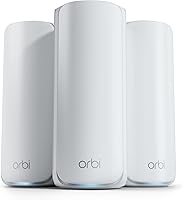
The Orbi 370 pairs a router with a satellite for WiFi 7 mesh coverage up to 4,000 square feet. NETGEAR says it can connect up to 70 devices, and the system works with cable or fiber provider equipment when connected to an existing modem.
Its Orbi app guides setup, and the system can be expanded with an additional Orbi 370 satellite. NETGEAR Armor includes a 30-day trial, with a separate subscription required afterward.
Is mesh WiFi or powerline better for gaming and streaming?
Choose powerline for a wired console or television when the electrical path works well; choose mesh when several devices need WiFi. Neither option guarantees a particular speed or response time in every home.
Ethernet can be useful for a stationary device with a network port. The PLP2000 is designed to connect equipment such as smart TVs, streaming players and game consoles through household wiring.
Mesh lets wireless devices connect in multiple rooms, but performance depends on placement, signal path, connected devices and your internet plan. Keep a mesh unit between the router and the far room rather than expecting it to fix a weak signal from an unfavorable location.
Which should you choose for a far room?
Pick mesh if you need WiFi throughout the home; pick powerline if one wired device is the main need. If you need both, a mesh system can cover everyday wireless use while Ethernet serves a fixed device where its wiring path works.
Choose the eero 6+ when you want a three-unit mesh system for several rooms. Consider the Orbi 370 for a router and satellite pair, and the PLP2000 when the far room mainly needs Ethernet.
For a broader comparison of a single router and mesh, read mesh WiFi vs a single router. That can help you decide whether the coverage problem calls for a multi-unit system at all.
Frequently asked questions
Is mesh WiFi better than a powerline adapter?
Mesh WiFi is better when several rooms need wireless coverage, while a powerline adapter suits a wired device in one far room. Powerline carries a network connection through electrical wiring and doesn't provide WiFi.
Your home's layout and wiring affect which option is practical.
Can a powerline adapter improve WiFi in a far room?
A powerline adapter can bring an Ethernet connection to a far room, but it doesn't create WiFi by itself. You can connect a compatible access point there if you need wireless service, but that adds another device and setup step.
Does powerline internet work through any electrical wiring?
Powerline adapters use household electrical wiring, but performance can vary with the wiring and the path between outlets. Plug both adapters directly into suitable wall outlets and follow the instructions for the exact kit; don't assume every outlet pair will give the same result.
Should I use mesh WiFi or Ethernet backhaul?
Use mesh WiFi when you need wireless coverage between rooms, and consider Ethernet backhaul when you can connect mesh units with Ethernet for their network link. Powerline can carry Ethernet through electrical wiring, but its results depend on your home's wiring.
Can mesh WiFi reach a detached garage?
A mesh system may reach a detached garage if a unit can receive a strong connection near the building, but distance and walls can limit coverage. For a separate building, compare outdoor-rated equipment and wired options, and plan placement around the path between the house and garage.